
下载来源
Device Configuration
Split APKs Installation Guide
某些应用以 Split APKs(打包在一起的多个 .apk 文件)形式分发以优化资源。标准的 Android 安装程序无法打开它们。
相关应用




关于此应用
Want to recover deleted messages & media instantly? ChatRecover notifies you and restores them in real time!
Frustrated by not being able to view and restore deleted messages? ChatRecover: Recover Deleted Messages is your go-to app! The moment a message or media file is deleted—whether from a group or private chat—ChatRecover notifies you and recovers it instantly.
Stay in control of your conversations by reading messages privately without being seen. Plus, with our fantastic status saver, you can download, view, and share your favorite statuses in just one tap! Efficient, secure, and convenient—ChatRecover ensures you stay on top of every important message!
With ChatRecover: Recover Deleted Messages, retrieve deleted messages, restore media and save status automatically! 100% FREE!
Key Features:
• Get instant notifications of deleted messages recovery
• Read messages without being seen
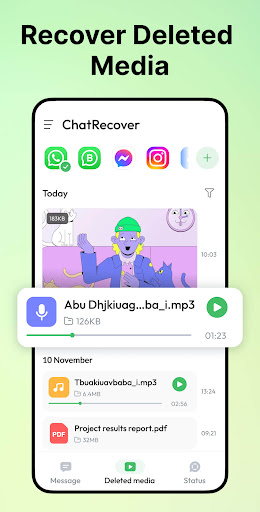
• Restore media files like photos, videos, voice messages in seconds
• View, download and share deleted media with ease
• Save & share status in one tap with status saver
• Add all chat apps for deleted message recovery
• Securely backup messages and notification history
• Use effortlessly with an intuitive interface
Read & Manage All Messages in One App
Compatible with all major chat apps, ChatRecover backs up your notifications securely, allowing you to view messages from all apps in one place. Enjoy our sleek interface and powerful deleted message recovery, effortlessly switch between apps and manage all your messages and media files, including deleted ones!
Recover Deleted Text Messages
With deleted messages recovery, never miss an important message again and view deleted messages anytime! ChatRecover helps you retrieve deleted messages in seconds, even if the sender deletes them right away, keeping you informed.
Media Recovery & View
Enjoy amazing deleted messages recovery—not just for text messages! Deleted media files like photos, videos, voice messages, audio, GIFs, and stickers can also be recovered seamlessly in HD quality, without any loss in clarity. Download ChatRecover now to view, download, and share deleted media without hassle!
Automatic Status Saver
The fantastic status saver automatically saves all viewed statuses—you can download, view and share them smoothly. With ChatRecover, keep your favorite statuses forever and repost or share them with your friends anytime!
Your Privacy is Our Priority
We value your privacy and will never collect or share your data. Your notifications and message backups are stored securely on your device, and you can delete them at any time.
How to Recover Deleted Messages?
Once key permissions are granted, ChatRecover: Recover Deleted Messages can save notifications and access certain storage folders to back up your messages locally. Once a message or a media file is deleted, our app can detect and recover it immediately.
Why Some Messages Can't Be Recovered?
• Notification access or other key permissions are disabled.
• The chat is muted.
• You are viewing the chat when the messages are deleted.
• Messages deleted before installing ChatRecover can't be recovered.
Download ChatRecover: Recover Deleted Messages now to recover and read deleted messages in one tap!
如何下载 Recover Deleted Messages APK
- 在 APK Downloader 首页 输入应用包名
recoverdeletedmessages.notificationhistory.notify.restoredata。 - 选择您的设备架构(现代设备推荐选择 ARM64)。
- 点击 下载 获取合并后的 APK 文件。
- 传输并安装 APK 到您的 Android 设备上。
- 保持更新: 定期访问 APK Downloader 以搜索并下载您最喜爱的应用的最新安全版本。
安全与签名验证
此 APK 下载 100% 安全。我们验证文件的加密签名与官方开发者的凭据相匹配。无任何修改或广告注入。