
Download Sources
Device Configuration
Split APKs Installation Guide
Some apps are distributed as Split APKs (multiple .apk files packaged together) to optimize resources. Standard Android installers cannot open them.
Related Applications







What's New
We've refreshed Wisely to make your life easier. We're continuing to optimize your myWisely experience with bug fixes and improvements.
About this app
Download the myWisely app(8) now to start making the most of your money, like getting paid up to 2 days early(1), saving(10) for what you love, and dropping the hidden fees(12). Wisely also moves with you even when you switch jobs(4).
LEAVE HIDDEN FEES BEHIND(12)
No hidden fees(12). No overdraft fees(9) No minimum balance requirements sneaking up on you.
GET PAID UP TO 2 DAYS EARLY(1)
Life doesn’t always wait until payday. With Wisely, you could get access to your pay up to 2 days early(1) at no cost(2) to you.
SHOP AND PAY BILLS(6)
In store, online, in-app(8) or by phone everywhere Visa® Debit cards are accepted or where Debit Mastercard® is accepted.
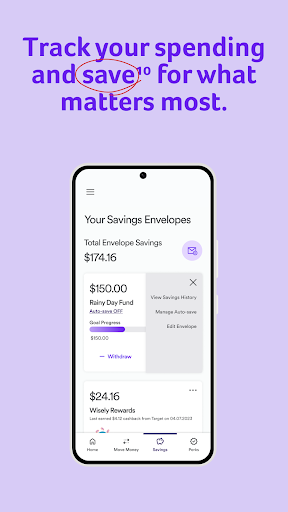
GROW YOUR SAVINGS(10)
Save at your own pace and make savings automatic(10) so you do not have to think about it.
(1) You must log in to the myWisely app or mywisely.com to opt-in to early direct deposit. Early direct deposit of funds is not guaranteed and is subject to the timing of payor’s payment instruction. Faster funding claim is based on a comparison of our policy of making funds available upon our receipt of payment instruction with the typical banking practice of posting funds at settlement. If you have a Wisely Pay or Wisely Cash card (see back of your card), this feature requires an upgrade which may not be available to all cardholders.
(2) While this feature is available without a fee, certain other transaction fees and costs, terms, and conditions are associated with the use of this card. Please log in to the myWisely app or mywisely.com to see your cardholder agreement and list of all fees for more information.
(4) If you have a Wisely Pay or Wisely Cash card (see back of your card), this feature requires an upgrade which may not be available to all cardholders.
(5)The number of fee-free ATM transactions may be limited. Please log in to the myWisely app or mywisely.com and see your cardholder agreement and list of all fees for more information.
(6)The bill pay feature, powered by Papaya, is available through the myWisely app. Additional terms and limits apply. This optional offer is not a Fifth Third Bank, Pathward or a [Mastercard, Visa] product or service, nor does Fifth Third Bank, Pathward or [Mastercard, Visa] endorse this offer.
(7) Ingo Money is operated by Ingo Money, Inc., and all check funding services are provided by First Century Bank, N.A. See complete terms, fees and conditions at: Ingomoney.com/termsconditions.html
(8) Standard message and data rates may apply.
(9) Because this card is prepaid, you can only spend what is on the card and thus are unable to overdraft.
(10) Amounts transferred to your savings envelope will no longer appear in your available balance. You can transfer money from your savings envelope back to your available balance at any time using the myWisely app mobile app or at mywisely.com.
(12) To view applicable fees, please log in to the myWisely app or mywisely.com to see your card- holder agreement and list of all fees for more information.
The Wisely Pay Visa® is issued by Fifth Third Bank, N.A., Member FDIC or Pathward, N.A., Member FDIC, pursuant to a license from Visa U.S.A. Inc. The Wisely Pay Mastercard® is issued by Fifth Third Bank, N.A., Member FDIC or Pathward, N.A., Member FDIC, pursuant to license by Mastercard International Incorporated. The Wisely Direct Mastercard is issued by Fifth Third Bank, N.A., Member FDIC. ADP is a registered ISO of Fifth Third Bank, N.A., or Pathward, N.A. The Wisely Pay Visa card can be used everywhere Visa debit cards are accepted. Visa and the Visa logo are registered trademarks of Visa International Service Association. The Wisely Pay Mastercard and Wisely Direct Mastercard can be used where debit Mastercard is accepted. Mastercard and the circles design are registered trademarks of Mastercard International Incorporated.
ADP, the ADP logo, Wisely, myWisely, and the Wisely logo are registered trademarks of ADP, Inc. Copyright © 2022 ADP, Inc. All rights reserved.
How to Download myWisely: Mobile Banking APK
- Enter the package name
com.adp.wiselymobileon the APK Downloader homepage. - Select your device architecture (ARM64 recommended for modern devices).
- Click Download to get the merged APK file.
- Transfer and install the APK on your Android device.
- Keep Updated: Visit APK Downloader regularly to search for and download the latest secure versions of your favorite apps.
Security & Signature Verification
This APK download is 100% safe. We verify that the cryptographic signature of the file matches the official developer credentials. No modifications or adware are injected.