
Download Sources
Device Configuration
Split APKs Installation Guide
Some apps are distributed as Split APKs (multiple .apk files packaged together) to optimize resources. Standard Android installers cannot open them.
Related Applications




What's New
Thanks for using Checkbook!
In this update:
- Minor Bug fixes
We'd love to hear your feedback! If you have any ideas or feature requests for future versions of the app, feel free to let us know. Please reach out to us at [email protected]
About this app
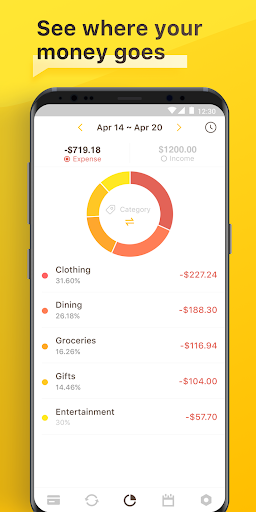
An easy & quick way to manage your daily finances! Checkbook keeps track of your credit card charges, cash expenditures...etc. With the Checkbook application, it can totally replace your paper checkbook register. You can create multiple accounts with a start balance, save recurring transactions, transfer funds, view reports & graphs, export data...etc. You can even search for the transaction by crossing your finger on the calendar! All details of the Checkbook are well designed to provide an excellent experience. And, Produced by Polycents
FEATURES
*Export your ledger in CSV Format
*Calendar
-Show all your monthly transactions as points on the calendar.
-Track transactions by tapping a date on the calendar.
*Recurring Transactions
-Save a transaction to be used repeatedly(daily, weekly, 2 weeks, monthly, tire monthly), without retyping all the details.
*Multiple Accounts
-Track as many accounts as you need.
*Categories
-Supports multiple categories with beautiful icons to choose from.
*Payee & Note
-All details you need to keep track of your transactions are including.
*Search
-Quickly search for transactions by account name, payee, notes, and category.
-Search and edit transactions on the same screen.
*Transfer
-Transfer funds from one account to another.
*Reconcile Transactions
-Reconcile your transactions by editing cleared/un-cleared status
*Reports & Charts
-Review all your expenses & income by category or account with beautiful graphs and reports.
-You can set the time period to daily, weekly, monthly & yearly.
*Passcode
-Protects your private information.
*Currency
-Supports multiple currencies.
*Elegant, Powerful & User-friendly interface
If your have any problems or suggestions please send a mail to [email protected], you will get the response in a short time.
The free version is an ad-supported version, we also offer an ad-free version which is available as an in-app purchase.
Permissions Overview:
1. Storage: Checkbook needs this permission to store the backup file on your device
2. Contact: Checkbook needs this permission to read your Google account when you choose to save the backup file to your Google Drive
3. Camera: Checkbook needs this permission to use the camera to scan docs.
Follow us on Twitter: @Appxy_official
Like us on Facebook: Appxy
Follow us on Google+: Appxy
How to Download Checkbook - Account Tracker APK
- Enter the package name
com.appxy.checkbook2on the APK Downloader homepage. - Select your device architecture (ARM64 recommended for modern devices).
- Click Download to get the merged APK file.
- Transfer and install the APK on your Android device.
- Keep Updated: Visit APK Downloader regularly to search for and download the latest secure versions of your favorite apps.
Security & Signature Verification
This APK download is 100% safe. We verify that the cryptographic signature of the file matches the official developer credentials. No modifications or adware are injected.