
BONGKOCH eBook Store APK Screenshots


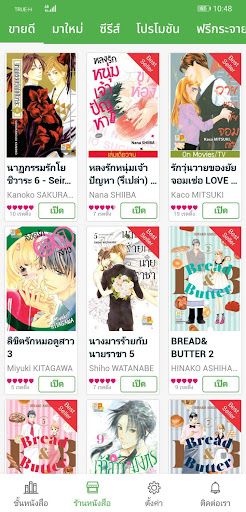
BONGKOCH eBook Store App Information
Download Sources
Device Configuration
Split APKs Installation Guide
Some apps are distributed as Split APKs (multiple .apk files packaged together) to optimize resources. Standard Android installers cannot open them.
What's New in BONGKOCH eBook Store
- เพิ่มระบบยืนยันตัวตนสองชั้น (Two-Factor Authentication)
- Bug fixes
About BONGKOCH eBook Store
แอปพลิเคชันร้านขายหนังสือในเครือบริษัท บงกช พับลิชชิ่ง จำกัด สามารถเลือกซื้ออ่านได้แล้วในรูปแบบอีบุ๊ค!
มากกว่า 3 ทศวรรษในแวดวงสื่อสิ่งพิมพ์ไทย บริษัท บงกช พับลิชชิ่ง จำกัดและสัญลักษณ์ "ดอกบัว" เป็นตัวแทนและความตั้งใจของผู้ก่อตั้งให้เป็นชื่อและสัญลักษณ์แห่งความมั่นใจถึงคุณภาพ ความทันสมัย "บงกช" ได้รับความไว้วางใจจากบริษัทต่างประเทศ เพื่อผลิตหนังสือภาคภาษาไทย โดยได้รับลิขสิทธิ์ถูกต้อง จากบริษัทชั้นนำของประเทศต่างๆเช่น ญี่ปุ่น, อเมริกา, ฮ่องกง, อิตาลี และเดนมาร์ก เป็นต้น ภายใต้ชื่อต่างๆในเครือบริษัทเช่น “บงกชคอมมิกส์” และ”บงกชบุ๊ค” รวมถึงหนังสือสำหรับเด็กเพื่อฝึกทักษะพัฒนาการเรียนรู้ภายใต้ชื่อ “บงกชคิดส์” อาทิเช่น นิทานสองภาษา, หนังสือระบายสี เป็นต้น นอกจากการผลิตหนังสือภาคภาษาไทยแล้ว "บงกช" ยังมีนโยบายสนับสนุนนักวาด/นักเขียนฝีมือคนไทยให้มีผลงานออกสู่ตลาดไทยและต่างประเทศ ที่ผ่านมา "บงกช" ไม่เคยหยุดนิ่ง เฉกเช่นครั้งนี้ที่พร้อมจะก้าวสู่ยุคการอ่านอีบุ๊ค เพื่อให้ลูกค้าได้รับความสะดวกในการเลือกซื้อสินค้าและเลือกอ่านผ่านสื่ออุปกรณ์อิเล็กทรอนิกส์ รวมถึงการสั่งซื้อสินค้าออนไลน์ที่ www.bongkoch.com
User Reviews

สรุปเเอปมันดูเป็นไฟล์ได้อย่างเดียวหรอ นึกว่าจะได้หนังสือด้วย ก็งงเเหละว่าทำไมถึงไม่มีให้กรอกที่อยู่อะไรเลย สั่งเเบบงงๆ

Very good
ชอบมากเลย แต่อยากให้มีการ์ตูนที่ขายเฉพาะใน7-11ด้วยจัง >_<
พกพาไปง่ายแค่มีมือถือก็ได้อ่านแล้วแต่ติดที่ยังมีเรื่องให้ซื้อทางe-bookน้อยไป
How to Download BONGKOCH eBook Store APK
- Enter the package name
com.askmedia.bongkoch2on the APK Downloader. - Select your device architecture (ARM64 recommended for modern devices).
- Click Download to get the merged APK file.
- Transfer and install the APK on your Android device.
- Keep Updated: Visit APKDER.COM regularly to search for and download the latest secure versions of your favorite apps.
Frequently Asked Questions
Yes! Every APK download provided by APKDER undergoes rigorous security verification. We verify that the cryptographic signature of the APK file matches the official signature from the developer, ensuring the APK is original, untouched, and free from any modifications.
To install it, you first need to enable "Unknown Sources" in your Android device's security settings. After downloading the APK file from APKDER, tap it to begin the installation and follow the on-screen prompts.
Yes! As soon as the developer releases a new version of BONGKOCH eBook Store, we will update and provide the updated APK on APKDER. You can simply download and install the new APK over the existing installation without losing your app data.
Yes. APKDER allows you to bypass geographic restrictions and download official APK files directly, even if the app or game is not officially available in your country's store.
A standard APK is a single installation package. An XAPK or Split APK contains multiple resource files (like OBB expansions or device-specific layout parts) packaged together. To install them, you can download splits individually or use dynamic helper tools like Split APKs Installer (SAI).
Security & Signature Verification
This APK download is 100% safe. We verify that the cryptographic signature of the file matches the official developer credentials. No modifications or adware are injected.


