
CNA APK Screenshots




CNA App Information
Download Sources
Device Configuration
Old Versions of CNA
| Version | Size | Min OS | Architecture | Release Date | Action |
|---|---|---|---|---|---|
| v4.4.9 | 43.1 MB | Android 24+ | x86 x86-64 armeabi-v7a arm64-v8a | Jul 1, 2026 | Download |
Split APKs Installation Guide
Some apps are distributed as Split APKs (multiple .apk files packaged together) to optimize resources. Standard Android installers cannot open them.
What's New in CNA
We are introducing minor enhancements and bug fixes to improve your experience with the app.
Thank you for using CNA. Got feedback? Contact us at [email protected]
About CNA
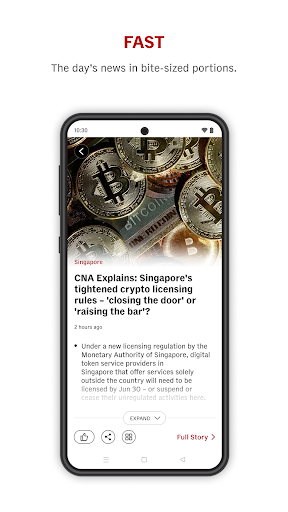
Get breaking news alerts and your daily digest of news from Singapore, Asia and around the world with the CNA app.
Improved interface :
Get more out of your visits to CNA with live coverage, top stories and expert analysis from Asia on our front page at a glance.
Discover :
Explore the best of CNA's journalism and shows with our new section Discover. Click here for a surprise.
Personalise My Feed :
You can also follow our journalists and topics of interest to tailor a section personalised for you with My Feed.
Watch :
Watch CNA's 24/7 livestream as well as our award-winning documentaries and popular current affairs programmes on demand.
Listen :
Listen to our podcasts with expert takes on major issues affecting you and get up to date with live radio on CNA938.
User Reviews

5-star for contents and 1-star for app experience. Due to placement of ads videos that always disrupt the loading and scrolling of content pages. so overall 3-star!

Overall gd & stable app. But fustrated by the INABILITY TO COPY TEXTS ACROSS PARAS. Can only copy 1 para each time, making it inconvenient if need to copy across paras. This has been the case since Day 1. Can develop do sth abt it once & for all plssss?

I love the app but the Topic section still does not work for me. Would be good to add a "Tech" section as well as technology (phones, laptops, gaming peripherals and related equipment, pcs, cars, other cool gadgets, Teach Companies Tech Youtubers, etc.) is becoming more relevant and it is an already big and growing interests especially among the youth. It would also be cool that the links of the headers in the "Sections" section would still lead to the app rather than a website. Thank you!

The app now just won't display any news on my tablet. Some unknown error. Even rolling bck to an earlier version (which used to work) doesn't help. I've given it time to correct itself but it still won't work. Just have to uninstall and look elsewhere instead. In any case, the ads are incredibly annoying. They intrude into the reading area. That's not good UX.
How to Download CNA APK
- Enter the package name
com.channelnewsasiaon the APK Downloader. - Select your device architecture (ARM64 recommended for modern devices).
- Click Download to get the merged APK file.
- Transfer and install the APK on your Android device.
- Keep Updated: Visit APKDER.COM regularly to search for and download the latest secure versions of your favorite apps.
Frequently Asked Questions
Yes! Every APK download provided by APKDER undergoes rigorous security verification. We verify that the cryptographic signature of the APK file matches the official signature from the developer, ensuring the APK is original, untouched, and free from any modifications.
To install it, you first need to enable "Unknown Sources" in your Android device's security settings. After downloading the APK file from APKDER, tap it to begin the installation and follow the on-screen prompts.
Yes! As soon as the developer releases a new version of CNA, we will update and provide the updated APK on APKDER. You can simply download and install the new APK over the existing installation without losing your app data.
Yes. APKDER allows you to bypass geographic restrictions and download official APK files directly, even if the app or game is not officially available in your country's store.
A standard APK is a single installation package. An XAPK or Split APK contains multiple resource files (like OBB expansions or device-specific layout parts) packaged together. To install them, you can download splits individually or use dynamic helper tools like Split APKs Installer (SAI).
Security & Signature Verification
This APK download is 100% safe. We verify that the cryptographic signature of the file matches the official developer credentials. No modifications or adware are injected.


