



Download Sources
Device Configuration
Split APKs Installation Guide
Some apps are distributed as Split APKs (multiple .apk files packaged together) to optimize resources. Standard Android installers cannot open them.
What's New
- Updated app target to Android 16.
- Bugfixes and dependency updates.
About This App
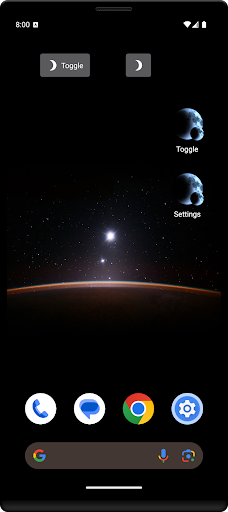
Night Filter is an easy to use screen filter app for your Android phone or tablet. Night Filter makes it easy for you to dim your screen, adjust your color tint and filter blue light, and more! Use it to read at night with less eye strain and correct for an excessive screen tint.
Features
★ Adjust your screen's brightness and color.
★ Add quick shortcuts to your home screen.
★ Schedule the filter to start & stop at a specific time.
And more! Download the app and try it out to see all of the features.
Support
If you have any questions or concerns, please don't hesitate to contact us by email.
Permissions
Draw over other apps: Required for the screen filter to work.
Full network access, view network connections: Used for Google AdMob.
Accessibility service: Can be optionally used to also dim the lock screen and notifications tray.
User Reviews
bricked my phone "not optimized" All of a sudden turned on this morning after I'd already started my day and couldn't disable it. Got error message, "screen taps not recognized- app isn't optimized" Only workaround - tapped the notification to "turn off display over screen" and then could get into settings and turn it off. Uninstalling until I'm confident this is updated/fixed.

Its free, its easy to use. I love the toggle feature which makes it easier to turn off and on when I want to access it outside of the schedule. It's nice to have a way to pick your own shade that works for you. I cannot see my screen when the dimmer is turned all the way down and my husband does not like bright lights, so this is a happy medium for both of us at bedtime.

It's a good app, I used it when I had the Samsung Galaxy J7, and it worked perfectly. However, I switched to the Samsung Galaxy S9 and now it doesn't work as well. It doesn't filter the pull down window (whatever you call it), and when you have the phone in rotation, the bar at the bottom with the home button, back, and tabs isnt filtered, so it just hurts your eyes unless you cover that portion of the screen with your hand or something. Can something be done about it?

💜Great App! Obviously,due to the fact I've tried alot of different night filters/easy on the eyes apps@night;on&off for the past I would say for 1.5yrs,once I installed this:Night Filter 8mos ago I've never felt the need to try again w/others In my opinion other apps have alot of Ads& are garbage in my perception now. Also,in case your wondering I'm using the free version,so that says alot in my opinion;those who are thinking of installing Night Filter Dynamic job Night Filter!!!!!💜
How to Download Night Filter APK
- Enter the package name
com.digipom.nightfilteron the APK Downloader. - Select your device architecture (ARM64 recommended for modern devices).
- Click Download to get the merged APK file.
- Transfer and install the APK on your Android device.
- Keep Updated: Visit APKDER.COM regularly to search for and download the latest secure versions of your favorite apps.
Security & Signature Verification
This APK download is 100% safe. We verify that the cryptographic signature of the file matches the official developer credentials. No modifications or adware are injected.


