




Download Sources
Device Configuration
Split APKs Installation Guide
Some apps are distributed as Split APKs (multiple .apk files packaged together) to optimize resources. Standard Android installers cannot open them.
What's New
We’re always working on new features, bug fixes and improvements. Make sure you stay updated with the latest version of app for best experience.
About this app
Streamline your business process & expand your customer base with eSewa.
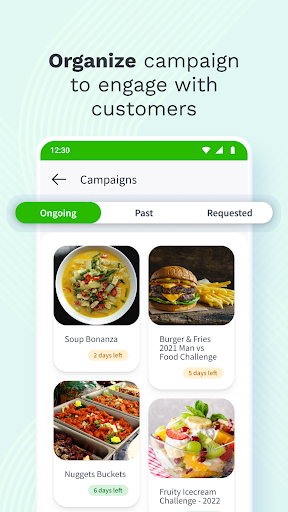
eSewa Business is a mobile application that will help you monitor digital payments effortlessly and in a more convenient way. You can maintain a record of your transactions and enhance business flow by reaching a wider customer base. Customer engagement will be made smoother with engaging campaigns on the eSewa app. You can also scan and validate the vouchers that are available from the voucher scan option.
The features of this app are:
View Transaction Statement: Keeping track of your business activities is easier with the neat statement view feature available in the app. Simply go to the transaction statement and view your payment details.
Withdraw Funds: The app allows you to withdraw funds almost in a fraction of a second. You can instantly withdraw funds from your merchant wallet to your linked bank account or eSewa wallet.
Campaign Request: Plan campaigns that will keep your customers engaged, then request and get them verified by eSewa. In this way, you can easily run campaigns that benefit your business.
Scan Voucher: You can scan the campaign vouchers for verification.
User Creation: User access can be added or removed. To improve efficiency, create multiple merchant wallet login users and assign roles.
How to use eSewa Business App?
1. Open the eSewa Business app.
2. Login with your credentials.
Please note that you must register as an eSewa Business to log in. If you’re not registered, do it now; and then receive your login credentials.
3. After log in you will see the dashboard.
4. At the top you can view your available Balance:
Withdrawable Balance is the balance that can be transferred to your linked bank account or eSewa ID
Pending Balance is the balance that is yet to be realized
Lien Balance is the balance that has been put on hold
5. You can now view all the In and Out Payments from the Payment section.
6. From "Scan QR" you can scan the available vouchers.
7. You can add campaigns from the "Campaign" option; after getting the campaign request approval.
8. On "Vouchers" you can see your available vouchers.
9. Now click on the "Profile" icon on the top left side; here you can add pictures, view your information, change your Password, and TPIN, and add users as well.
User Reviews

The app is not dark but useful If you keep the fingerprint option then it would be a good idea to keep the password in a jiffy, it would not be enough

This app is worst to use.. I am unable to login my id. And the customer service is also terrible. They are unable to solve simple issue😡😡.

Esewa app is the most low standard app can't send money shows limit login problem and no service or call at all??

Guys this new esewa merchant is not good this esewa not open my old I'd why this too much glitch in this esewa how to log in in esewa merchant
How to Download eSewa Business APK
- Enter the package name
com.esewa.merchanton the APK Downloader. - Select your device architecture (ARM64 recommended for modern devices).
- Click Download to get the merged APK file.
- Transfer and install the APK on your Android device.
- Keep Updated: Visit APKDER.COM regularly to search for and download the latest secure versions of your favorite apps.
Security & Signature Verification
This APK download is 100% safe. We verify that the cryptographic signature of the file matches the official developer credentials. No modifications or adware are injected.


