

Write It! Thai APK Screenshots
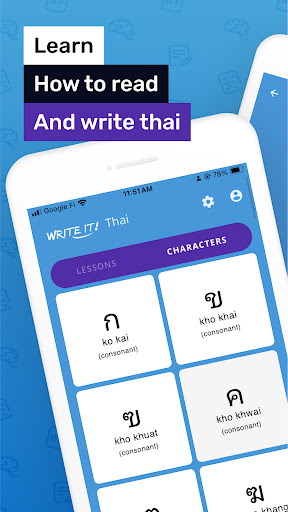


Write It! Thai Game Information
Download Sources
Device Configuration
Split APKs Installation Guide
Some apps are distributed as Split APKs (multiple .apk files packaged together) to optimize resources. Standard Android installers cannot open them.
What's New in Write It! Thai
- Bug fixes and stability improvements
About Write It! Thai
Learn to write all 80 letters of the Thai script alphabet with Write It! Thai, the ultimate app for mastering Thai handwriting. Whether you're a beginner or looking to improve your skills, our innovative app replaces traditional pen and paper with cutting-edge handwriting recognition technology.
Dive into bite-sized lessons designed to fit your busy schedule, allowing you to make progress in just a few minutes a day. With our intuitive practice mode, you'll receive stroke-by-stroke guidance to perfect your technique. Then, put your skills to the test in our exhilarating test mode, where you can race against the clock and prove your mastery.
Key Features:
• Real handwriting recognition technology
• Bite-sized lessons for quick learning
• Practice mode with stroke-by-stroke guidance
• Timed test mode to challenge your skills
• Customizable review mode
• Progress tracking
• Full offline support
Why Choose Write It! Thai?
Innovative Technology: Our real handwriting recognition technology provides instant feedback, helping you improve faster than traditional methods.
Comprehensive Learning: Master all 80 letters of the Thai script alphabet through a structured, step-by-step approach.
Flexibility: Practice at your own pace with customizable review options and offline accessibility.
Engaging Experience: Gamified elements like the test mode keep you motivated and challenged throughout your learning journey.
Progress Monitoring: Track your improvement over time and celebrate your achievements as you advance.
Write It! Thai combines the best of traditional learning methods with modern technology to create an engaging and effective way to master Hebrew script. Our app's unique approach guides you through each stroke, helping you develop muscle memory and confidence in your writing abilities.
Write It! Thai is the perfect tool for anyone looking to master the beautiful art of Thai handwriting. Our app combines cutting-edge technology with proven learning methods to make the process of learning to write Thai engaging, efficient, and effective.
Start your journey to mastering the Thai script alphabet today. Download Write It! Thai and transform your Thai writing skills one stroke at a time. With dedication and practice, you'll soon be confidently writing the intricate and elegant the letters of the Thai script. Begin your Thai writing adventure now!
Privacy Policy: https://jernung.com/privacy
Terms of Use: https://jernung.com/terms
User Reviews

It's okay. The test function prioritizes speed over accuracy. Often accepting blatantly incorrect attempts. Additionally, it took my a VERY long time to realize why it would not accept some characters after dozens of attempts. There should be more specific feed back if the app is looking for something in particular *Edit- What are these vowel? I have never heard these names before...

Not the best idea. It teaches how to write the letters and how to say the names of the letters... but not the sound the letters make. How is that helpful? It won't help me to read at all. I can read Spanish because I know the sounds the letters make. The importance is the sound, not the name. If they corrected this, it would be a great app. For example, showing how to draw the letter, say the sound and put a correlating picture. Like in English we say "A" and then show a pic of an apple.

I'd say that it's the best Thai writing app ever. In just a few minutes I mastered 4 to 5 consonants.

I've tried 5 different Thai Language apps (free versions), and this is the one I chose after all. Even in the free version, you can practice all letters and the ads are reasonable and could be skipped after a bit. It would be even better if there were an English translation of the letters since it helps in memorizing their names.
How to Download Write It! Thai APK
- Enter the package name
com.jernung.writeit.thaon the APK Downloader. - Select your device architecture (ARM64 recommended for modern devices).
- Click Download to get the merged APK file.
- Transfer and install the APK on your Android device.
- Keep Updated: Visit APKDER.COM regularly to search for and download the latest secure versions of your favorite apps.
Frequently Asked Questions
Yes! Every APK download provided by APKDER undergoes rigorous security verification. We verify that the cryptographic signature of the APK file matches the official signature from the developer, ensuring the APK is original, untouched, and free from any modifications.
To install it, you first need to enable "Unknown Sources" in your Android device's security settings. After downloading the APK file from APKDER, tap it to begin the installation and follow the on-screen prompts.
Yes! As soon as the developer releases a new version of Write It! Thai, we will update and provide the updated APK on APKDER. You can simply download and install the new APK over the existing installation without losing your app data.
Yes. APKDER allows you to bypass geographic restrictions and download official APK files directly, even if the app or game is not officially available in your country's store.
A standard APK is a single installation package. An XAPK or Split APK contains multiple resource files (like OBB expansions or device-specific layout parts) packaged together. To install them, you can download splits individually or use dynamic helper tools like Split APKs Installer (SAI).
Security & Signature Verification
This APK download is 100% safe. We verify that the cryptographic signature of the file matches the official developer credentials. No modifications or adware are injected.


