


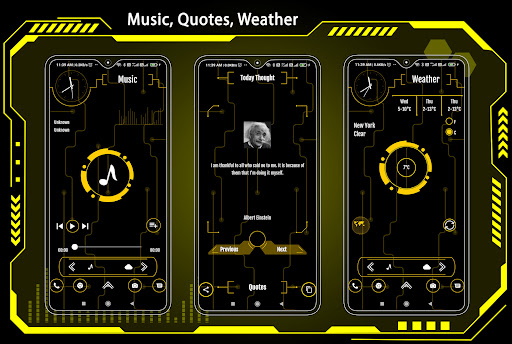


Version
16.0
Downloads
10,000+
Updated
Aug 21, 2025
Developer
Launchers World
Category
Tools
Content Rating
Everyone
Package
com.lw.hitechnewest.launcher
Platform
Android
Download Sources
Device Configuration
Split APKs Installation Guide
Some apps are distributed as Split APKs (multiple .apk files packaged together) to optimize resources. Standard Android installers cannot open them.
1.
Download Split APKs Installer (SAI) from Google Play Store.
2.
Download the app archive (.apks) using the download sources listed above.
3.
Open SAI, click "Install APKs", choose the downloaded archive, and click Install.
What's New
Bug fixed.
About This App
AppLock, HideApp, 50 Keyboard, Wallpaper, Color themes, Weather, Widget & Folder
User Reviews

Alex Gee
Apr 9, 2023
I truly enjoy this unique neon yellow high tech color design. It's really looks futuristic. Nice job to all app designers

Amara Alex k
Apr 15, 2025
so amazing and easy to work with the unbelievable application

MUDASHIR Abiodun mudashir
Jul 14, 2025
the app is really good ,it support live wallpaper.
Sty Lii
Jan 27, 2026
I love this app, it is great there is no problem by passing or using.
How to Download Hi-tech newest launcher APK
- Enter the package name
com.lw.hitechnewest.launcheron the APK Downloader. - Select your device architecture (ARM64 recommended for modern devices).
- Click Download to get the merged APK file.
- Transfer and install the APK on your Android device.
- Keep Updated: Visit APKDER.COM regularly to search for and download the latest secure versions of your favorite apps.
Security & Signature Verification
This APK download is 100% safe. We verify that the cryptographic signature of the file matches the official developer credentials. No modifications or adware are injected.


