

Cyber Hi-tech Launcher 2024 APK Screenshots


Cyber Hi-tech Launcher 2024 App Information
Download Sources
Device Configuration
Split APKs Installation Guide
Some apps are distributed as Split APKs (multiple .apk files packaged together) to optimize resources. Standard Android installers cannot open them.
What's New in Cyber Hi-tech Launcher 2024
bug fixed.
About Cyber Hi-tech Launcher 2024
Cyber Hi-tech Launcher 2024 - AppLock, HideApp, Hitech Wallpaper, Folder and Themes easy to use, stylish and offers higher performance. It stylized your phone’s home screen in future UI which gives a next generation launcher and virtual theme to your android phone.
A new clean and perfect user interface design which gives user to easy and better interactive control experience. It provides more wonderful and useful features and any color themes which enhance your phone with different styles.
App Lock:
Lock app with password, Now you don't need separate app for locking your apps.
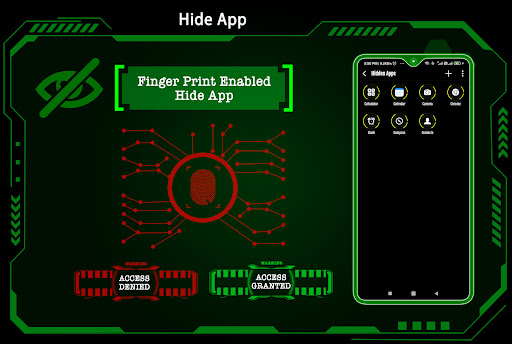
Hide App:
Finger print hide app. You can Hide from your apps from app list.
Hi-tech Keyboard:
For each and every theme, a diffrent color hi-tech keyboard.
15-Hitech themes:
15 different type of themes available.
Incredibly faster & smarter:
Cyber Hi-tech Launcher 2024 provides users extremely fast and smarter handling experience with simple and smooth user interface.
Elegant look:
It is most stylish launcher because it provides colorfull and beautiful themes for the users, we have created theme for you with lots of love and passion so that users can give new, fresh, ultimate and virtual look to their phones every day.
Folder:
You can manage your app in better way using folder feature. You can long press on any icon to convert it into folder and vice versa.
Wallpaper:
Hi-tech wallpaper & Simple wallpaper added, which can change its color with your theme color. You can also apply wallpaper from your own gallery.
Personalization:
You can personalize phone by long pressing on it, you can change app whatever you like most.
Easier Access Feature:
It provides you very easier way to access all apps by just left swipe where you can get full app information, uninstall app and app information.
Widgets:
Clock, weather information, memory analyzer, calendar, Map and battery widget is available in Cyber Hi-tech Launcher 2024.
Cyber Hi-tech Launcher 2024 is fast and easy to use launcher for Android which is styled similar to future of UI. This app provides you various customization features which will change your android phone to a complete look of Hi-fi launcher. Say goodbye to the old launcher and adopt a brand new Cyber Hi-tech Launcher 2024 - AppLock, HideApp, HitechWallpaper, Folder and Themes for better experience.
User Reviews

Got this to inject a little cyberpunk in to my life. Everything works great, no issues, and the way it organizes apps alphabetically and allows you to make custom folders is very handy. Lots of themes to choose from. It does throw an ad at you every once in a while, but hitting the home button makes it go away so they aren't too annoying. And honestly, what cyberpunk future wouldn't throw ads at you? I consider it in theme. It could be improved by allowing you to mix and match colors and themes.

I would say this app is really a great app. I mean it lets you do so much with the app and it's just very pleasing to the eyesight, because of the different themes you offer, pretty awesome! I haven't figured out how to use this front keyboard, what is it just for!?🤔 I even hope you come up with more color themes you can use, but for now these are perfect!! I would give you five stars for your app! 📧.📧vans ⭐⭐⭐⭐⭐

Installed it and set it up because I thought it looked cool, then ended up with something uncool... ransomware. Yes, almost half of my files are missing. To everyone who read this review, let this be a warning. And no, I never install apk files. So the source of this problem is the developers and their cool desguised viruses. And play store... should fix the fact that one star is minimum. I want zero star for developers like you!!!!!!

That cli interface is a nice feature, but the ads are annoying. Any chance for a premium no ads version of this one?
How to Download Cyber Hi-tech Launcher 2024 APK
- Enter the package name
com.lw.hud.cyberlauncheron the APK Downloader. - Select your device architecture (ARM64 recommended for modern devices).
- Click Download to get the merged APK file.
- Transfer and install the APK on your Android device.
- Keep Updated: Visit APKDER.COM regularly to search for and download the latest secure versions of your favorite apps.
Frequently Asked Questions
Yes! Every APK download provided by APKDER undergoes rigorous security verification. We verify that the cryptographic signature of the APK file matches the official signature from the developer, ensuring the APK is original, untouched, and free from any modifications.
To install it, you first need to enable "Unknown Sources" in your Android device's security settings. After downloading the APK file from APKDER, tap it to begin the installation and follow the on-screen prompts.
Yes! As soon as the developer releases a new version of Cyber Hi-tech Launcher 2024, we will update and provide the updated APK on APKDER. You can simply download and install the new APK over the existing installation without losing your app data.
Yes. APKDER allows you to bypass geographic restrictions and download official APK files directly, even if the app or game is not officially available in your country's store.
A standard APK is a single installation package. An XAPK or Split APK contains multiple resource files (like OBB expansions or device-specific layout parts) packaged together. To install them, you can download splits individually or use dynamic helper tools like Split APKs Installer (SAI).
Security & Signature Verification
This APK download is 100% safe. We verify that the cryptographic signature of the file matches the official developer credentials. No modifications or adware are injected.


