



Download Sources
Device Configuration
Split APKs Installation Guide
Some apps are distributed as Split APKs (multiple .apk files packaged together) to optimize resources. Standard Android installers cannot open them.
What's New
- Fixed a rare crash that occurred when the app was moved to the background.
- Minor improvements to the Start Guide.
About this app
■A completely free app for creating official Weekly Shonen Jump manga and illustrations!!
G-pens, Mapping Pens, Tones and Backgrounds are all free to use!!
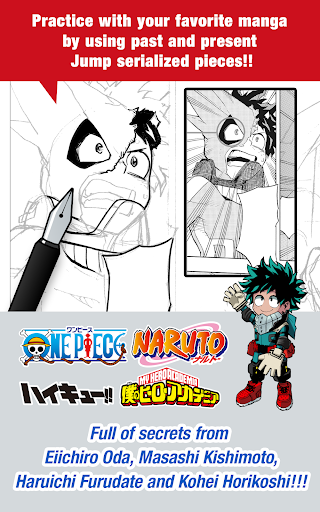
■Practice with your favorite manga by using past and present Jump serialized pieces!!
Full of secrets from past and present Jump authors like One Piece's Eiichiro Oda and My Hero Academia's Kohei Horikoshi!!
■Learn techniques on how to create a manga from Jump's editorial department!!
Loads of lessons on story, character creation and dialogue!!
■You can also enter Jump contests!!
The app will give you information on each contest. Don't miss out!!
What is JUMP PAINT?
It's the ultimate app for creating manga and illustrations -- a collaboration between MediBang Paint (12 million downloads) and Weekly Shonen Jump.
JUMP PAINT was developed to provide an environment for creators to draw anytime and anywhere using MediBang Paint's features.
JUMP PAINT is the perfect paint software for creating illustrations and manga. It comes with many features to enjoy drawing illustrations and manga, like a multitude of brushes, materials and manga fonts.
■ Draw Anywhere!
・With JUMP PAINT you can have almost all the features of a desktop painting program in your pocket.
・Despite being packed with so many features, the interface of JUMP PAINT has been designed especially for the iPhone in mind.
・The UI can be closed and opened in one touch.
・The sleek interface allows users to change brush sizes or color modes with ease.
■ Painting Tools
・90 free brushes!!
・In addition to the Pen, Pencil, Watercolor, Blur, Smudge, G Pen, Mapping Pen, Rotation Symmetry and Edge Pens, we have added over 50 different kinds of brushes, including the Brush, Flat Brush, Round Brush, Acrylic, School Pen, and Soft Pastel.
・Force Fade In and Out make your lines sharp even if you’re drawing with your fingers.
・Users can create their own custom brushes.
■ Free Resources
・800 different types of free tones and backgrounds.
・Premade clouds, buildings, and vehicles are included.
・Tones can be added with one simple touch.
■ Layers
・Comes with layers complete with blending modes.
・Can be used to preserves different elements of you work.
■ Comic Fonts
・Use them to change the atmosphere of your comics.
・Use them to define your character’s moods or personalities.
・50 fonts used by industry professionals available.
■ Comic Creation
・Just drag across the screen to create comic panels.
・Freely transform their shape.
■ User Friendly
・Includes customizable shortcuts
・Geared towards first time users.
・Has an interface designed to give artists room to draw.
・One touch to access full-screen mode.
■ Other Tools
・Guides for drawing in perspective, or creating lines, and curves.
・Correction to stabilize your line strokes.
■ Photo Reference
・You can take photos in the app and use them as references on a different layer.
・Use them for reference or learning how to draw new things.
■ Cloud Storage
・You can backup and manage your data safely.
・Easily transfer your work.
■ Manage Project
・Save and manage multipage documents.
■ Syncability
・You can sync your preset settings with the PC version of JUMP PAINT.
■ Team Creation
・You can collaborate on work with friends no matter where you are.
■ Auto Recovery
・Your data is automatically backed up if your device crashes.
IMPORTANT
In order to use the app’s cloud features a MediBang account is required(https://medibang.com/).
User Reviews

I love this app. I just hate that I have to be connected to some sort of data/wifi to use it. I like using my tablet on the go which often means working offline and in places without any form of these services available. inspiration comes to artists anywhere and everywhere, not just when having data/internet/wifi connections. As someone who likes to be surrounded by nature when they draw, it would be nice if this was changed for use anywhere.

I change my mind I want to be an comic and art creator. manga is kinda like an comic until this yes thank you medibang nice manga app good interphase and nic ui and community thanks for manga goodness but except the UI sometimes glitches.
I love this app, I've used it for a few months now, I like the panel functions, brushes and the overall layout. I have used programs like procreate, ibis and Clipstudio but I prefer this one. I especially like the feel of the program while drawing and the brushes are really nice and it's not too overwhelming. Also the app provides extra materials like speech bubbles, sound effects and patterns and backgrounds. Also you can save things to the cloud and access on other devices even on a laptop.
At first i hated the app because how frustrating it is to use. But after a while i ended up liking it more than i expected. The app have many features that is needed to make a manga. But i was hoping in the future the app will be compatible with drawing tablet such as xp pen. Yes, there is pressure pen. But i would like it if i can use the buttons on my tab pen as the redo button similar with ibispaint. Unless... the IS a setting to enable such feature? Can't find it.
How to Download JUMP PAINT by MediBang APK
- Enter the package name
com.medibang.android.jumppainton the APK Downloader. - Select your device architecture (ARM64 recommended for modern devices).
- Click Download to get the merged APK file.
- Transfer and install the APK on your Android device.
- Keep Updated: Visit APKDER.COM regularly to search for and download the latest secure versions of your favorite apps.
Security & Signature Verification
This APK download is 100% safe. We verify that the cryptographic signature of the file matches the official developer credentials. No modifications or adware are injected.


