
Weather Hi-Def Radar APK Screenshots




Weather Hi-Def Radar App Information
Download Sources
Device Configuration
Split APKs Installation Guide
Some apps are distributed as Split APKs (multiple .apk files packaged together) to optimize resources. Standard Android installers cannot open them.
What's New in Weather Hi-Def Radar
Introducing Weather Hi-Def Live Radar—now available for Android! Explore a powerful weather app that features real-time radar images to make tracking the weather a breeze.
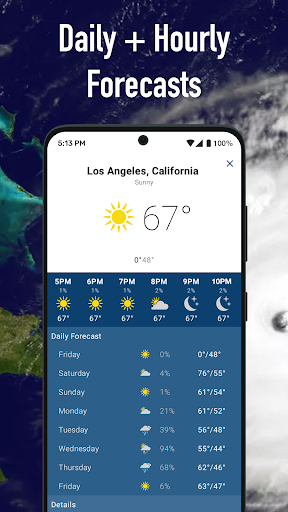
See current & future weather conditions with the 8-Day Forecast
View full-screen map for an overview of weather radar activity
Track storms, floods and more with Severe Weather Overlays
Have questions or feedback? Email us at [email protected] for fast & friendly support.
About Weather Hi-Def Radar
Weather Hi-Def Radar is a simple yet powerful weather radar app that features real-time animated weather radar images in vivid color on a highly-responsive interactive map. View future forecasts and detailed weather information with map layers, including snowfall and windspeed.
Features include:
Sharp weather radar displays for current & future radar images
Tap & hold on the map to check current weather conditions and forecasts (for U.S. locations, and some non-U.S. locations where available)
Save multiple locations for fast & easy access to weather forecasts, current road conditions, barometric pressure readings, and detailed weather information for all your saved locations
View your GPS position, direction of travel and elevation on the map with location enabled
View weather map full-screen on your device and hide app buttons for a crystal clear display of weather radar activity
Turn on Weather Layers to see past weather imagery (for U.S. locations & some non-U.S. locations where available):
Radar layer
Clouds layer
Clouds & Radar layer
Temperature layer
Wind Speed layer
Snowfall layer
Severe Weather Overlays and alerts on the map display severe weather warning boxes (U.S. locations only):
Tornado & Thunderstorm watches and warnings
Flood watches and warnings
Hurricane & Tropical Storm forecast tracks
Hurricane & Tropical Storm watches and warnings
Storm Tracks show storm direction in the next few minutes
Winter storm watches and warnings
Marine and coastal alerts
Earthquakes
Recent Lightning strikes
Upgrade to Storm Watch Plus for even more features that keep you safe and informed:
Future Radar: See predicted radar imagery for the next few hours
Future Clouds: See predicted cloud coverage for the next few hours
Sync Clouds & Radar: See predicted future clouds and radar imagery in one place
Future Temperatures Map: See predicted future temperatures on the map
Future Wind Speeds Map: See predicted future wind speeds on the map
Storm Tracker: Stay safe with severe weather overlays
Snowfall Radar: Keep track of flurries and snowstorms alike
Extended Forecast: Plan ahead with predicted temperatures for the weeks ahead
Privacy Policy: http://www.weathersphere.com/privacy
Terms of Service: http://www.weathersphere.com/terms
User Reviews

You can only see one perspective at a time. The saved locations sometimes will not save the town name, even though it finds the location. My home town is listed as "unknown location". The process of getting the app was BEYOND RIDICULOUS and I was overcharged for a subscription I already paid for. Finally, I still need to go to another app to get a forecast for tomorrow.

Info differs from online weather radar. Like the info is late- not time stamped. App is always asking for a review. Like a car dealer wanting your full review on your new car before even get it home from the dealership. This approach is getting old- Just like clerks that are pointing out the page asking for tips when you get a breakfast burrito from the hot lamp display at the convenience store. Don't get me started on rounding up.... it is all too much.

I paid for a lifetime subscription and can't even use it. I never got the activation email and when I tried to use it, I got signed up to pay monthly and had to delete my account. It was a total waste of money and very frustrating. Any charges I see will be disputed and reversed. very shady

No severe weather alerts, which is the sole reason I need a weather app. I just found out I'm in a severe thunderstorm warning by opening Google. This app? Nothing.
How to Download Weather Hi-Def Radar APK
- Enter the package name
com.noaa_hidef_radaron the APK Downloader. - Select your device architecture (ARM64 recommended for modern devices).
- Click Download to get the merged APK file.
- Transfer and install the APK on your Android device.
- Keep Updated: Visit APKDER.COM regularly to search for and download the latest secure versions of your favorite apps.
Frequently Asked Questions
Yes! Every APK download provided by APKDER undergoes rigorous security verification. We verify that the cryptographic signature of the APK file matches the official signature from the developer, ensuring the APK is original, untouched, and free from any modifications.
To install it, you first need to enable "Unknown Sources" in your Android device's security settings. After downloading the APK file from APKDER, tap it to begin the installation and follow the on-screen prompts.
Yes! As soon as the developer releases a new version of Weather Hi-Def Radar, we will update and provide the updated APK on APKDER. You can simply download and install the new APK over the existing installation without losing your app data.
Yes. APKDER allows you to bypass geographic restrictions and download official APK files directly, even if the app or game is not officially available in your country's store.
A standard APK is a single installation package. An XAPK or Split APK contains multiple resource files (like OBB expansions or device-specific layout parts) packaged together. To install them, you can download splits individually or use dynamic helper tools like Split APKs Installer (SAI).
Security & Signature Verification
This APK download is 100% safe. We verify that the cryptographic signature of the file matches the official developer credentials. No modifications or adware are injected.


