

Download Sources
Device Configuration
Split APKs Installation Guide
Some apps are distributed as Split APKs (multiple .apk files packaged together) to optimize resources. Standard Android installers cannot open them.
About This App
The fastest and easiest way to stay connected while gaming!
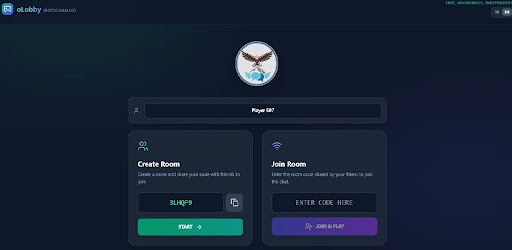
oLobby is a high-quality voice communication platform designed specifically for gamers. We’ve removed the friction of complex setups and mandatory registrations. No accounts, no passwords—just instant, anonymous voice chat.
Why oLobby?
✅ No Registration, No Login: Just open the app, set your nickname, and create a room instantly.
✅ Quick Connection: Share your unique 6-digit room code with your friends and start talking in seconds.
✅ End-to-End Privacy: We use Peer-to-Peer (P2P) technology. Your voice data travels directly between you and your friends; we don’t store your conversations on our servers.
✅ Low Latency: Built on WebRTC infrastructure to ensure minimal ping and lag, so your game performance stays smooth.
✅ Cross-Platform Support: Connect with friends whether they are on mobile, tablet, or desktop.
✅ Screen Wake Lock: Prevents your screen from sleeping during intense matches, keeping your communication active at all times.
How to Use?
Open the app and choose a nickname.
Tap "Create Room" and share the generated code with your squad.
Or, enter a code provided by a friend to "Join Room."
You're all set! Coordinate with your team and secure your victory.
oLobby is an independent, player-centric platform. It’s the perfect alternative for those who want to avoid the complexity of traditional chat apps and focus solely on gaming and teamwork.
Download now and hear the sound of victory!
How to Download OLobby: Gamers Voice Chat APK
- Enter the package name
com.olobby.appon the APK Downloader. - Select your device architecture (ARM64 recommended for modern devices).
- Click Download to get the merged APK file.
- Transfer and install the APK on your Android device.
- Keep Updated: Visit APKDER.COM regularly to search for and download the latest secure versions of your favorite apps.
Security & Signature Verification
This APK download is 100% safe. We verify that the cryptographic signature of the file matches the official developer credentials. No modifications or adware are injected.