

Double Click Lock - Double Tap APK Screenshots


Double Click Lock - Double Tap App Information
Download Sources
Device Configuration
Old Versions of Double Click Lock - Double Tap
| Version | Size | Min OS | Architecture | Release Date | Action |
|---|---|---|---|---|---|
| v10.0 | 7.9 MB | Android 19+ | Jul 6, 2026 | Download |
Split APKs Installation Guide
Some apps are distributed as Split APKs (multiple .apk files packaged together) to optimize resources. Standard Android installers cannot open them.
What's New in Double Click Lock - Double Tap
- bug fixes and optimizations
About Double Click Lock - Double Tap
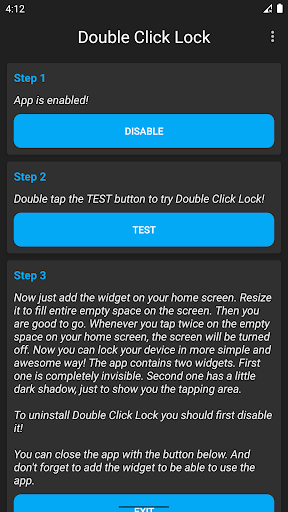
Double Click Lock Widget is very useful app. Most of the modern smartphones have double tap option to turn off and turn on the display. This app allows all devices, even older ones, to turn off display when user double tap on the homescreen. Fast, easy, and very handy!
Tips:
- the app should work on all devices
- the battery drain should be none
- this app is just a widget
To learn how to use the app, follow the instructions in the video or in the app's help screen!
On some devices, when you lock the device using the app, your fingerprint scanner or facial recognition will not work next time you are trying to unlock. This is Android limitation and it cannot be avoided at the moment. If you want to use your fingerprint or face to unlock your device, unfortunately you should not use this app. But in any case be sure to try the app to see if your device is affected by this behavior.
To uninstall the app, first disable it from Device Administrators!
This app uses the Device Administrator permission!
User Reviews

Very bad I found difficulty to delete it.. it is downloaded and I found it in the admin program of the device.. even when I try to delete it , it give me a msg that admin cannot be erased ... I can't believe that I get rid of it 😭😭😭😭😭

GUYS, THIS APP IS NOT BROKEN. IF YOU WANT TO DELETE IT, FIRST REMOVE IT AS AN ADMIN APP. ADMIN APPS CAN'T BE DELETED UNLESS THEY'RE REMOVED AS ADMINS.

Not working it's only off the screen on double tap not opening

Dont install its fake ... Its spam ... I install this app and it is not uninstalling in any way ...... And it is also not working
How to Download Double Click Lock - Double Tap APK
- Enter the package name
com.radefffactory.doublelockon the APK Downloader. - Select your device architecture (ARM64 recommended for modern devices).
- Click Download to get the merged APK file.
- Transfer and install the APK on your Android device.
- Keep Updated: Visit APKDER.COM regularly to search for and download the latest secure versions of your favorite apps.
Frequently Asked Questions
Yes! Every APK download provided by APKDER undergoes rigorous security verification. We verify that the cryptographic signature of the APK file matches the official signature from the developer, ensuring the APK is original, untouched, and free from any modifications.
To install it, you first need to enable "Unknown Sources" in your Android device's security settings. After downloading the APK file from APKDER, tap it to begin the installation and follow the on-screen prompts.
Yes! As soon as the developer releases a new version of Double Click Lock - Double Tap, we will update and provide the updated APK on APKDER. You can simply download and install the new APK over the existing installation without losing your app data.
Yes. APKDER allows you to bypass geographic restrictions and download official APK files directly, even if the app or game is not officially available in your country's store.
A standard APK is a single installation package. An XAPK or Split APK contains multiple resource files (like OBB expansions or device-specific layout parts) packaged together. To install them, you can download splits individually or use dynamic helper tools like Split APKs Installer (SAI).
Security & Signature Verification
This APK download is 100% safe. We verify that the cryptographic signature of the file matches the official developer credentials. No modifications or adware are injected.


