

Tuner APK Screenshots


Tuner App Information
Download Sources
Device Configuration
Split APKs Installation Guide
Some apps are distributed as Split APKs (multiple .apk files packaged together) to optimize resources. Standard Android installers cannot open them.
What's New in Tuner
This update includes general performance and stability improvements.
About Tuner
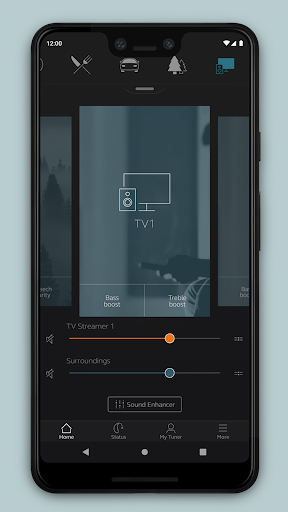
The Tuner app lets you control your hearing aids directly from your mobile device. You can change programs, and make simple or more advanced sound adjustments and save them as favorites. The app helps you learn what you can do and how to do it. It can even help you find your hearing aids if you lose them.
Tuner device compatibility:
Please consult the Tuner app website for up-to-date compatibility information: www.userguides.gnhearing.com
Use the Tuner app to:
• Adjust volume settings on your hearing aids
• Mute your hearing aids
• Adjust volume of your streaming accessories
• Adjust speech focus as well as noise and wind-noise levels with Sound Enhancer (feature availability depends on your hearing aid model and the fitting by your hearing care professional)
• Change manual and streamer programs
• Edit and personalize program names
• Adjust treble, middle and bass tones to your preferences
• Save your preferred settings as a Favorite – you can even tag to a location
• Monitor the battery status of your rechargeable hearing aids
• Help locate lost or misplaced hearing aids
• Tinnitus manager: Adjust sound variation and frequency of the Tinnitus Sound Generator. Select Nature Sounds (feature availability depends on your hearing aid model and the fitting by your hearing care professional)
For more information and help, please visit www.userguides.gnhearing.com
User Reviews

Doesn't connect my Ambios to Samsung Note 8, Android 9. App looks good but has never worked with my hearing aids. Would appreciate help from devs to fix, as Note 8 is in the supported list.

Upgraded from Samsung S8 to Samsung S22 and now program will not work.

Good but I need BT capability so I ain't gotta wear my BT too.
Will not connect
How to Download Tuner APK
- Enter the package name
com.resound.vanillaon the APK Downloader. - Select your device architecture (ARM64 recommended for modern devices).
- Click Download to get the merged APK file.
- Transfer and install the APK on your Android device.
- Keep Updated: Visit APKDER.COM regularly to search for and download the latest secure versions of your favorite apps.
Frequently Asked Questions
Yes! Every APK download provided by APKDER undergoes rigorous security verification. We verify that the cryptographic signature of the APK file matches the official signature from the developer, ensuring the APK is original, untouched, and free from any modifications.
To install it, you first need to enable "Unknown Sources" in your Android device's security settings. After downloading the APK file from APKDER, tap it to begin the installation and follow the on-screen prompts.
Yes! As soon as the developer releases a new version of Tuner, we will update and provide the updated APK on APKDER. You can simply download and install the new APK over the existing installation without losing your app data.
Yes. APKDER allows you to bypass geographic restrictions and download official APK files directly, even if the app or game is not officially available in your country's store.
A standard APK is a single installation package. An XAPK or Split APK contains multiple resource files (like OBB expansions or device-specific layout parts) packaged together. To install them, you can download splits individually or use dynamic helper tools like Split APKs Installer (SAI).
Security & Signature Verification
This APK download is 100% safe. We verify that the cryptographic signature of the file matches the official developer credentials. No modifications or adware are injected.


