

iTel Mobile Dialer Express APK Screenshots




iTel Mobile Dialer Express App Information
Download Sources
Device Configuration
Split APKs Installation Guide
Some apps are distributed as Split APKs (multiple .apk files packaged together) to optimize resources. Standard Android installers cannot open them.
About iTel Mobile Dialer Express
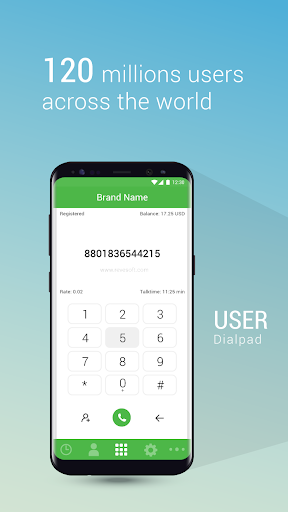
iTel Mobile Dialer Express is a mobile app for Android and other smartphones, offering a range of functionalities like VoIP Calls & SMSs, cross-OS Instant Messaging and much more from data enabled mobile phones (3G/4G or WiFi).
For using this app, end users will need an Operator Code, which they can obtain from a VoIP Service Provider. While Service Providers can use this White Label Platform to offer Mobile VoIP services in their own brand.
Features:
★VoIP Calls & SMSs via Wifi, 3G / 4G, edge or UMTS.
★Cross-platform Instant Messaging – an Android user can chat with an iPhone user or a Windows OS user can chat with a BlackBerry user. Offer unlimited mobile chatting and increase stickiness to your brand.
★Easy Sign Up with Mobile Number as user ID & automatic Buddy List creation with facility to invite phonebook contacts to install the app.
★Facility to enable Mobile Top Up.
For Service Providers
iTel Mobile Dialer Express is available in all major OS Platforms and you can fully customize & brand it as per your requirements. For a free trial:
1. Visit www.revesoft.com
2. Register for a free Demo, with details of your softswitch(IP, Port) & we will send you a Demo Operator Code for testing the app on your own softswitch.
For End Users
You will be prompted for the following while starting the app:
1. Operator Code – Collect Operator Code from your VoIP service provider. If the Service Provider is using REVE platform, he will be able to provide a valid Operator Code.
2. Mobile Number – to be entered with country code.
3. Password – Received via SMS / IVR after entering your mobile number.
User Reviews

⭐⭐⭐⭐⭐ I have been using the itel Mobile Dialer app, and my experience has been excellent. The app is very easy to use, provides clear voice quality, and offers stable connections. The interface is simple and user-friendly, making it convenient for everyday use. I have had a smooth and reliable experience, and it has consistently met my expectations. I highly recommend this app to anyone looking for a dependable mobile dialer. Great job to the development team!

I can't use this app. I'm logging in with my user ID and password, but when I go to dial, it keeps logging me out of the app. Please tell me what the problem is. I want a solution to the problem.

Here’s a clear and polite version you can send on Play Store: Hello, I am facing a problem with the app. Everything seems normal and my balance is available, but after opening the app, it automatically closes within a few seconds. Whenever I try to use it or enter a number, the app crashes and shuts down by itself. Please look into this issue and provide a fix as soon as possible. Thank you.

This does not allow calls to Pakistan Ufone SIM, check the apps.
How to Download iTel Mobile Dialer Express APK
- Enter the package name
com.revesoft.itelmobiledialer.dialeron the APK Downloader. - Select your device architecture (ARM64 recommended for modern devices).
- Click Download to get the merged APK file.
- Transfer and install the APK on your Android device.
- Keep Updated: Visit APKDER.COM regularly to search for and download the latest secure versions of your favorite apps.
Frequently Asked Questions
Yes! Every APK download provided by APKDER undergoes rigorous security verification. We verify that the cryptographic signature of the APK file matches the official signature from the developer, ensuring the APK is original, untouched, and free from any modifications.
To install it, you first need to enable "Unknown Sources" in your Android device's security settings. After downloading the APK file from APKDER, tap it to begin the installation and follow the on-screen prompts.
Yes! As soon as the developer releases a new version of iTel Mobile Dialer Express, we will update and provide the updated APK on APKDER. You can simply download and install the new APK over the existing installation without losing your app data.
Yes. APKDER allows you to bypass geographic restrictions and download official APK files directly, even if the app or game is not officially available in your country's store.
A standard APK is a single installation package. An XAPK or Split APK contains multiple resource files (like OBB expansions or device-specific layout parts) packaged together. To install them, you can download splits individually or use dynamic helper tools like Split APKs Installer (SAI).
Security & Signature Verification
This APK download is 100% safe. We verify that the cryptographic signature of the file matches the official developer credentials. No modifications or adware are injected.


