

Engage (SmartSpending) APK Screenshots




Engage (SmartSpending) App Information
Download Sources
Device Configuration
Old Versions of Engage (SmartSpending)
| Version | Size | Min OS | Architecture | Release Date | Action |
|---|---|---|---|---|---|
| v2.0.2 | 50.0 MB | Android 21+ | x86 x86-64 armeabi-v7a arm64-v8a mips | Jun 26, 2026 | Download |
Split APKs Installation Guide
Some apps are distributed as Split APKs (multiple .apk files packaged together) to optimize resources. Standard Android installers cannot open them.
What's New in Engage (SmartSpending)
Improvements and bug fixes
About Engage (SmartSpending)
Welcome to Engage, the app that brings together everyday savings, recognition, goals & challenges, wellbeing support and company updates.
Engage helps your money go further with instant savings at hundreds of retailers. From everyday essentials to fashion, electronics, utilities, holidays and more, Engage lets you discover and redeem discounts anytime, anywhere.
Engage is much more than just discounts. Depending on your employer's setup, you may also be able to send and receive recognition, connect your device to count steps and track your fitness progress, set up personal or team goals and challenges, explore wellbeing content, stay up to date with company news, and get instant answers to your benefits questions, all from your phone.
New to Engage?
If your employer offers Engage as part of your benefits or employee engagement programme, simply download the app, register with your work details, and start using it straight away.
Already using Engage?
Welcome to your new and improved experience! Depending on your employer’s programme, you may now see some or all of the below.
With Engage you can now:
• Save money with exclusive discounts at hundreds of popular in-store and online retailers.
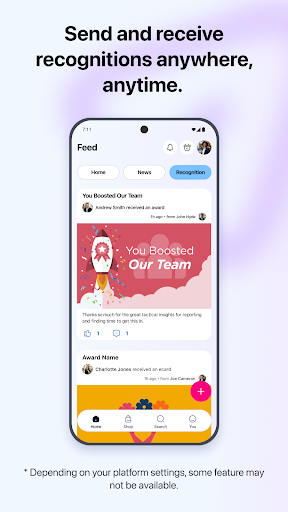
• Send and receive recognitions, including eCards and instant awards.
• Connect your device (Apple Health, Apple Watch, Fitbit, Garmin, Withings, HealthConnect) to count your steps and track your health and fitness progress.
• Set up personal fitness, financial, learning or mental health goals and track progress over time.
• Join fun team challenges that bring people together.
• Explore wellbeing content such as videos, audio, articles and recipes.
• Stay connected with company news and updates.
• Get instant answers to your benefits questions with your own AI Assistant.
Note: To use Engage, your employer must be a participating client, and you will need an eligible account.
User Reviews

Merchants and discounts dependant on who you sign up through. I have two jobs and both jobs have different levels of discounts, cash back and merchants. The platform is a middle man as they act as a bridge between various gift card issuers. Thus, not able to save the gift card to digital wallets immediately. You have to open a gift card of the respective issuer before saving. Overall, it is nice saving a little bit here and there and that there are no ads.

Reloadable cards are no longer visible in the "my reloadable card" screen. After a while there is an error message "cannot connect to our servers". Access is possible in a browser on the same device so the problem is not a lack of internet access. This has been happening at each attempt to top up over several weeks.

The SmartSpending service itself is great, I love the discounts, but the app can be very buggy. Please add a wallet feature where you can store your instant cards and show the remaining balance! The app only shows the full balance, and checking the current balance is tedious, especially when you have to keep doing it over and over again, every time you go into the app!! You have to go to the retailers site and type in the card numbers each time to see if the card still has a balance. Adding a wallet showing the actual balance would bring mu rating to 5 stars!

Not sure what's going on with this app. over the past few months has asked me to update the app at least once a week. It's getting to the point where every time I open it, it needs updating. Edit: No. When the notification comes up, it will not let me use the app until I have updated. There is no option to dismiss. If I do not update the app closes. When I do update and get back in, I have to get a new magic code and it's becoming far too often that updates are needed.
How to Download Engage (SmartSpending) APK
- Enter the package name
com.rewardgateway.mob_04on the APK Downloader. - Select your device architecture (ARM64 recommended for modern devices).
- Click Download to get the merged APK file.
- Transfer and install the APK on your Android device.
- Keep Updated: Visit APKDER.COM regularly to search for and download the latest secure versions of your favorite apps.
Frequently Asked Questions
Yes! Every APK download provided by APKDER undergoes rigorous security verification. We verify that the cryptographic signature of the APK file matches the official signature from the developer, ensuring the APK is original, untouched, and free from any modifications.
To install it, you first need to enable "Unknown Sources" in your Android device's security settings. After downloading the APK file from APKDER, tap it to begin the installation and follow the on-screen prompts.
Yes! As soon as the developer releases a new version of Engage (SmartSpending), we will update and provide the updated APK on APKDER. You can simply download and install the new APK over the existing installation without losing your app data.
Yes. APKDER allows you to bypass geographic restrictions and download official APK files directly, even if the app or game is not officially available in your country's store.
A standard APK is a single installation package. An XAPK or Split APK contains multiple resource files (like OBB expansions or device-specific layout parts) packaged together. To install them, you can download splits individually or use dynamic helper tools like Split APKs Installer (SAI).
Security & Signature Verification
This APK download is 100% safe. We verify that the cryptographic signature of the file matches the official developer credentials. No modifications or adware are injected.


