
Download Sources
Device Configuration
Split APKs Installation Guide
Some apps are distributed as Split APKs (multiple .apk files packaged together) to optimize resources. Standard Android installers cannot open them.
Related Applications




What's New
- Fixed an intermittent error trying to update the Save List.
- Other minor bug fixes and performance improvements.
About this app
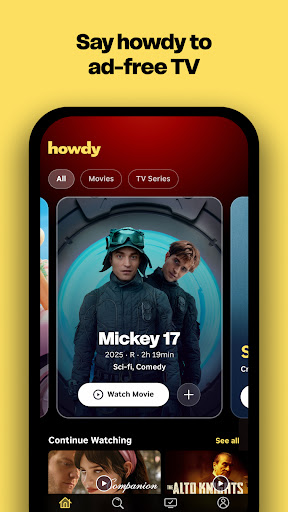
Howdy is a new streaming service from Roku that brings you unlimited access to iconic TV shows and movies, and familiar favorites—all for less than a cup of coffee. No ads. No stress. Just great stories anytime.
Why You’ll Love Howdy
• Always ad‑free: Packed with great stories, uninterrupted.
• Affordable Low Price: Come for the thrills. Stay for lower bills. TV shouldn’t cost more than your coffee order.
• Over 2,500+ movies & TV series: Say howdy to thousands of shows you’ll love.
• No commitments: Cancel anytime or enjoy it all the time.
• Watch everywhere: Stream on mobile, tablet, web browser, Roku TV, and Roku player.
Features
• Browse: Enjoy personalized picks, popular shows, and curated recommendations made just for you.
• Search: Quickly find what you want to watch—or discover today’s top movies and series.
• Continue Watching: Pick up right where you left off, across all your devices.
• My Shows: Save your favorites for easy access, anytime.
• Cross‑device sync: Start on your phone, finish on your TV—your progress and Saved List travel with you.
• Watch on multiple devices: Stream on different screens simultaneously — no fighting over the remote.
How to Download Howdy: Streaming Movies & TV APK
- Enter the package name
com.roku.howdyon the APK Downloader homepage. - Select your device architecture (ARM64 recommended for modern devices).
- Click Download to get the merged APK file.
- Transfer and install the APK on your Android device.
- Keep Updated: Visit APK Downloader regularly to search for and download the latest secure versions of your favorite apps.
Security & Signature Verification
This APK download is 100% safe. We verify that the cryptographic signature of the file matches the official developer credentials. No modifications or adware are injected.