

Egg Wars APK Screenshots



Game Information
Download Sources
Device Configuration
Split APKs Installation Guide
Some apps are distributed as Split APKs (multiple .apk files packaged together) to optimize resources. Standard Android installers cannot open them.
What's New
What's new in 1.9.35.1
1.Game optimizated
2.Fix bugs
About This App
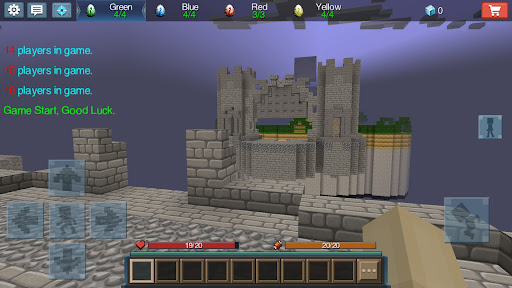
Egg War is a team-up PVP game that has gathered a large number of players in Blockman GO. Players protect their base —— the Egg, and use all the resources they have to destroy others' eggs to win the final victory.
Here are the rules for this game:
- It will divide 16 players into 4 teams. They will be born on 4 different islands. The island has its own base with a egg. Players in the team can be revived as long as the the egg exists.
- The island will produce irons, golds, and diamonds, which used to exchange for equipment from merchants in the island.
- Use the equipment and blocks in hands to collect more resources on the center island.
- Build bridge to enemy's island, destroy their egg.
- The last surviving team wins the final victory
Tips:
1.The key is to snatch the resources of the central island.
2.Upgrade the resource point can make the team develop faster.
3.It is important that help each other with teammates.
This game is owned by Blockman GO. Download Blockman GO to play more interesting games.
If you have any reports or suggestions, please feel free to contact us via [email protected]
User Reviews

Though this game is enjoyable, there are some glitches that I'm not exactly too found over: One issue, my most hated, is that from time to time, the buttons will freeze. Doesn't matter which button it is, or whether or not you're in the menu, they will just stop. They'll stay stuck in a singular place for at least 10 seconds, which in time, can quickly kill you. And also, every time I'm having to log out after a game, it'll just stop working. Making me have to exit the app and then go back in.

It is a pretty good game but sometimes when im playing it would have ads and it would not let me get out of them. Also sometimes when i tried to get into a server my screen went black!! And another time when I fell I would not stop falling and I was falling for about 1 minute. But it still is a pretty good game. All they need to do is fix some of the bugs.😏😏

This is a good game, and even though I have bad wifi it works really good. But for some reason, my tablet kept popping up notifications (like the low battery ones) saying that Google services framework keeps stopping. Every time I hit "close app" or "ok" it just popped back up. I deleted the app and it hasn't happened yet. Keeping this a four star for now, but might make it a five star, considering the fact this could also be a error on my own tablet, not because of the game.

this game is so best but have 2 problem in game 1st not gives coin match to win and 2nd they are very hackers fly and kill and egg destroyed please fixed fast
How to Download Egg Wars APK
- Enter the package name
com.sandboxol.indiegame.eggwarson the APK Downloader. - Select your device architecture (ARM64 recommended for modern devices).
- Click Download to get the merged APK file.
- Transfer and install the APK on your Android device.
- Keep Updated: Visit APKDER.COM regularly to search for and download the latest secure versions of your favorite apps.
Frequently Asked Questions
Yes! Every APK download provided by APKDER undergoes rigorous security verification. We verify that the cryptographic signature of the APK file matches the official signature from the developer, ensuring the APK is original, untouched, and free from any modifications.
To install it, you first need to enable "Unknown Sources" in your Android device's security settings. After downloading the APK file from APKDER, tap it to begin the installation and follow the on-screen prompts.
Yes! As soon as the developer releases a new version of Egg Wars, we will update and provide the updated APK on APKDER. You can simply download and install the new APK over the existing installation without losing your app data.
Yes. APKDER allows you to bypass geographic restrictions and download official APK files directly, even if the app or game is not officially available in your country's store.
A standard APK is a single installation package. An XAPK or Split APK contains multiple resource files (like OBB expansions or device-specific layout parts) packaged together. To install them, you can download splits individually or use dynamic helper tools like Split APKs Installer (SAI).
Security & Signature Verification
This APK download is 100% safe. We verify that the cryptographic signature of the file matches the official developer credentials. No modifications or adware are injected.


