




Download Sources
Device Configuration
Split APKs Installation Guide
Some apps are distributed as Split APKs (multiple .apk files packaged together) to optimize resources. Standard Android installers cannot open them.
What's New
NEW FEATURES
• Backend configurable work order due dates
• Pagination support for Editable Data Table (EDT)
• Support Failure effect field in Notifications
• Create minor and emergency notifications with screening
• Map improvements with grouping of business layers and returning feature properties in actions
• Sync error messages UX improvement
• Support EWM Outbound Delivery process with discard capability
• Support Remote Kitting in Field Logistics (FL)
• Joule mobile client enablement
About This App
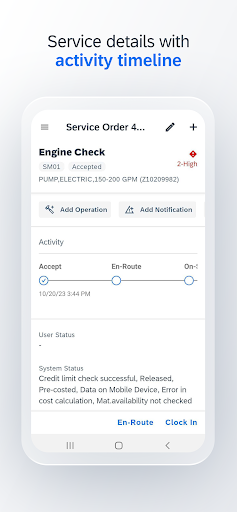
SAP Service and Asset Manager is a new mobile app that leverages the digital core with SAP S/4HANA as well as SAP Business Technology Platform as the cloud platform for managing work orders, notifications, condition monitoring, material consumption, time management, and failure analysis. It supports multiple personas for asset management, field service management and inventory management in a single app, enabling highly skilled workers to perform their job with complex information and business logic that is always available whether they are connected to the network or working in offline environments.
Key features of SAP Service and Asset Manager
• Access to different sources of enterprise data and capabilities: provides timely, relevant, and accurate information such as asset health, inventory, maintenance, and safety checklists
• Ready-to-use, extensible Android native app: integrated with native features and services
• Enables the worker to be more productive and seamlessly take advantage of the Android ecosystem
• Intuitive UI: SAP Fiori (for Android design language)
• Context-rich visualization and actionable insights
• Mobile-enabled processes integrated with enterprise systems
• Easy and timely execution of end-to-end asset management on the go
Note: To use SAP Service and Asset Manager with your business data, you must be a user of SAP S/4HANA, with mobile services enabled by your IT department. You can try out the app first using sample data.
User Reviews

initial sync is getting failed in my mobile, screen automatically changes if i sync again. Batch error 500 is coming. in my colleagues phone it is working, but if i login their account in my phone , the initial sync fails how to resolve this

Since the 2505 update the app is not working as for the previous version. Issues with part description not showing, wierd error message with only 'view detail' as content when creating an emergency order, ending an operation shows message status update failed and status update successful floating message at the same time, adding a note when completing an operation shows note add failed message. Rather than the buttons add and sync that are in blue and in a different shape and size than normal

After scanning the QR code, a popop appears "Network Unavailable........." and nothing happens after that except "Loading".. It seems like this version is not that stable as earlier was. I tried alot of apps and video's calling and the network seems fine.

I have installed SAM 2511. However, I have only maintenance technicians visible in the application, and I am not getting the option to change the persona to Inventory clerk. kindly help
How to Download SAP Service and Asset Manager APK
- Enter the package name
com.sap.mobile.apps.assetmanager.releaseon the APK Downloader. - Select your device architecture (ARM64 recommended for modern devices).
- Click Download to get the merged APK file.
- Transfer and install the APK on your Android device.
- Keep Updated: Visit APKDER.COM regularly to search for and download the latest secure versions of your favorite apps.
Security & Signature Verification
This APK download is 100% safe. We verify that the cryptographic signature of the file matches the official developer credentials. No modifications or adware are injected.


