


Download Sources
Device Configuration
Split APKs Installation Guide
Some apps are distributed as Split APKs (multiple .apk files packaged together) to optimize resources. Standard Android installers cannot open them.
What's New
1. Target API level updated to 34.
2. Bug fix.
About this app
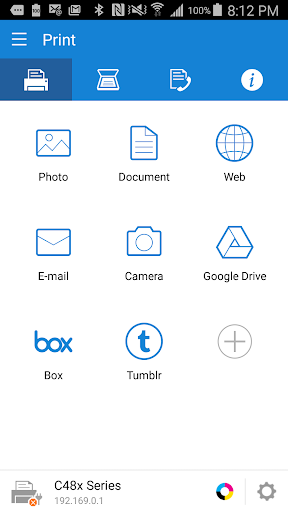
Print, Scan or send Fax wirelessly from your Android phone, tablet, or any other supported Android device to almost any* Samsung Laser Printer.
Samsung Mobile Print empowers to print or send fax, most of the digital contents like Office documents, PDF, images, emails, web pages or even the contents on your social network sites.
Let your content be on your phone or on Google drive it’s just easy.
It also supports scanning from your network multi-functional device and saving in various formats like pdf, jpg or png. Sharing your scanned documents is just a click away.
Key Features
> Intuitive action bar style user interface.
> Automatic discovery of supported network devices.
> Select multiple images, tap to crop or rotate.
> Supports multiple image sizes and multiple images on a page.
> Print or send fax documents/emails/email attachments/web pages/images.
> Supports contents at Google Drive, Dropbox, Evernote, OneDrive, Box and Facebook.
> Scan from flatbed or ADF and save as PDF, PNG, JPG.
> Print or Scan pages as big as A3*.
> Share to open any of the supported content from any other App.
> For corporate environment, supports security features like Job Accounting, Confidential Print and Secure Release.
> Integration support for Auto Toner Ordering Service (US and UK)
> Integration support for following printer's Wi-Fi setup (M2020/2070/283x/288x/262x/282x/267x/287x/301x/306x Series, CLP-360 Series, CLX-330x Series, C410/460/430/480 Series)
**Supports Only Samsung Printers**
* Scanning and sending fax is supported only on supported N/W printers.
* Printing can be done on printers connected via Print server or Shared.
* Maximum print and scan size would depend on the media size supported by the device.
* If you use the CJX-1050W/CJX-2000FW printer, please install "" Samsung Mobile Print Photo"" instead this app.
Supported Model List
* M2020/2070/283x/288x/262x/282x/267x/287x/4370/5370/4580 Series
* C410/460/1810/1860/2620/2670/140x/145x/4820 Series
* CLP-300/31x/32x/350/360/610/620/660/670/680/770/775 Series
* CLX-216x/316x/317x/318x/838x/854x/9252/9352/92x1/93x1 Series
* ML-1865W/2150/2160/2165/2250/2525/257x/2580/285x/2950/305x/3300/347x/331x/371x/405x/455x/551x/651x Series
* SCX-1490/2000/320x/340x/4623/4x21/4x24/4x26/4x28/470x/472x/4x33/5x35/5x37/6545/6555/8030/8040/8123/8128 Series
* SF-650, SF-760 Series
Permission Details:
Below are the details about the permissions Samsung Mobile Print app is using.
. STORAGE : To print photos and files.
. LOCATION : Location permission is required to search for nearby Wi-Fi Direct printers.
. NFC : For direct connection between mobile device and Printer.
. CAMERA : To use Camera.
. INTERNET: For any network communication.
. READ_CONTACTS: For selecting Fax number from Address book.
. GET_ACCOUNTS: For showing registered accounts in email printing and printing contents from Google drive.
. USE_CREDENTIALS: For printing from Google Drive.
. VIBRATION : To notify when NFC tag was read properly
User Reviews

WHAT THE H*LL SAMSUNG! Ever since the last update it is virtually impossible to connect my phone to the printer. Takes sometimes up to 40 attempts (no joke) or more to connect. It seems I always end up bringing out my laptop and connecting it with a printer cable in order to print a document. I don't understand whats going on. It use to work fairly decent before. I think its time to look into other printing options, because either the printer or the app really blow.
After setting up my M2020 with the Samsung Easy Printer Manager, it was simple to use. BUT then it disconnects, and re-connecting is a PITA, so I often just give up. Theres no option to navigate folder by folder. The app scans the phone and lists ALL files, so I have to know the EXACT name of the file. Finally, it can't be moved to the SD card any longer. 80+ megabytes is far too big for something only used occasionally and that works erratically. Uninstalled.
There's a bug with the version updated around Nov. 2019 where scanned pdf files have nothing but blank pages, which makes the scanner unusable or useless. Also, the scanned images are no longer stored to the Scan folder as they used to be but to a secure folder somewhere that cannot be found, which seems to cause problems with sharing with other services such as Google Photos.

Is this app going to be updated so that it can set up a wireless printer without being blocked by Google for accessing sensitive info? It's no longer an option to enable less secure apps. If it detects an error, it'll be useful to the user for it to stay in screen to be able to read it rather than just hear a beep and it go back to the default screen.
How to Download Samsung Mobile Print APK
- Enter the package name
com.sec.print.mobileprinton the APK Downloader. - Select your device architecture (ARM64 recommended for modern devices).
- Click Download to get the merged APK file.
- Transfer and install the APK on your Android device.
- Keep Updated: Visit APKDER.COM regularly to search for and download the latest secure versions of your favorite apps.
Security & Signature Verification
This APK download is 100% safe. We verify that the cryptographic signature of the file matches the official developer credentials. No modifications or adware are injected.


