

Voice Lock : Speak to Unlock APK Screenshots




Voice Lock : Speak to Unlock App Information
Download Sources
Device Configuration
Split APKs Installation Guide
Some apps are distributed as Split APKs (multiple .apk files packaged together) to optimize resources. Standard Android installers cannot open them.
About Voice Lock : Speak to Unlock
Now lock/unlock your mobile screen without touching. Use voice command as password to Lock/Unlock with Voice Lock App.
App Main Features:
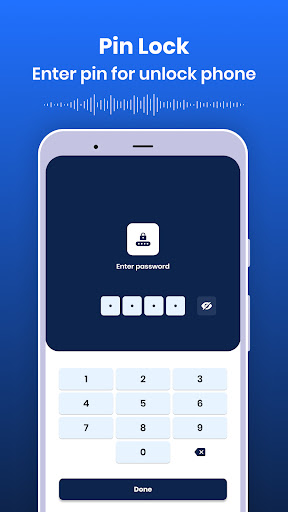
- Set Voice lock, PIN lock, and Pattern lock for unlocking the device. Here you can also set a security question and answer in case you forgot your set lock.
- Set fake icon - Here you will be able to set different icons for this app.
- Set theme - Set different picture or photo on lock screen.
- You can also enable/disable the unlock sound while the phone is unlocked.
- Enable/disable vibrate even when the phone is unlocked.
- See the lock screen preview for the picture selected for the lock screen.
##Permission :
1. Record Audio - To access your voice and match it with the lock
2. System Alert Window - To start overlays on other apps
User Reviews

It's not good first you should unlock your mobile normally and if any emergency is there then also you should first say the password........ There is no emergency dial on this app while unlocking the app....... The worst experience ever......... You should not try even😔😣

The worst of the worst app ever!!! 1) What is the use of voice lock & unlock if you have to manually press the Mic button on the screen to first START THE APP & THEN VOICE COMMAND ? 2) How much more lame could it get if I can't LOCK screen when I want? 3) Gave all permissions & made me switch off Google Assistant & EVEN AFTER THAT, ahhh ! 4) Use Voice Unlock with Google Assit: • a. U HAV TO UNLOCK SCREEN WITH PHN PIN • b. Now press mic on phn Only Now can use VOICE 2 UNLNLOCK HOW STUPID!

So far, so good...but I will come back to re-rate if I run into issues. But for me, this is the ONLY voice unlock app that has worked so far for me.

initial [cr]app setup screens don't support landscape & clip off unscrollable right halves. demands Phone Call permission, not Mic. demands gAssistamt & won't work w/ Bixby. demands setting PIN code. this is a trojan horse for major privacy leaks/invasions. all i wanted was RELIABLE, TOTALLY HANDSFREE, OFFLINE VOICEPRINT+UNIQUE PASSPHRASE HOMESCREEN UNLOCK, NOT ANY OTHER GARBAGE "FEATURES." too much to expect. too many ads...
How to Download Voice Lock : Speak to Unlock APK
- Enter the package name
com.sm.voicelockon the APK Downloader. - Select your device architecture (ARM64 recommended for modern devices).
- Click Download to get the merged APK file.
- Transfer and install the APK on your Android device.
- Keep Updated: Visit APKDER.COM regularly to search for and download the latest secure versions of your favorite apps.
Frequently Asked Questions
Yes! Every APK download provided by APKDER undergoes rigorous security verification. We verify that the cryptographic signature of the APK file matches the official signature from the developer, ensuring the APK is original, untouched, and free from any modifications.
To install it, you first need to enable "Unknown Sources" in your Android device's security settings. After downloading the APK file from APKDER, tap it to begin the installation and follow the on-screen prompts.
Yes! As soon as the developer releases a new version of Voice Lock : Speak to Unlock, we will update and provide the updated APK on APKDER. You can simply download and install the new APK over the existing installation without losing your app data.
Yes. APKDER allows you to bypass geographic restrictions and download official APK files directly, even if the app or game is not officially available in your country's store.
A standard APK is a single installation package. An XAPK or Split APK contains multiple resource files (like OBB expansions or device-specific layout parts) packaged together. To install them, you can download splits individually or use dynamic helper tools like Split APKs Installer (SAI).
Security & Signature Verification
This APK download is 100% safe. We verify that the cryptographic signature of the file matches the official developer credentials. No modifications or adware are injected.


