



Download Sources
Device Configuration
Split APKs Installation Guide
Some apps are distributed as Split APKs (multiple .apk files packaged together) to optimize resources. Standard Android installers cannot open them.
What's New
Bugfixes and improvements
About This App
Snoonu Business Manager
Manage your business on Snoonu straight from your phone.
Transform your operations anytime, anywhere.
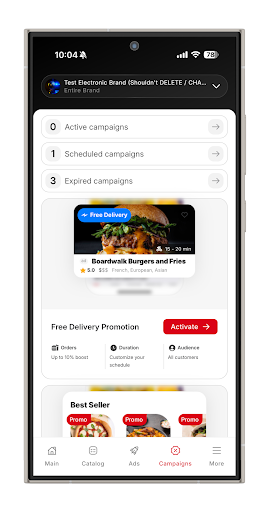
Take full control of your business with real-time insights on earnings, performance, and growth.
Key Features
Complete Store Control
Adjust opening hours, set special closures, pause your store, or change availability instantly.
Analytics and Reports
View daily, weekly, and monthly performance. Discover your top-selling items and track revenue trends to make smarter decisions.
Simple Menu Management
Add or edit menu items, update prices, upload photos, and manage variations with just a few taps.
Multiple Store Access
Switch between locations easily and manage each store with full visibility.
Instant Alerts and Support
Get notifications about store updates or issues. Contact support directly from the app whenever you need help.
Why Snoonu Business Manager?
Snoonu Business Manager gives you the flexibility to run your store efficiently from anywhere. Whether you are on-site or on the move, stay connected to your business and keep your customers happy.
Download now and take your Snoonu store to the next level.
How to Download Snoonu for Business APK
- Enter the package name
com.snoonu.ownerappon the APK Downloader. - Select your device architecture (ARM64 recommended for modern devices).
- Click Download to get the merged APK file.
- Transfer and install the APK on your Android device.
- Keep Updated: Visit APKDER.COM regularly to search for and download the latest secure versions of your favorite apps.
Security & Signature Verification
This APK download is 100% safe. We verify that the cryptographic signature of the file matches the official developer credentials. No modifications or adware are injected.


