
Download Sources
Device Configuration
Split APKs Installation Guide
Some apps are distributed as Split APKs (multiple .apk files packaged together) to optimize resources. Standard Android installers cannot open them.
Related Applications




What's New
eSchoolPLUS Family version 1.7.3 is now available for download.
Key Fix:
- Updated Android SDK to version 35
About this app
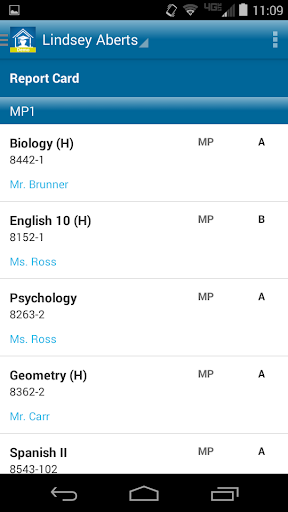
Easy to download and easy to use, the eSchoolPLUS Family App provides information for student success available for the parent on the go. Parents simply log in and select a student and view vital information—right at their fingertips. Right from the home screen, parents can choose from easy-to-view icons to access activities, notifications, classwork, report card, schedule, attendance, and more!
This app is free to families of schools that have eSchoolPLUS Mobile Connector enabled. If your school does not show up, please contact your school district for more information.
Feature List:
Alerts: Parents will be alerted of important notifications right on the home screen. They can receive unique alerts for things such as:
* Attendance
* Student Fees
* Grades
* School Updates
* ...and more
Schedule: Let parents know where their children are on any given day throughout the year. Details include:
* Dates and times
* Class names
* Room numbers
* Teacher assignments
Resources for Success
* Provide extra resources such as lunch menus, social media accounts, and a unique RSS feed.
* Plus, parents will always have access to important transportation information like pickup times, pickup days, bus number assignment, and bus stop location.
Classwork: Provide detailed classwork information for parents and students to reference, such as:
* Due dates
* Descriptions
* Categories
* Associated links
* Scores
* ...and more
Grades on the Go: Parents can stay up-to-date on student success through detailed comments, class grades, and interim progress reports and report cards.
Calendar: Assignments, events, activities, and tardies can be viewed as month or list details and can be synced with personal calendars for easy access.
Activities: Always keep parents and students up-to-date on when practices, clubs, and events will take place and show information such as:
* Activity name
* Instructor/coach
* Location
* Dates and times
How to Download eSchoolPLUS Family APK
- Enter the package name
com.sungardps.plus360homeon the APK Downloader homepage. - Select your device architecture (ARM64 recommended for modern devices).
- Click Download to get the merged APK file.
- Transfer and install the APK on your Android device.
- Keep Updated: Visit APK Downloader regularly to search for and download the latest secure versions of your favorite apps.
Security & Signature Verification
This APK download is 100% safe. We verify that the cryptographic signature of the file matches the official developer credentials. No modifications or adware are injected.