

Download Sources
Device Configuration
Split APKs Installation Guide
Some apps are distributed as Split APKs (multiple .apk files packaged together) to optimize resources. Standard Android installers cannot open them.
What's New
- Minor fixes and updates
About this app
Talker ACR is a smart call recorder that enables you to record incoming & outgoing phone calls and virtually any VoIP conversations on your Android smartphone and/or tablet.
Unlike other apps of a similar kind, Talker call recorder ACR allows you to record WhatsApp calls as well as conversations on Viber, Skype, Hangouts, Facebook, and other messengers in the highest possible quality, in a matter of a few simple steps.
Slick and intuitive in its UI design, Talker call recorder is packed with cutting-edge functionality, which enables it to preserve the best sound quality, while also providing a wide array of extra features to app users.
Talker ACR supports recording of:
* Incoming / outgoing phone calls
* WhatsApp
* Viber
* Hangouts
* Skype (including Skype Lite)
* Facebook Messenger
* WeChat
* Slack
* LINE
* KAKAO
* IMO, and more!
NOTE! This app uses Accessibility services.
NOTE! Not all Android devices support the recording of VoIP calls.
Feature highlights:
* Best possible sound quality
Talker call recorder ACR allows ensuring the clearest sound quality of recording on your Android device.
* Automatic call recording vs. a manual recording
Configure recording of phone calls and VoIP conversations automatically, from their very beginning, or record only selected ones manually, simply by tapping the Talker “Record” button during the call.
* Contacts exclusion
Enjoy the setup granularity and easily mark contacts, whose calls you prefer not to record
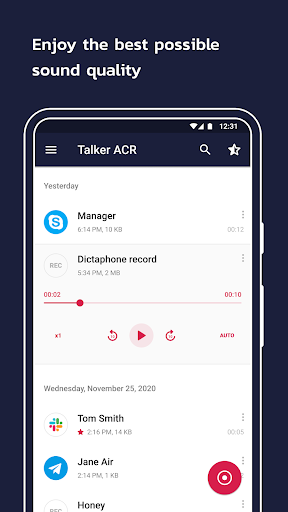
* In-app call playback
Re-listen to recorded conversations directly in the Talker app and mark essential calls as “starred” for easier access in the future if needed.
Note! If you’re only hearing your own voice on playback, try changing the recording source - in Settings.
* In-app callback capabilities
Call your contacts directly in the Talker ACR, without switching the apps.
* Select between Free & Premium membership
Talker call recorder includes both Free and Premium features, for your convenience. While the core app functionality is available for free, you may switch on extra capabilities (see below), by purchasing the Talker Premium membership anytime, when needed.
Note! Buying Talker Premium will NOT improve the quality of recorded calls.
Talker ACR Premium features include:
* Recordings back up in the cloud, e.g. on Google Drive, or else
* Intelligent storage management, like the automatic deletion of old conversations, filtering short calls from recording, etc.
* PIN lock protection
* Wider audio format selection
* Shake-to-mark options for the instant marking of the conversation highlights directly during the call
* Smart recordings management: play, share, rename or delete recorded conversations instantly post-call
Legal disclosure:
Laws and regulations, regarding the recording of phone calls, vary depending on the country or state. Please ensure you’re not breaking any of the relevant rules or laws in the caller’s / callee’s area.
Make sure to always notify your caller/callee of the recording and request their permission for such actions.
Talker Call Recorder ACR requires the following app permissions:
* Overlay (run over other apps) - enables the recording of phone calls and VoIP conversations.
* Phone - detects incoming and outgoing calls.
* Storage - enables saving the recorded conversations on your Android device.
* Contacts - enables filtering the phone calls from recording, and making outgoing calls directly from the app.
Note! Talker ACR does NOT collect, store or disclose your contact list to any third parties.
User Reviews

Overall a good app. User friendly and intuitive. However it does not work if you use Bluetooth earbuds or other devices to make or take calls. This MUST be fixed!! I'm trying to decide if I'm going to pay the $25. On one hand it does work for calls on speaker. On the other I've invested heavily in my earbuds and use them for everything. Well everything except for this recorder I guess. Fix this Bluetooth problem ASAP so I can justify better than 3 stars and decide to pay the $25 fee!

It keeps disconnecting It records only one side sometimes, that is whenever it is actually recording any calls because every couple of days I have to go back into my setting in the accessibility and allow access to the app again and again if I don't remember to do so ever couple of days then I won't have any calls recorded till I finally do realize. And I paid for the year subscription. I am extremely dissatisfied with his app. And I WILL NOT be renewing my subscription.

Only one I could get to work. Doesn't record the other person on Bluetooth, not a big issue it records me and that's really all I need. Just using the phone, it records both sides. Other apps wouldn't work at all. Easy install and setup. Gotta hate Google for striping call recording. Privacy is a joke. About anyone you call these days record the call. You should always assume you are being recorded.

I've loved this app. Never had any issues and the last few days my calls are not recording. Well, that's untrue. The calls are being recorded but when I go to play ack the recording, it's nothing but dead air? The time is going, but the entire call is nothing. Contacts and numbers are not being recognized being labeled as "unknown contact" instead. Ive considered deleting and re-downloading but will lose recordings. Please help
How to Download Call Recorder - Talker ACR APK
- Enter the package name
com.talker.acron the APK Downloader. - Select your device architecture (ARM64 recommended for modern devices).
- Click Download to get the merged APK file.
- Transfer and install the APK on your Android device.
- Keep Updated: Visit APKDER.COM regularly to search for and download the latest secure versions of your favorite apps.
Security & Signature Verification
This APK download is 100% safe. We verify that the cryptographic signature of the file matches the official developer credentials. No modifications or adware are injected.