

SayIt: Read with Ears APK Screenshots



SayIt: Read with Ears App Information
Download Sources
Device Configuration
Old Versions of SayIt: Read with Ears
| Version | Size | Min OS | Architecture | Release Date | Action |
|---|---|---|---|---|---|
| v4.3 | 11.9 MB | Android 24+ | Mar 19, 2026 | Download | |
| v4.2 | 11.9 MB | Android 24+ | Mar 13, 2026 | Download | |
| v4.1 | 11.9 MB | Android 24+ | Feb 10, 2026 | Download | |
| v4.0 | 11.8 MB | Android 24+ | Jan 15, 2026 | Download | |
| v3.8 | 11.8 MB | Android 24+ | Dec 20, 2025 | Download | |
| v3.7 | 11.8 MB | Android 24+ | Dec 10, 2025 | Download | |
| v3.5 | 11.8 MB | Android 24+ | Nov 30, 2025 | Download | |
| v3.3 | 11.7 MB | Android 24+ | Nov 21, 2025 | Download | |
| v3.1 | 10.7 MB | Android 24+ | May 29, 2025 | Download | |
| v2.33 | 10.5 MB | Android 24+ | Mar 20, 2025 | Download |
Split APKs Installation Guide
Some apps are distributed as Split APKs (multiple .apk files packaged together) to optimize resources. Standard Android installers cannot open them.
What's New in SayIt: Read with Ears
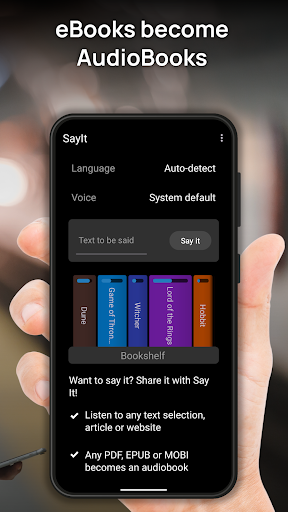
- Manage bookshelf - left / right / star
- Fix for backward from notification
- Fix for translations without connectivity
- Round font
- Expressive icons
- Material expressive elements
- Scrolling text when reading
- Design tweaks
- Edge to edge fixes
- Android 16 target
- New translations
About SayIt: Read with Ears
🎧 SayIt: Turn the World into a Podcast. Listen to Anything!
📚 Free your eyes! Instantly convert articles, eBooks, PDFs, and web links into audiobooks. Learn languages on the go!
🔥 Stop Reading. Start Listening. (Your Digital Narrator)
SayIt is the ultimate productivity and learning hack for anyone who feels overwhelmed by screen time. Why stare at your phone when you could be listening hands-free while driving, working out, or cooking?
Mindlessly scrolling is out. Hands-free knowledge is in.
✨ SayIt is Your All-in-One Audio Powerhouse:
SayIt doesn't just read—it transforms your entire library and the internet into professional-grade audio content.
📰 Web to Podcast: Turn any selected text, long-form article, or complex website into a smooth, personalized podcast instantly. (We automatically strip out the junk like menus and ads!)
📖 eBook Magic: Convert PDFs, EPUBs, and MOBI (Kindle) files directly into seamless Audio Books. Perfect for mastering your book list faster.
🌐 Instant Global Translation: Hear any text or article spoken aloud, instantly translated into your native language. Break down language barriers instantly!
🚀 The Ultimate Language Learning Tool:
Want to learn a new language like a pro? SayIt is built for rapid mastery.
Bilingual Mode: Use the bilingual translation feature to hear the original text followed by the translation. Learn by listening and comparing.
Automatic Language Detection: SayIt intelligently detects the right language (no need to manually switch between Spanish, Chinese, or Swahili).
💎 Features That Make SayIt Irresistible:
New! Material 3 Expressive Design: Enjoy a beautiful, modern, and intuitive user interface.
Full Android Integration: Easily share any content from any app directly to SayIt using the standard Android sharing mechanism.
Smart Content Stripping: Automatic text download from links and smart junk removal ensure you only hear the content that matters.
Clipboard Reading: Copy text anywhere and instantly listen.
Custom Speed Control: Adjust the reading speed to match your pace (for fast learners or detailed listening).
Massive Language Support: Supports over 50 languages including Hindi, Tamil, Russian, Japanese, German, French, and many more! (Af, Ar, Bg, Bn, Cs, Da, De, El, En, Es, Et, Fa, Fi, Fr, Gu, He, Hi, Hr, Hu, Id, It, Ja, Kn, Ko, Lt, Lv, Mk, Ml, Mr, Ne, Nl, No, Pa, Pl, Pt, Ro, Ru, Sk, Sl, So, Sq, Sv, Sw, Ta, Te, Th, Tl, Tr, Uk, Ur, Vi, Zh (Simplified), Zh (Traditional)).
Download SayIt now. Stop scrolling. Start mastering.
User Reviews

I find the app very helpful for reviewing my writing projects. There are pronunciation errors, at times, however, particularly with look-alike words. I appreciate being able to keep my own bookshelf and resume from where I left off. After recent updates (January 2026), the text-to-speech has become less natural-sounding, and has begun to cut off the first words in most sentences which makes listening more difficult. I have actually lowered my rating as a result.

Love the app and love that the voice is not robotic and more natural than other apps out there. It's been super helpful and practical. I would suggest the progress bar be not be so at the limit of the screen and moved to the center. It's easily moved accidentally and loosing my spot. If you're not seeing the screen you have to figure out where the bar was. Please stop using line numbers and better add page numbers to easily locate where you left off. Other than that I definitely recommend it.

This is NOT AD-FREE SOFTWARE, it will NAG you VERBALLY at every tap of text to BUY his PAID version, literally, it's horrible to use this app... ------ And that's a shame bc it does most things well, except for the constantly spinning morphing large center play/pause icon... ------ Don't look for settings bc those are only a list of self-serving self-advertising choices he put there, nothing will turn off the blatant verbal nags to buy his not free version. ------ It's a Demo or free with Ads.

This app just pipes text to the system text-to-speech generator, which is *really* awful. This might have been sufficient 5 years ago, but it's 2026. I expect an app like this to use modern large language models for realistic, human-like voice synthesis that understands context, abbreviations, etc. It could be done entirely on-device using Gemini Nano/Gemma 4. The app doesn't even respect my voice settings, it forces a US English voice instead of the proper English voice I have selected.
How to Download SayIt: Read with Ears APK
- Enter the package name
com.urbandroid.sayiton the APK Downloader. - Select your device architecture (ARM64 recommended for modern devices).
- Click Download to get the merged APK file.
- Transfer and install the APK on your Android device.
- Keep Updated: Visit APKDER.COM regularly to search for and download the latest secure versions of your favorite apps.
Frequently Asked Questions
Yes! Every APK download provided by APKDER undergoes rigorous security verification. We verify that the cryptographic signature of the APK file matches the official signature from the developer, ensuring the APK is original, untouched, and free from any modifications.
To install it, you first need to enable "Unknown Sources" in your Android device's security settings. After downloading the APK file from APKDER, tap it to begin the installation and follow the on-screen prompts.
Yes! As soon as the developer releases a new version of SayIt: Read with Ears, we will update and provide the updated APK on APKDER. You can simply download and install the new APK over the existing installation without losing your app data.
Yes. APKDER allows you to bypass geographic restrictions and download official APK files directly, even if the app or game is not officially available in your country's store.
A standard APK is a single installation package. An XAPK or Split APK contains multiple resource files (like OBB expansions or device-specific layout parts) packaged together. To install them, you can download splits individually or use dynamic helper tools like Split APKs Installer (SAI).
Security & Signature Verification
This APK download is 100% safe. We verify that the cryptographic signature of the file matches the official developer credentials. No modifications or adware are injected.


