
CalcGrid APK Screenshots


CalcGrid App Information
Download Sources
Device Configuration
Split APKs Installation Guide
Some apps are distributed as Split APKs (multiple .apk files packaged together) to optimize resources. Standard Android installers cannot open them.
What's New in CalcGrid
Optimized the result display logic
About CalcGrid
CalcGrid: A Structured Vertical Table Calculator for Life, Work, and Study
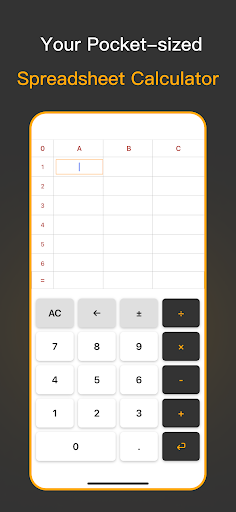
CalcGrid isn’t just a basic calculator—it’s a smart, structured, and intuitive vertical table calculator designed to bring clarity and order to your daily calculations. Inspired by the layout of Excel, CalcGrid displays your entire calculation process in a vertical column format, making every step visible and editable. Instead of struggling with long, hard-to-read single-line formulas, you can now manage your math as clearly as writing it on paper.
CalcGrid is built for real-world usage—not just quick math but multi-step, continuous, and revisable calculations. Whether you’re tracking expenses, solving math problems, or preparing a budget, it gives you the simplicity of a calculator with the structure of a spreadsheet, all in a mobile-optimized design.
Core Features
• Vertical Table Layout
Input numbers and operators in a clean column layout. Just like writing on paper—clear, easy, and organized.
• Step-by-step Calculation Display
Every number, operator, and result appears in its own cell. Perfect for reviewing, correcting, or validating your logic.
• Smart Input Handling
The app automatically places your inputs in the correct fields (number or operator) and moves to the next cell—ideal for fast-paced entry.
• Fully Editable at Any Time
Tap on any cell to modify its content without needing to redo the entire calculation.
• Real-time Auto Calculation
As you type or make changes, the result updates immediately. No extra buttons, no repeated “equals” taps.
• No Sign-up or Ads
Lightweight, fast, distraction-free. Just download and go.
Use CalcGrid for Everyday, Professional, and Educational Needs
Everyday Life
• Shopping Calculator – Keep a running total while grocery shopping.
• Daily Expense Tracker – Record and manage your spending effortlessly.
• Bill Splitter – Easily divide restaurant or shared expenses with friends.
• Home Budget Planner – Organize your rent, utilities, and savings in one place.
Work & Business
• Business Trip Expense Calculator – Tally travel, meals, and hotel costs.
• Pricing & Profit Estimator – Enter costs and margins to quickly calculate prices.
• Small Business Ledger – Track inventory, sales, and costs with a column layout.
• Freelance Project Quotes – Build, review, and update pricing for client projects.
Learning & Education
• Math Homework Assistant – Break down complex problems step-by-step.
• Classroom Teaching Tool – Help students visualize arithmetic operations clearly.
• Student Budgeting Practice – Teach basic budgeting and money management.
Fast, Clean, and Focused
• Instant launch with zero lag
• Real-time input response
• Seamless cell editing
• Designed for touch-first devices
• Works offline—no internet required
• No ads, no clutter—just pure utility
Who Is CalcGrid For?
• Shoppers who want to tally costs on the go
• Budget-conscious users organizing monthly finances
• Freelancers quoting project costs
• Travelers recording expenses on the road
• Students solving math problems step-by-step
• Teachers and tutors guiding learners
• Anyone who finds traditional calculators limiting
Whether you’re working on personal finances, educational tasks, or business calculations, CalcGrid gives you a structured and visual way to stay organized and accurate.
Rethink How You Calculate
CalcGrid isn’t just about finding a result—it’s about understanding how you got there. Its clear table structure lets you see, adjust, and manage complex calculations with ease. If you’ve ever wished for a mobile version of Excel that’s fast, simple, and focused solely on math, this is it.
Perfect for those who love order, need flexibility, and expect more than a basic calculator can offer.
How to Download CalcGrid APK
- Enter the package name
com.viadexventures.calcgridon the APK Downloader. - Select your device architecture (ARM64 recommended for modern devices).
- Click Download to get the merged APK file.
- Transfer and install the APK on your Android device.
- Keep Updated: Visit APKDER.COM regularly to search for and download the latest secure versions of your favorite apps.
Frequently Asked Questions
Yes! Every APK download provided by APKDER undergoes rigorous security verification. We verify that the cryptographic signature of the APK file matches the official signature from the developer, ensuring the APK is original, untouched, and free from any modifications.
To install it, you first need to enable "Unknown Sources" in your Android device's security settings. After downloading the APK file from APKDER, tap it to begin the installation and follow the on-screen prompts.
Yes! As soon as the developer releases a new version of CalcGrid, we will update and provide the updated APK on APKDER. You can simply download and install the new APK over the existing installation without losing your app data.
Yes. APKDER allows you to bypass geographic restrictions and download official APK files directly, even if the app or game is not officially available in your country's store.
A standard APK is a single installation package. An XAPK or Split APK contains multiple resource files (like OBB expansions or device-specific layout parts) packaged together. To install them, you can download splits individually or use dynamic helper tools like Split APKs Installer (SAI).
Security & Signature Verification
This APK download is 100% safe. We verify that the cryptographic signature of the file matches the official developer credentials. No modifications or adware are injected.


