


Download Sources
Device Configuration
Split APKs Installation Guide
Some apps are distributed as Split APKs (multiple .apk files packaged together) to optimize resources. Standard Android installers cannot open them.
What's New
This new version includes:
- Improvements and bug fixes.
About This App
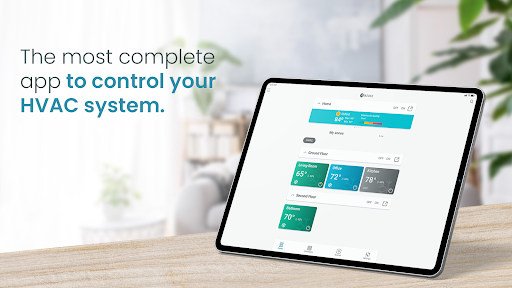
The new Airzone Cloud App allows you to control your air conditioning system with Airzone from your smart devices. Now also control your Aidoo devices in the same application.
Description
With Airzone Cloud you no longer need the remote control of your air conditioner or heating.
From your sofa or bed, at your office or while strolling at the park, the Airzone Cloud app lets you control the AC using your smart devices. Turn the air on or off and adjust the temperature in each room separately for maximum comfort with great savings.
See if you left the AC on in any room, check the temperature where your child is sleeping. Airzone Cloud App leaves all control at your fingertips, anytime and anywhere.
Easily create time schedules on a specific day or for the whole week and say goodbye to hassling with complicated AC remotes.
Create customized scenes that fit your daily routines.
Limit the temperature and reduce the cost of your air conditioning or heating.
Invite new users to the app and define the level of control you want to give each person.
Functionalities:
- Control several systems both in residential and commercial buildings.
- Control of air conditioning and heating by zones.
- Visualization of room temperature and humidity.
- Customization of each controlled site (location, name, color).
- Weekly or calendar time schedules.
- Creation of customized scenes with combination of actions from different zones for your routines.
- User management with different permissions.
- Access to zone settings.
- Shutdown timer in each zone.
- Voice control via Alexa or Google Home.
- For Airzone Cloud Webserver devices and Aidoo devices.
User Reviews

The app does almost everything I need of it except one very basic thing. There is no way to add an alert or push notification if the temperature goes outside of a certain range. Or at least a way of overriding the schedule to run the system if the temperature goes beyond a certain limit. This would prevent pipes freezing or the interior becoming overly hot. And could function as a fire alarm in an emergency. The Honeywell app had this. Add this functionality and I'll rate 5 stars.

The functionality of the app is good but most of the time when I open the app it just loads forever then eventually I get a white screen and have to close and start over. I end up just using my remote to turn things on or off. years later and still having loading issues that seem to be worse than ever. lowering to 1 star. kind of ridiculous after spending the money to put this on all 5 of our mini splits.

Only sometimes works with Mitsubishi heat pump. Currently have it set to cool to 67, it shows the room temp is at 79 but shows up in the green "comfort" mode and won't go to blue cold mode. Can't control some settings from the app. Doesn't tell you when the pump is on vs off which is annoying. The options to select mode doesn't always show up.

3 stars because it's better than others but... 1. Devices disconnect at least once at week, I have to restart the devices. 2. There is a hidden scheduler which make turn off one of my device. I can't delete that schedule. To make sure this issue is because the application. I have removed the device from the app, and not more went off. The I added it again, then again it starts to turn off. 3. My AC can go to 61F, app only reach 67F. 4. Actual room temperature is sometime 10F above of reality.
How to Download Airzone Cloud APK
- Enter the package name
es.altra.airzoneon the APK Downloader. - Select your device architecture (ARM64 recommended for modern devices).
- Click Download to get the merged APK file.
- Transfer and install the APK on your Android device.
- Keep Updated: Visit APKDER.COM regularly to search for and download the latest secure versions of your favorite apps.
Security & Signature Verification
This APK download is 100% safe. We verify that the cryptographic signature of the file matches the official developer credentials. No modifications or adware are injected.


