




Download Sources
Device Configuration
Split APKs Installation Guide
Some apps are distributed as Split APKs (multiple .apk files packaged together) to optimize resources. Standard Android installers cannot open them.
What's New
Discover the latest improvements in our all-in-one alarm clock app 🌟 featuring future date alarms 📆. Enjoy a tailored waking experience with options like adjustable snooze ⏰, multiple timers ⏱️, and a gradually increasing alarm volume 🔊. Explore a vast selection of alarm sounds 🎶 . Upgrade now and streamline your daily routine with our app's improved functionality and design! 🚀 In this version, we fixed some minor bugs and incrased reliability.
About this app
🤗 #1 Alarm Clock App for FREE.
🎶 Wake up gently to your favorite music and avoid accidentally disabling your alarm.
Simple, Reliable, Precise:
⏰The Clock features a reliable alarm clock with extreme functions. It combines all of the functionality you need into one simple, beautiful package. It is designed to create, edit and remove multiple alarms in the easiest way. It can be used to wake up in the morning or setup reminders or TODOs for your daily tasks.
😀 Clock Alarm Widget: The Clock is a reliable daily helper perfect for every timing situation. Use alarm clock widget to set alarm with just one touch.
📅Set future date: Never forget an important task or event again by setting alarms on a specific date in future.
⌚ Timely and easy-to-use: The Clock is a simple alarm clock with an easy-to-use interface! You can set date on calendar, set alarm time or sleeping goal. You are able to set your alarm title, snooze options and repeating days for recurring events.
💡 Smart alarm clock: Set alarms and timers by using voice commands via Google Assistant (Just say; 'Hey Google, set alarm at 6 am tomorrow' and that's it!).
📶 Gradual volume increase: The Clock enables to set alarm volume increasing in a peaceful and progressive way (fade-in) to provide gentle wake-up experience (Volume Crescendo).
🚀Lightweight, Fast and Functional: The Clock is better than other alarm clock apps. Alarm works even when screen is off, in silent mode or headphones plugged in. Alarms are automatically set on timezone changes.
💤Are you a heavy sleeper?
Our Loud Alarm Clock will force you out of bed in time and do not oversleep. You can also set vibration (for sleepyhead).
🎶Say Good Morning! Enjoy beautiful alarm sounds or set ringtones, music file or favorite playlist from your music library on Spotify. You can also set a radio station online.
🧮 Solve math problems to stop: In order to avoid disabling your alarm accidentally, you are able to set your alarm clock to ask math challenges to dismiss (brain teaser).
🤔Upcoming alarm notification:
Deactivate your alarm if you wake up before it goes off and skip next. Set auto-snooze or auto-dismiss for a successful morning.
💤Nap Alarm: Feeling drowsy and need a short sleep to reboot your brain? The Clock offers a nap alarm widget on your home screen for a joyful afternoon siesta. Wake up in time and never late for work.
🐦Stylish Bedside Clock:
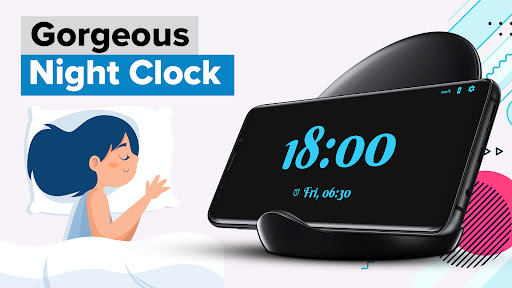
Enjoy our built-in, retro-style nightstand clock with gorgeous themes.
🌏World Clock: The Clock has a world clock and widget to keep track of time around the world. Whether you are a traveler, a business person or someone who has relatives abroad, our app offers a functional world clock where you can customize and add as many cities as required.
⌚Timer:
Countdown Timer, both on app and as a widget on home screen. ✔Use it for sports, fitness exercises, games, in the kitchen for cooking or gym.
⏱️Stopwatch:
Advanced stopwatch with sensitivity down to 1/100 of a second. The lap times can be shared via any application such as SMS, e-mail or Whatsapp or recorded on your notepad.
📱Beautiful Widgets: Enjoy beautiful clock widgets such as digital clocks and calendars.
🎨Colorful Themes and Dark Mode: The Clock offers gorgeous themes for best user experience and customization.
Download The Clock - Alarm Clock & Timer for FREE.
** Important Note: your phone must be on for the alarm to work **
Follow us on Facebook, Twitter and Instagram as @Jetkite.
User Reviews

UPDATE: This app works exactly as expected about 1/3 of the time. zit use to work perfectly all of the time. Now, half the time the alarm goes off, but the only way to stop it is to open the app, the Snooze/Stop screen never shows. And that WHEN it works at all or isn't late. I have uninstalled and reinstalled the app several times and it still isn't working right. I don't know when the developers did, but I am taking this from 5 stars to 2. BE WARNED!!

I wanted so badly for this app to be my morning wakeup, because I love the features it offers, but unfortunately it is simply not reliable enough for someone in my line of work. About half the time my daily alarm simply does not go off in the morning. The app is up-to-date, all settings are correct, but one day it might work and the next, maybe not. Gave 2 stars because the advertised features are fantastic ideas, but as far as functionality goes, 0 stars.

I downloaded this app a while ago because I wanted to use my own music for the alarm sound. I even purchased a premium to get more alarm slots. it worked well at first but over the last year the widget doesn't track the actual time correctly and half the time the alarms don't go off. Oh, and the timer used to work now it's a hassle to even set one and sometimes it doesn't work either. If these issues get resolved I might come back to it but for now I'm uninstalling it.

I like two widget options. These widgets display day and date to the left with either an analog or digital clock to the right. .... I have a suggestion for a third and fourth widget similar to the two already noted. Removing the month and year from the top, left side of both widgets would allow for the day to show in larger font. It might also allow for the digital clock to show in larger font as well. Those with poor eyesight might better be able to read the date, day, and time.
How to Download The Clock: Alarm Clock & Timer APK
- Enter the package name
hdesign.theclockon the APK Downloader. - Select your device architecture (ARM64 recommended for modern devices).
- Click Download to get the merged APK file.
- Transfer and install the APK on your Android device.
- Keep Updated: Visit APKDER.COM regularly to search for and download the latest secure versions of your favorite apps.
Security & Signature Verification
This APK download is 100% safe. We verify that the cryptographic signature of the file matches the official developer credentials. No modifications or adware are injected.


