

Ente Auth - 2FA Authenticator APK Screenshots




Ente Auth - 2FA Authenticator App Information
Download Sources
Device Configuration
Split APKs Installation Guide
Some apps are distributed as Split APKs (multiple .apk files packaged together) to optimize resources. Standard Android installers cannot open them.
What's New in Ente Auth - 2FA Authenticator
* Added support for search deep links via
enteauth://search.
* Improved Proton Authenticator import,
including support for encrypted exports.
* Improved QR/image import reliability,
including better cleanup of temporary picked
images.
* Reduced duplicate sync work during bulk code
imports and updates.
About Ente Auth - 2FA Authenticator
Ente Auth is the best and the only 2FA authenticator app you will ever need. It provides secure, end-to-end encrypted backup to your codes, works across devices whether its Android, iOS, Mac, Windows, Linux or Web. It also offers quality of life features like Tap to Copy, Next Code, and even allows you to share your codes securely with others.
Our customers absolutely love it.
- It works everywhere and can either be used in the cloud with end-to-end encryption or on a single device without the need for an account. Ente’s UI is well thought out and easy to use. Plus it even shows you the next code if the current one is about to expire so you dont have to wait for it to roll over before your start typing. You can even pin, tag, and search your codes which makes it a lot easier to manage a big list compared to Google Authenticator. They call it a labour of love on their Github page, and it really looks like one. - Linus Tech Tips
- Underrated but great authenticator app. Free, open source, and offers cloud backup. Very stable, has nice QoL features like the preview for the next code and the search bar. Overall, the best 2FA app I've used yet. - Luna Lometta
- Fantastic, fluid, has a dark theme, is open source, and also has a PC program. I switched from Authy to Ente Auth precisely for this reason, and I was surprised since the app as a whole is better and faster. - Daniel Ramos
- Better than Google Authenticator. - Piaw Piaw Kittens
- Authy's best replacement. Open source, desktop support, synchronization, convenient token export. Huge thanks to the developers, I hope your product will become popular and famous. - Sergey Tverye
Ente Auth is recommended by Linus Tech Tips, CERN, Zerodha and many others.
✨ Features
EASY IMPORT
Add TOTP 2FA Codes to Ente Auth easily. You can either scan a QR code, or import from other authenticator apps to make sure you never lose a code while migrating
CROSS PLATFORM
Ente Auth is available cross platform and supports all major devices and OS - including Android, iOS, Mac, Windows, Linux and Web.
SECURE E2EE BACKUP
Ente Auth provides end-to-end encrypted cloud backups so that you don't have to worry about losing your tokens. We use the same protocols Ente Photos uses to encrypt and preserve your data.
OFFLINE MODE - NO SIGNUP REQUIRED
Ente Auth generates 2FA tokens offline, so your network connectivity will not get in the way of your workflow. You can even use Ente Auth without signing up for backups and use it locally for as long as you want
INTUITIVE SEARCH
Ente Auth allows you to find your 2FA codes through one tap search. No more scrolling through a long list to find the right codes. Just tap on search and start typing.
CUSTOMISE YOUR EXPERIENCE
Customise your experience of Ente Auth to make it like you want. Reorder your 2FA codes so that your most frequently used services are always on top. Change the icons by choosing from our massive icon library. Add tags so that you can filter codes like you want
SEE NEXT CODE
Ever had to pause for the timer to run out on the current code, so you can type in the new 2FA code? Ente Auth makes your workflow extremely fast by displaying the next code prominently. Say goodbye to waiting
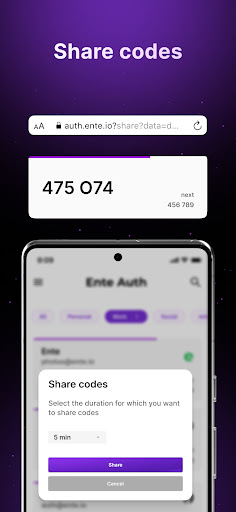
SHARE 2FA CODE
We all have sent multiple messages to that colleague who keeps asking for the 2FA code to a shared account. Such a waste of productive time. With Ente Auth, you can securely share your 2FA tokens as a link. You can even set an expiry time for the link as well.
ADD NOTES
Use notes to save any additional information including recovery codes. All notes are backed up with end to end encryption so you dont have to worry about losing them.
User Reviews

it's pretty good, tried it and would pick it over Proton because the UI is better, but a few things. I think there should be an option for a search bar at the bottom, plus search focus doesn't bring up the keyboard, same with categories, there should be an option to have them at the bottom, and you should be able to reorder them, them appearing in order of creation is stupid imo

A great way to manage your two-factor authentication. However, I have a bug to report. When I try to export my two-factor authentication keys in an encrypted fashion, it seems like the app continually spins once I've created a unique password for that encrypted file. When I hit cancel it allows me to download an unencrypted file. But I've yet to be able to download an encrypted file with a password.

Good app Nice interface Easy to use Works fine as it should... Because they haven't been around forever dosen't mean their not on point getting the job done Everyone was the new kid on the block at some point in time... I'm currently running on iPhone, Android, Zorin OS(Linux) laptop and Windows desktop...Did I mention running and integrating flawlessly under four very different operating systems as well as a diverse variety of hardware both new and old... Very impressive Well done

I want to say that I really like this app. it is simple, it does not require a Google log in, and it just works. Here is the little caviat... It is a royal pain to set up the app in 2 phones. It took me about an hour to get it to allow me to use both phones. I don't like having to turn off 2FA since I have Yubi keys as my primary means of verification but it does not work at this point. That is the only reason why it's 4/5
How to Download Ente Auth - 2FA Authenticator APK
- Enter the package name
io.ente.authon the APK Downloader. - Select your device architecture (ARM64 recommended for modern devices).
- Click Download to get the merged APK file.
- Transfer and install the APK on your Android device.
- Keep Updated: Visit APKDER.COM regularly to search for and download the latest secure versions of your favorite apps.
Frequently Asked Questions
Yes! Every APK download provided by APKDER undergoes rigorous security verification. We verify that the cryptographic signature of the APK file matches the official signature from the developer, ensuring the APK is original, untouched, and free from any modifications.
To install it, you first need to enable "Unknown Sources" in your Android device's security settings. After downloading the APK file from APKDER, tap it to begin the installation and follow the on-screen prompts.
Yes! As soon as the developer releases a new version of Ente Auth - 2FA Authenticator, we will update and provide the updated APK on APKDER. You can simply download and install the new APK over the existing installation without losing your app data.
Yes. APKDER allows you to bypass geographic restrictions and download official APK files directly, even if the app or game is not officially available in your country's store.
A standard APK is a single installation package. An XAPK or Split APK contains multiple resource files (like OBB expansions or device-specific layout parts) packaged together. To install them, you can download splits individually or use dynamic helper tools like Split APKs Installer (SAI).
Security & Signature Verification
This APK download is 100% safe. We verify that the cryptographic signature of the file matches the official developer credentials. No modifications or adware are injected.


