
OshareWeather - For cute girls APK Screenshots




OshareWeather - For cute girls App Information
Download Sources
Device Configuration
Old Versions of OshareWeather - For cute girls
| Version | Size | Min OS | Architecture | Release Date | Action |
|---|---|---|---|---|---|
| v5.18.0 | Varies | Android 5.0+ | universal |
Jul 11, 2026 | Download |
Split APKs Installation Guide
Some apps are distributed as Split APKs (multiple .apk files packaged together) to optimize resources. Standard Android installers cannot open them.
What's New in OshareWeather - For cute girls
Ver 5.18.0 changes:
Some features have been improved.
About OshareWeather - For cute girls
The much talked-about app with one million users in Japan!
Check out the weather and your outfit for today, both in one go.
A cute weather app, popular among girls.
Live happily every day wearing fashionable outfits!
108 new outfits!
+------------------------------------------------------+
Main Topic News
+------------------------------------------------------+
★Reached the number one spot on the AppStore’s free apps weather category ranking (Japan)
★Featured on TBS TV "King's Brunch!".
http://www.tbs.co.jp/brunch/mobile_apps/20150404.html
★Featured on Fuji TV "Tokudane!".
★Featured on the August issue of Popteen 2014 by Ms.Yumi Shida and Ms.Reimi Osawa.
★Featured on the September issue of AneCan 2013!
★Featured on “Smartphone Police” on TV Asahi!
http://www.tv-asahi.co.jp/sp_police/
★Featured on TV Tokyo’s “Audrey no Kami Appli @ Shinseiki -UP DATE-“!
http://gyao.yahoo.co.jp/player/01060/v00002/v0000000000000000058/?nc=1
★Featured on Nippon TV’s “OhaYon News Live”!
http://www.ntv.co.jp/oha4/catch/61083.html
★Featured on Octoba!
http://octoba.net/archives/20120927-android-app-oshare-tenki-166086.html
+-------------------------------------------------------+
How to Use
+-------------------------------------------------------+
◆Widget setup
1. Press and hold the home screen on your device → “Widget” → “Oshare Weather”
2. On the Widget Settings Screen, select “Forecast Area” and “Outfit” and tap on “Save.”
*This operation may be different on certain devices. For more details, please refer to your device’s user manual.
◆How to display indices for pollen, skin, and flu.
Tap on “Humidity, Wind, UV.”
◆How to add multiple areas
1. Tap on the prefecture symbol on the top left of the main screen.
2. Tap on “Add Areas” on the Area Settings Screen and select the areas that you want to add.
3. Tap on the newly added areas in the Registered Areas or tap on “Close.”
◆Devices that support display of short comments on weather forecasts
These can be displayed on screens with the following resolutions: 480x854, 480x1024, 540x960, 720x1280, 900x1600, and 1080x1920.
Even when compliant with the resolutions stated above, comments may not be displayed on certain types of devices such as those containing soft keys within the screen.
+------------------------------------------------------+
Main Functionality
+------------------------------------------------------+
Suggests Clothes that Suit Your Taste
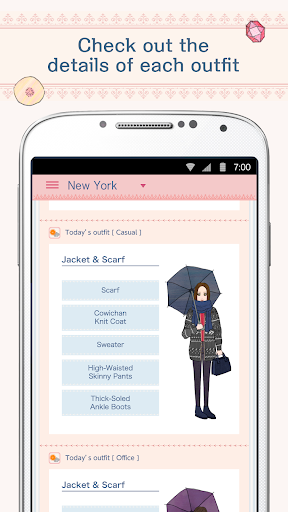
Oshare weather suggests outfits to match your taste from many different variations across four fashion styles: feminine, natural, office, and fashion.
The clothes are categorized into cold and hot weather with 9 levels each. You can enjoy 144 different varieties including with/without an umbrella.
Built-in Push Notification!
At the specified time, it sends a notification to the lock screen containing the weather forecast!
The app can be launched directly from the lock screen, a fantastic functionality for your busy mornings.
Share on Twitter
You can share with your friends the weather forecast for today, tonight, or tomorrow on Twitter!
You can share the maximum temperature, minimum temperature, chance of rain, as well as your recommended outfits!
Fully Fledged Weather App
Needless to say, this is also a fully featured weather app. It’s a really user-friendly app offering a great variety of menu items that allow you to select hourly, 3-hourly, and weekly weather forecasts across all the regions in Japan.
It also displays information about humidity, wind, and UV.
+------------------------------------------------------+
Data Source/Supported Devices
+------------------------------------------------------+
Weather forecast data source: Life & Business Weather Inc. (weather forecast permit #83 from the Japan Meteorological Agency).
Runs on Android OS 4.0 or higher.
User Reviews

This has to be the cutest weather app ever. The styles for each days temp are super cute. 10/31/2019 I have been using this app since 2016 and have never had a problem with it. Now when I open the app there is no display for my area of choice. I rely on this app every morning to get an idea in what to wear that day. Now with it not working properly I can't. Please fix Oshare? I can't dress without it!

I've been using the app since 2016 given how useful it's been despite it's constant bugging. It has moments when unable to update itself to the current date and time, and one would have to uninstall and reinstall to use it. Now that they've removed support for the app in English, it's now completely useless for me.

the app is advertised as if its available in English...but its only in japanese with location setting limited to japan. i like it and wish it was possible to use in another country & language

I love the app, and outfits make it clearly understandable what should I wear. It's just poor with data It brings the capital of Armenia as Albania, though recognizes other cities. AND takes the lowest option, so while weather app says 15/5, raining, your app says 5 and snowing. Please do something about data And more cute outfits would always make us happy
How to Download OshareWeather - For cute girls APK
- Enter the package name
jp.co.recruit.mtl.osharetenkion the APK Downloader. - Select your device architecture (ARM64 recommended for modern devices).
- Click Download to get the merged APK file.
- Transfer and install the APK on your Android device.
- Keep Updated: Visit APKDER.COM regularly to search for and download the latest secure versions of your favorite apps.
Frequently Asked Questions
Yes! Every APK download provided by APKDER undergoes rigorous security verification. We verify that the cryptographic signature of the APK file matches the official signature from the developer, ensuring the APK is original, untouched, and free from any modifications.
To install it, you first need to enable "Unknown Sources" in your Android device's security settings. After downloading the APK file from APKDER, tap it to begin the installation and follow the on-screen prompts.
Yes! As soon as the developer releases a new version of OshareWeather - For cute girls, we will update and provide the updated APK on APKDER. You can simply download and install the new APK over the existing installation without losing your app data.
Yes. APKDER allows you to bypass geographic restrictions and download official APK files directly, even if the app or game is not officially available in your country's store.
A standard APK is a single installation package. An XAPK or Split APK contains multiple resource files (like OBB expansions or device-specific layout parts) packaged together. To install them, you can download splits individually or use dynamic helper tools like Split APKs Installer (SAI).
Security & Signature Verification
This APK download is 100% safe. We verify that the cryptographic signature of the file matches the official developer credentials. No modifications or adware are injected.


