

Shizuku APK Screenshots
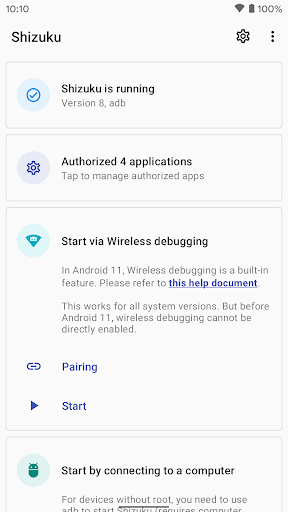

Shizuku App Information
Download Sources
Device Configuration
Old Versions of Shizuku
| Version | Size | Min OS | Architecture | Release Date | Action |
|---|---|---|---|---|---|
| v13.6.0.r1091.b844bc49 | 2.5 MB | Android 24+ | x86 x86-64 armeabi-v7a arm64-v8a | Oct 1, 2025 | Download |
| v13.6.0.r1090.16d28799 | 2.5 MB | Android 24+ | x86 x86-64 armeabi-v7a arm64-v8a | Jun 10, 2025 | Download |
| v13.6.0.r1086.2650830c | 2.5 MB | Android 24+ | x86 x86-64 armeabi-v7a arm64-v8a | May 28, 2025 | Download |
| v13.5.4.r1049.0e53409 | 3.3 MB | Android 24+ | x86 x86-64 armeabi-v7a arm64-v8a | Mar 1, 2026 | Download |
| v13.2.1.r968.9b59737 | 3.4 MB | Android 23+ | x86 x86-64 armeabi-v7a arm64-v8a | Mar 9, 2023 | Download |
| v3.6.1.r341.009208f | 3.0 MB | Android 21+ | x86 x86-64 armeabi-v7a arm64-v8a | Aug 25, 2022 | Download |
Split APKs Installation Guide
Some apps are distributed as Split APKs (multiple .apk files packaged together) to optimize resources. Standard Android installers cannot open them.
What's New in Shizuku
Please see full changelog at GitHub (RikkaApps/Shizuku).
About Shizuku
User guide: https://shizuku.rikka.app/guide/setup.html
Source code and developer guide: https://github.com/RikkaApps/Shizuku
User Reviews

It no longer works like it used to. Yes, I know how to use it. I can succesfully pair it with my android tablet using the 6 digit pairing code. But it won't start running. No matter how many time I get it correctly paired, it says "Shizuku is not running". Yes I have USB debugging and wireless debugging turned on, but it will not run. I have rebooted my tablet, reinstalled the app, nothing will get it to run, even though it is paired with the tablet. Disappointing, as it was working fine.

If you are confused, this gives you a lot of access and abilities that normally you would have to be rooted to get without having to root your phone. There's a slight learning curve and don't go clicking around without knowing what you're doing because you could slow your phone down or worse, but if you are okay watching a simple video you will be able to do amazing things

It doesn't work for the most recent Samsung builds. Everything is configured correctly (I triple checked). It doesn't give access to the data folder. For example, when access is given to Total Commander through Shizuku and the Shizuku option is enabled in Total Commander, even when Shizuku is running, only the Total Commander app folder is visible in the Android data folder.

This app is useful when it actually works properly, but sometimes it doesn't work the way I think it is meant to. I try copying files to a specific folder that the app allows access to and it doesn't do anything, isn't that the whole point of this app to allow access to protected folders? I should be able to use the FV File Manager with Shizuku (they recommended the file manager after all) with no problems, but I'm not allowed write access it seems, yet it doesn't say anything about it.
How to Download Shizuku APK
- Enter the package name
moe.shizuku.privileged.apion the APK Downloader. - Select your device architecture (ARM64 recommended for modern devices).
- Click Download to get the merged APK file.
- Transfer and install the APK on your Android device.
- Keep Updated: Visit APKDER.COM regularly to search for and download the latest secure versions of your favorite apps.
Frequently Asked Questions
Yes! Every APK download provided by APKDER undergoes rigorous security verification. We verify that the cryptographic signature of the APK file matches the official signature from the developer, ensuring the APK is original, untouched, and free from any modifications.
To install it, you first need to enable "Unknown Sources" in your Android device's security settings. After downloading the APK file from APKDER, tap it to begin the installation and follow the on-screen prompts.
Yes! As soon as the developer releases a new version of Shizuku, we will update and provide the updated APK on APKDER. You can simply download and install the new APK over the existing installation without losing your app data.
Yes. APKDER allows you to bypass geographic restrictions and download official APK files directly, even if the app or game is not officially available in your country's store.
A standard APK is a single installation package. An XAPK or Split APK contains multiple resource files (like OBB expansions or device-specific layout parts) packaged together. To install them, you can download splits individually or use dynamic helper tools like Split APKs Installer (SAI).
Security & Signature Verification
This APK download is 100% safe. We verify that the cryptographic signature of the file matches the official developer credentials. No modifications or adware are injected.


