




Download Sources
Device Configuration
Split APKs Installation Guide
Some apps are distributed as Split APKs (multiple .apk files packaged together) to optimize resources. Standard Android installers cannot open them.
What's New
🎵 Faster Video to MP3 conversion with better audio quality
✂️ Improved audio & video trimming for more precise editing
🔔 Create custom ringtones from your favorite songs
🎙️ Voice Recorder & Screen Recorder enhancements
🎭 More fun Voice Changer effects to explore
📂 Better file management and quicker access to media
⚡ Stability improvements, bug fixes, and smoother performance
Convert, trim, merge, and enjoy your music offline with ease!
About this app
Convert video to MP3, trim audio, merge songs, create ringtones, change voice effects, and edit audio files with the all‑in‑one VidTune Video to MP3 Converter app.
VidTune is a fast and easy MP3 converter and audio editor for Android. Convert MP4 to MP3, extract audio from videos, cut songs, merge music, edit recordings, create custom ringtones, and manage all your media files in one powerful app.
Whether you want to create ringtones, trim music, convert video to audio, record voice notes, or edit audio tracks, VidTune gives you all the tools you need.
Video to MP3 Converter
Convert video to audio in seconds with high‑quality output.
• Convert MP4 to MP3
• Extract audio from videos
• Convert video to music files
• Fast MP3 converter
• High‑quality audio output
• Supports multiple video formats
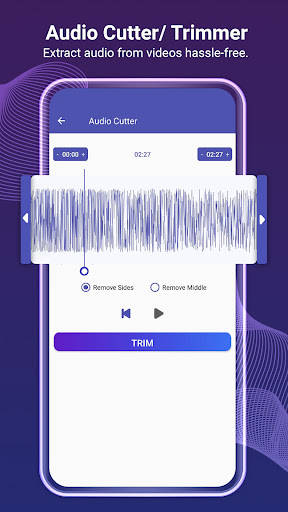
Audio Cutter & MP3 Cutter
Trim audio files and create custom sound clips.
• Cut songs easily
• Trim MP3 files
• Create ringtone clips
• Remove unwanted audio parts
• Save edited music instantly
Video Cutter & Video Trimmer
Cut and trim videos with precision.
• Trim videos quickly
• Cut favourite moments
• Supports multiple video formats
• Easy video editing tools
Ringtone Maker
Create personalised ringtones and notification sounds.
• Set custom ringtone
• Create alarm tones
• Edit music for notifications
• Save favourite ringtone clips
Audio Merger
Merge multiple songs and audio files.
• Combine music files
• Create mashups
• Merge audio in seconds
• Easy music editing tools
Voice Changer
Apply fun voice effects to recordings.
• Robot voice
• Baby voice
• Alien voice
• Funny voice filters
• Change voice effects instantly
Audio & Screen Recorder
Record audio and screen activity with sound.
• Voice recorder
• Meeting recorder
• Audio recording tools
• Screen recorder with audio
• High‑quality recording
Format Converter
Convert audio and video into different file formats.
• Audio format converter
• Video format converter
• Convert media files easily
• Supports popular media formats
Music & Video Player
Play your favourite media files anytime.
• Built‑in music player
• HD video player
• Easy playback controls
• Organise media files
Media Library & Output Folder
Manage all converted and edited files easily.
• Organise audio files
• Manage converted videos
• Browse edited media
• Quick access output folder
Why Choose VidTune?
• Fast video to MP3 conversion
• Simple and easy‑to‑use interface
• Powerful audio editing tools
• MP3 cutter and ringtone maker
• Voice changer effects
• Audio merger and recorder
• Built‑in music and video player
• Supports multiple formats
VidTune is the complete audio and video editing solution for Android users who want an easy MP3 converter, ringtone maker, audio cutter, voice changer, and music editing app in one place.
Download VidTune Video to MP3 Converter now and enjoy fast MP4 to MP3 conversion, audio editing, ringtone creation, and media management.
If you enjoy using VidTune, we would love to hear your feedback at [email protected].
User Reviews

This app worked flawlessly. When I installed the app, what I expected was a simple video to mp3 converter. What I did not expect was a full audio editor. This app is simple to use, converts files quickly, has very few ads, and it works great as an audio editor. The only problem I have with this app is that it can't convert .mov files, but I feel like that might be added in a future update.

𝗜 𝗛𝗔𝗧𝗘 𝗧𝗛𝗜𝗦 𝗔𝗣𝗣😫 PPPLLZZZ DON'T INSTALL THIS APP Very disappointing app. When I try to convert a video to audio, the conversion always gets stuck at 99% and never finishes. I waited for a long time, but it still doesn't complete or save the audio file. Please fix this bug. I also do not recommend this app to other users. Don't waste your time or mobile data installing it because it doesn't work properly.

The recent update completely broke the app! It keeps asking to allow permissions even though all permissions are already allowed in the phone settings. I tried clearing storage and resetting permissions, but it is stuck in a continuous loop and won't work at all. Very disappointing update. Uninstalled!

Smooth experience. i can't even tell how good this app is! no annoying ads and does the job PERFECTLY!! It's easy to navigate, does the job beyond your expectations and does crash at all! moreover if you're using this app, no matter what you're doing — Video to mp3 etc etc, it's done within seconds! fabulous job, Kudos to the team 🫶
How to Download Video to Mp3 Converter APK
- Enter the package name
mp3converter.videotomp3.ringtonemakeron the APK Downloader. - Select your device architecture (ARM64 recommended for modern devices).
- Click Download to get the merged APK file.
- Transfer and install the APK on your Android device.
- Keep Updated: Visit APKDER.COM regularly to search for and download the latest secure versions of your favorite apps.
Security & Signature Verification
This APK download is 100% safe. We verify that the cryptographic signature of the file matches the official developer credentials. No modifications or adware are injected.


