


Download Sources
Device Configuration
Split APKs Installation Guide
Some apps are distributed as Split APKs (multiple .apk files packaged together) to optimize resources. Standard Android installers cannot open them.
What's New
Bugs fixed. Fixed an issue affecting compass accuracy on some devices.
About this app
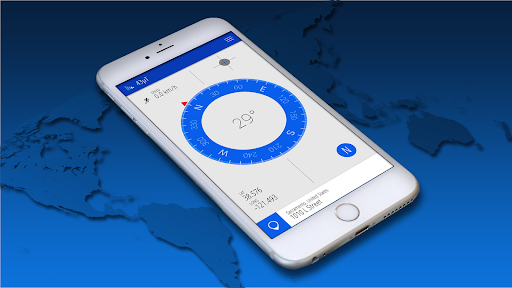
A Compass is an instrument used for navigation and orientation.
Main advantages of our Compass app:
- Shows device real-time orientation to North
- Ability to switch between Geographic Pole and Magnetic Pole
- Beautiful and modern material design style
- Use of GPS or Network location for best accuracy
- Show Location coordinates (longitude, latitude).
- Show location address
- Magnetic fields signal indicator
User Reviews

Initially loved the app - enough to buy the pro version. But they lie about there being an altitude function, and this was too much! This free version is decent enough, in that it has a compass that works - so use this app. But don't fund fraud! Do NOT purchase the pro version unless you like throwing money away.

Excellent compass! Very easy & easy enough to calibrate. My suggestion for easier calibration is to get a selfie pop button & instead of the figure 8, just spin the phone using the pop button. Super easy & works a lot better than the fig 8.

I'm going on a long car trip to the California coast from the middle of USA. I generally am the only one in my family to know North from South, but on a long trip and especially at night, I'll know zip. I will use Google Maps, but the cardinal directions don't really work unless you are moving. So this compass will be especially useful when, say, I'm parked at a hotel or restaurant or gas station and need a quick confirmation of my bearings. ☆☆ Reccomend the PRO version to enable dark mode! ☆☆

Very nice. Seems accurate. Attractive. Shows the addresses of people in your contacts. Price for Pro version is reasonable. Wish it worked better when mounted vertically in a car.
How to Download Compass APK
- Enter the package name
org.nixgame.compasson the APK Downloader. - Select your device architecture (ARM64 recommended for modern devices).
- Click Download to get the merged APK file.
- Transfer and install the APK on your Android device.
- Keep Updated: Visit APKDER.COM regularly to search for and download the latest secure versions of your favorite apps.
Security & Signature Verification
This APK download is 100% safe. We verify that the cryptographic signature of the file matches the official developer credentials. No modifications or adware are injected.


