
PDF Reader - PDF Viewer APK Screenshots




PDF Reader - PDF Viewer App Information
Download Sources
Device Configuration
Old Versions of PDF Reader - PDF Viewer
| Version | Size | Min OS | Architecture | Release Date | Action |
|---|---|---|---|---|---|
| v2.0.6 | 75.0 MB | Android 23+ | arm64-v8a | Mar 21, 2026 | Download |
Split APKs Installation Guide
Some apps are distributed as Split APKs (multiple .apk files packaged together) to optimize resources. Standard Android installers cannot open them.
What's New in PDF Reader - PDF Viewer
🌟 Optimized performance and interaction
🌟 Fixed minor bugs
About PDF Reader - PDF Viewer
This AI-powered all-in-one PDF Reader lets you open, read, edit, sign and convert PDF files anytime, anywhere.
This smart PDF Viewer automatically detects and displays all files on your device — PDF, Word, Excel, PPT and TXT are all supported. With this PDF Editor and PDF Converter, you can easily edit text and images in PDF files, highlight key sections, and annotate your opinions. You can also scan documents, notes, and receipts to PDF instantly.
Summarize long reports, translate content into multiple languages, and generate article outlines with our AI Assistant. Listen to your files on the go with AI Read Aloud.
Whether you are organizing academic notes, reviewing business contracts, or preparing a professional CV, this all-in-one PDF tool helps you read and edit files efficiently. Download this PDF Reader for Android today!
📖 All-in-One Document Viewer
- Automatically detect and display all your files: PDF, Word, Excel, PPT
- Simple and clear file lists, easy to search and manage
- Night mode for comfortable reading
- Enjoy convenient reading with reflow mode
- Add bookmarks to files for future reference
- Page-by-page and continuous scrolling mode
- Horizontal and vertical viewing mode
- Full-screen mode for distraction-free reading
- Zoom in and out of pages as needed
- Jump directly to the page by entering the page number
📑 Powerful PDF Converter
- Convert Image to PDF
- Scan to PDF
- Convert PDF to Image
- Convert Word to PDF
- Convert PDF to Word
- Quickly edit and share the conversion results
📝 Efficient PDF Editor
- Edit text & images in PDF
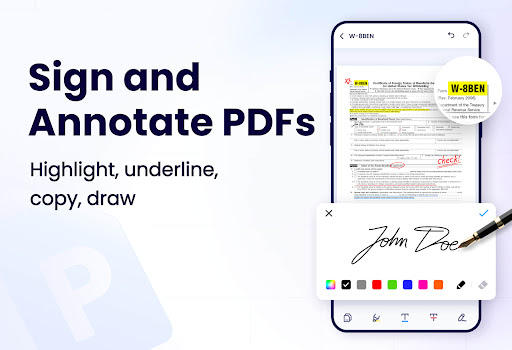
- Sign PDF easily
- Fill in PDF forms
- Insert pages or images into your PDF
- Create PDF with different page styles
- Highlight key points with vibrant colors
- Underline or strikethrough text
- Draw and annotate freely on the PDF pages
- Compress PDF to suit your needs
- Search and copy any text in PDF files with ease
🌐 Convenient AI Assistant
- Summarize documents, extract key points, and create mind maps
- Translate PDF into multiple languages
- Listen to your files with AI Read Aloud
- Generate article abstract/outline
- Rewrite/refine/expand/shorten articles
- Improve writing accuracy with grammar check
- Check sensitive information
📂 Full-Featured PDF Manager
- Merge PDF & split PDF
- Set password to protect your documents
- Recently opened files in a simple list for quick viewing
- Share your PDF files via any social media easily
- The most lightweight PDF Reader/Manager, only 12MB
- Rename your PDF files to your liking
- Print PDF directly from your device
🌟 More Features on the Way
► PDF to PPT & PPT to PDF
► PDF to Excel & Excel to PDF
► Eye protection mode
► Edit Word files
► Collaborative editing with others
► Generate a table of contents for your files
...
Enjoy your reading with this AI-powered PDF Reader for Android!✌️
Permission required:
* For users on Android 11 and above, MANAGE_EXTERNAL_STORAGE permission is required to read and edit all files on your device. Rest assured, this will NEVER be used for any other purpose.
If you have any questions or suggestions while using this PDF Reader - PDF Editor, please feel free to contact us at [email protected].
Save time with PDF editor for Android
Whether you're reading contracts or study materials, try this PDF editor - PDF scanner app. Efficiently manage your files with this PDF reader for Android. This PDF annotate tool can greatly boost your productivity. Easily sign PDF, convert photos to PDF with this PDF sign and fill tool.
User Reviews

this app is somehow less than useless. it will allow you to open your document. (eventually) after being berated with ads and anything and everything that isn't your document. then it will give you the opportunity to interact with your document. you can sign it and everything you'd expect from a pdf reader. But then you'll realize you can't save it, export it, or really anything of useful value until you pay them a subscription. it's an Indian call center disguised as a pdf app.

why in the hell do I run into 3 different ad spaces just trying to load one book? Am ad when I start the app. an ad when I click on the book. then, when that doesn't load the pdf, ANOTHER ad to make it work? you're app does little, but you're trying to charge ppl like it's an interactive game. Have begin searching for an alternative, and I think I've found one. to anyone else using this app, once it fricking loads it's fine. But it forces you to work to get there. In my opinion, for a simple PDF

the absolute worst. so much bloat, ads, & they want you to subscribe immediately. comes with a 3-day trial but you still have to sign up... it's developers like this that make for a bad App Store environment for us all. shame. might as well ask me to subscribe to a notepad editor. it's the same kind of stupid. these morons just don't get it, if they did a reasonable one-time fee way more people would take advantage, as opposed to running for the hills/uninstall & cache cleared!

Click-Bait. Says the app is #3 in the top free. False. Once you open the app, it wants your payment info to pay for a subscription service. You get a trial period only after you input your payment info. After that, you're getting billed with the subscription unless you go through the complicated process of canceling the reoccurring payments. That's pretty shady. I downloaded it and instantly deleted it. So, this just wasted my time. All because I wanted to view 1 image and not get suckered.
How to Download PDF Reader - PDF Viewer APK
- Enter the package name
pdf.pdfreader.viewer.editor.freeon the APK Downloader. - Select your device architecture (ARM64 recommended for modern devices).
- Click Download to get the merged APK file.
- Transfer and install the APK on your Android device.
- Keep Updated: Visit APKDER.COM regularly to search for and download the latest secure versions of your favorite apps.
Frequently Asked Questions
Yes! Every APK download provided by APKDER undergoes rigorous security verification. We verify that the cryptographic signature of the APK file matches the official signature from the developer, ensuring the APK is original, untouched, and free from any modifications.
To install it, you first need to enable "Unknown Sources" in your Android device's security settings. After downloading the APK file from APKDER, tap it to begin the installation and follow the on-screen prompts.
Yes! As soon as the developer releases a new version of PDF Reader - PDF Viewer, we will update and provide the updated APK on APKDER. You can simply download and install the new APK over the existing installation without losing your app data.
Yes. APKDER allows you to bypass geographic restrictions and download official APK files directly, even if the app or game is not officially available in your country's store.
A standard APK is a single installation package. An XAPK or Split APK contains multiple resource files (like OBB expansions or device-specific layout parts) packaged together. To install them, you can download splits individually or use dynamic helper tools like Split APKs Installer (SAI).
Security & Signature Verification
This APK download is 100% safe. We verify that the cryptographic signature of the file matches the official developer credentials. No modifications or adware are injected.


