

QR Code Scanner - Scan Barcode APK Screenshots




QR Code Scanner - Scan Barcode App Information
Download Sources
Device Configuration
Split APKs Installation Guide
Some apps are distributed as Split APKs (multiple .apk files packaged together) to optimize resources. Standard Android installers cannot open them.
What's New in QR Code Scanner - Scan Barcode
⭐️ Fastest QR Code Scanner and Barcode Reader.
⭐️ Batch Scan Mode Added - Scan multiple QR & Barcodes.
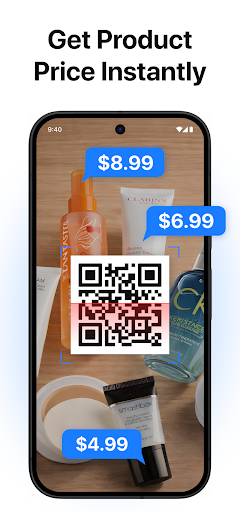
⭐️ Scan products and get real prices.
⭐️ Improve the recognition speed & reliability.
⭐️ You can create QR & Barcodes for free.
⭐ Small size and easy to use.
⭐️ Optimize the user experience.
About QR Code Scanner - Scan Barcode
Looking for the fastest and most reliable way to scan QR codes and barcodes? With QR Code Scanner – Barcode Scanner, you get a powerful QR scanner and barcode reader all in one lightweight, easy-to-use app. Whether you need to scan product barcodes, open links, connect to WiFi, or decode any type of code, this QR scanner is the ultimate tool you need on your Android device.
Key Features of QR Scanner - Barcode Reader App:
• Ultra-fast QR scanner and barcode scanner with instant results
• Supports all formats: QR, UPC, EAN, ISBN, Data Matrix, and more
• Scan directly from camera or gallery images with camera QR scanner
• Built-in QR code generator and QR code maker to create codes
• Save and manage your scan history for quick access later
• One-tap actions: open links, connect to WiFi, add contacts, share info
• Works offline with secure, lightweight performance
Why you need it / Who it’s for:
Our QR code scanner and barcode scanner app is perfect for everyone—shoppers, travelers, students, and professionals. Instantly check product details in stores, scan QRs for discounts and coupons, or open event tickets with one tap. With the QR code reader feature, you can also connect to WiFi by scanning a QR code, making life more convenient than ever. If you want a secure, fast QR scanner that works anytime, anywhere, this app is designed for you.
Unlike other apps, this QR code app combines simplicity with performance. The built-in barcode reader supports all formats: QR Code, UPC, EAN, ISBN, Data Matrix, and more. You can even use the QR code generator and QR maker functions to create custom QR codes for personal or business use. With the QR scanner for Android, you can scan directly using your camera or import codes from your gallery. Every scan is fast, accurate, and secure, making this one of the best QR scanners available on Google Play.
Download QR Code Scanner – Barcode Reader today and enjoy the easiest way to scan QR codes and barcodes efficiently. Whether you need a WiFi QR scanner, a smart QR reader for shopping, or a quick barcode scanner for business, this app has everything you need. Try this perfect QR scanner now and discover why millions of users trust it as their go-to QR & barcode scanner.
Privacy Notice:
Your privacy matters. This QR code scanner app only requires camera permission to function. It does not collect personal data or track your activity. All scans stay safe on your device, giving you complete control and peace of mind.
User Reviews

It's a Trojan virus. After you install it, it tells you that it needs an upgrade. When you install the update, it completely covers your screen and says you need to pay for an anti-virus because people in India are stealing your bank account. Not a joke. I'm starting to get random texts now.

A lot of ads. And it's not any good at searching out items. When you go to web search the number that they say it is is always a FedEx number or it is not able to be found. This app sucks don't try it.

Too many ads! When you're at a restaurant that requires you to scan for the menu, it's annoying to have to watch a 30 second video first!

Scam alert: FREE For 5 days only, then it costs $39+ a month. Requires credit card to subscribe . Cost information hidden @ the very end.
How to Download QR Code Scanner - Scan Barcode APK
- Enter the package name
qrcodescanner.qrscanner.barcodescanner.qrcodereader.scanqron the APK Downloader. - Select your device architecture (ARM64 recommended for modern devices).
- Click Download to get the merged APK file.
- Transfer and install the APK on your Android device.
- Keep Updated: Visit APKDER.COM regularly to search for and download the latest secure versions of your favorite apps.
Frequently Asked Questions
Yes! Every APK download provided by APKDER undergoes rigorous security verification. We verify that the cryptographic signature of the APK file matches the official signature from the developer, ensuring the APK is original, untouched, and free from any modifications.
To install it, you first need to enable "Unknown Sources" in your Android device's security settings. After downloading the APK file from APKDER, tap it to begin the installation and follow the on-screen prompts.
Yes! As soon as the developer releases a new version of QR Code Scanner - Scan Barcode, we will update and provide the updated APK on APKDER. You can simply download and install the new APK over the existing installation without losing your app data.
Yes. APKDER allows you to bypass geographic restrictions and download official APK files directly, even if the app or game is not officially available in your country's store.
A standard APK is a single installation package. An XAPK or Split APK contains multiple resource files (like OBB expansions or device-specific layout parts) packaged together. To install them, you can download splits individually or use dynamic helper tools like Split APKs Installer (SAI).
Security & Signature Verification
This APK download is 100% safe. We verify that the cryptographic signature of the file matches the official developer credentials. No modifications or adware are injected.


