


Download Sources
Device Configuration
Split APKs Installation Guide
Some apps are distributed as Split APKs (multiple .apk files packaged together) to optimize resources. Standard Android installers cannot open them.
What's New
The new version includes:
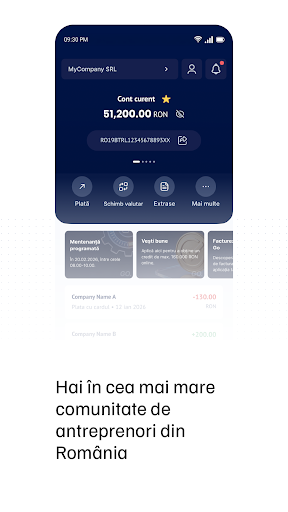
• New mobile dashboard, clearer and more intuitive;
• Virtual assistant that helps you find information about BT Go or get in touch with a BT representative;
• Company contact details online update;
• FX rate alerts and more options for opening deposits;
• MT940 and XML account statements;
• Performance improvements.
About This App
BT Go, your new business banking experience!
BT Go is Banca Transilvania’s new internet and mobile banking platform, bringing banking and business services together in a single digital ecosystem. BT Go is dedicated exclusively to companies (legal entities and self-employed individuals).
Banca Transilvania is Romania’s market leader in the corporate segment, with over 550,000 active customers.
BT Go covers both the financial‑banking needs of an internet banking application and the management needs of a business:
Online onboarding - Open your account or business relationship 100% online.
• For LLCs, sole traders, and liberal professions;
• Fast and secure, with no branch visits;
• Paperless, fully digital, with 24/7 access;
• Simple and intuitive experience.
Your company accounts and transactions
• View all your BT accounts, and open or close a current account directly from the app;
• Rename and reorder accounts and mark your favorite;
• Identify and check transactions and their status using search filters;
• Download account statements for different periods and account types (current, savings, or deposit accounts), individually or for all accounts at once;
• Generate statements in multiple formats (PDF, MT940, CSV, XML) for fast and easy integration with automated accounting systems;
• Download monthly statements for the last 10 years in a single ZIP file;
• Download transaction lists in PDF or CSV format;
• Manage company cards: issue new cards, block them, or change transaction limits;
• Reissue the PIN code for a card directly from the app;
• Open classic or negotiated deposits and savings accounts;
• Access loan details, download repayment schedules, or make early repayments;
• View and trade fund units in your BT Asset Management investment portfolio;
• If you use POS, ePOS, or eCommerce solutions, access transaction details, reports, and charts;
• Enjoy access to Open Banking (PSD2).
Quick and easy payments
• Make payments between your own accounts or to partners, in any currency;
• Save payment templates and speed up future payments;
• Create payment packages or upload payment files for simultaneous signing;
• Create payments requiring multiple signatures or receive payments created by other users for signing;
• Import payroll payment files;
• Perform classic or negotiated FX operations and set exchange rate alerts;
• Schedule future or recurring payments;
• Manage your payment partners.
Your invoices in the banking app
• Issue, reverse, cancel, set recurrences and customize invoices directly from the BT Go app (through integration with the FGO billing app).
• e-Factura - log in to your SPV account, send your invoices automatically and track the processing by ANAF. Additionally, view all the invoices received via SPV in the app;
• Pay incoming invoices quickly, while also enjoying multiple payment functionalities - select and send up to 5 invoices for payment at once;
• Invoices are automatically matched with payments and collections;
• Download invoices and send them to your customers.
Intuitive dashboard
• Virtual assistance for quick information about BT Go;
• Direct access to accounts and the FGO invoicing solution;
• Fast transfers of any kind;
• Balance overview, recent transactions, and comparisons for the last 4 months;
• Quick access to deposits, loans, and cards;
• Centralized notifications.
User Reviews

after the last update it is very very difficult to find the invoices section (fgo). precisely because of this possibility I chose by bank ( I am not interested in commissions etc,), because the application can be linked to FGO + SAGA + bt go. I think the bank is too profit-oriented and loses sight of the fact that it is one of the biggest and most influential players in Romania, and at this level it can already /(should it,?) take other principles into account.

not bad, actually pretty good. but can you implement a small vibration when my fingerprint is scanned? or just use androids fingerprint popup animation(with the vibration) thanx cheers!

Fast & easy to use, good for business. I didn't have any problems yet, everything and every time worked smoothly. I use it daily.

The banking app with the dumbest requirements i met: password must contain special characters, but not all special characters are accepted, requires update to work for the web login, but doesn't prompt to be updated (just doesn't react to the login), locks me out of my account if i have Anydesk installed! After 11 years i think it's time to move on from the bank of silly requirements and procedures. BT24 mostly worked, neoBT was meh, this one takes the cake...and throws it on the wall.
How to Download BT Go APK
- Enter the package name
ro.btrl.forbon the APK Downloader. - Select your device architecture (ARM64 recommended for modern devices).
- Click Download to get the merged APK file.
- Transfer and install the APK on your Android device.
- Keep Updated: Visit APKDER.COM regularly to search for and download the latest secure versions of your favorite apps.
Security & Signature Verification
This APK download is 100% safe. We verify that the cryptographic signature of the file matches the official developer credentials. No modifications or adware are injected.


