



Download Sources
Device Configuration
Split APKs Installation Guide
Some apps are distributed as Split APKs (multiple .apk files packaged together) to optimize resources. Standard Android installers cannot open them.
What's New
Fixed bugs and speeded up the application
About This App
The waiter sees a detailed description and photos of all the dishes, which means that they will quickly and accurately advise the guests. When the order is typed, the waiter sends it to the kitchen, if necessary, settings dishes serving order — what to cook immediately and what later. The dishes are ready — the waiter receives a notification and immediately picks them up in the kitchen. For paying, the waiter prints the bill remotely on the printer.
Features:
— Monitor the readiness of dishes — for each order, the waiter sees the status-created, prepared, can be picked up, served to the client.
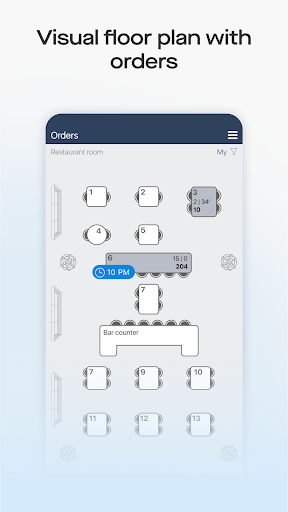
— Reservation of tables — selection of a table on a visual diagram of the room, prepayment, pre-order of dishes.
— Interactive seating of guests-place each guest in their place at a virtual table and assign each an avatar, so as not to confuse exactly who ordered what.
— Take into account the preferences of the guest — choose the degree of roasting of the meat or the necessary sauce on the modifier panel, write in the comments «without onions».
— Scan discount cards — without leaving the table, just with the camera of your smartphone, the discount or bonuses will be credited automatically.
— Support for any operations with orders — separation, «transfer» to another table, transfer of dishes between guests, etc.
— Indication of dishes in the stop list-indicating the number of servings available for ordering.
— Staff motivation — salary, bonuses, sales plans, badges for success and faults.
— Choice of design theme-dark is suitable for establishments with dimmed lights, light is optimal for daytime work — your employees will not have tired eyes.
Learn more about Saby: https://saby.ru/presto
News, discussions and suggestions: https://n.saby.ru/presto
How to Download Saby Waiter APK
- Enter the package name
ru.saby.waiteron the APK Downloader. - Select your device architecture (ARM64 recommended for modern devices).
- Click Download to get the merged APK file.
- Transfer and install the APK on your Android device.
- Keep Updated: Visit APKDER.COM regularly to search for and download the latest secure versions of your favorite apps.
Frequently Asked Questions
Yes! Every file hosted on APKDER undergoes rigorous security verification. We verify that the cryptographic signature matches the official signature from the developer, ensuring the app hasn't been modified or tampered with.
To install it, you first need to enable "Unknown Sources" in your Android device's security settings. After downloading the APK file from APKDER, tap it to begin the installation and follow the on-screen prompts.
Yes! As soon as the developer releases a new version of Saby Waiter, we will scrape and post the updated APK on APKDER. You can simply download and install the new APK over the existing installation without losing your app data.
Security & Signature Verification
This APK download is 100% safe. We verify that the cryptographic signature of the file matches the official developer credentials. No modifications or adware are injected.


