


Download Sources
Device Configuration
Old Versions of Calendar Widget: Month/Agenda
| Version | Size | Min OS | Architecture | Release Date | Action |
|---|---|---|---|---|---|
| v2026.06.25-312 | 6.8 MB | Android 27+ | x86 x86-64 armeabi-v7a arm64-v8a | Jun 25, 2026 | Download |
| v2026.04.29-311 | 6.8 MB | Android 26+ | x86 x86-64 armeabi-v7a arm64-v8a | May 3, 2026 | Download |
| v2026.04.18-310 | 6.5 MB | Android 26+ | x86 x86-64 armeabi-v7a arm64-v8a | Apr 17, 2026 | Download |
| v8.2_20250324 | 5.7 MB | Android 21+ | x86 x86-64 armeabi-v7a arm64-v8a | Nov 12, 2025 | Download |
Split APKs Installation Guide
Some apps are distributed as Split APKs (multiple .apk files packaged together) to optimize resources. Standard Android installers cannot open them.
What's New
+ Dark theme
+ Settings backup
+ Show overdue tasks
~ Fixed tasks filtering
~ Fixed Portuguese localization
About This App
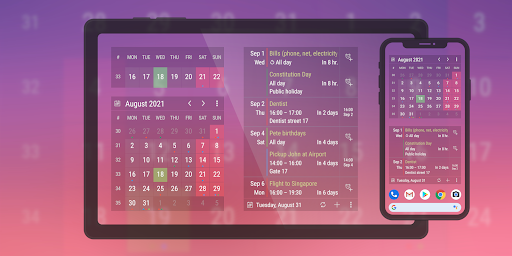
Two minimalistic, fully customizable, and resizable widgets - agenda (list) and month (grid) - offer you a quick glance at your daily schedule directly on your home screen. The widgets can display events from Facebook, Google, or Outlook calendars and also Google Tasks.
It is also possible to set custom reminders for events from the calendars, so you'll never miss anything again!
Problems with the app? Please read the FAQ here or email me.
User Reviews

I've tried a lot of calendar apps and this is the best one, I've used it for years. The customization is nice, but the main feature for me is the easy set alarm right in the widget - an actual alarm, not a single ding that won't wake me up in the morning. It's much more convenient to have it right next to the calendar entry than opening a separate app. As someone with ADHD, the fewer steps I have to go through to set reminders, the better.

Wanted an agenda view widget that worked with both Outlook/GCal accounts natively, could fit into Material You with user customization, and could fit a reasonable number of events in a smaller window - all without a wild subscription. This app is nearly perfect and I'm so glad I found it! Only rating down because the premium version doesn't get you a whole lot extra but is necessary for usability. Although $7, it's one time and you can try it for free so can't complain too much. Hidden gem!

Very solid, what I've been looking for & almost built myself because it seems like the features I wanted are totally foreign to everyone else. I'd love more customization options & also battery depletion for sync intervals is a little crazy. It'd be nice to have a frequency setting for those of us who don't really need to sync constantly. Well done, happy to upgrade!

I've been using this widgets for years & loved it! But a recent update to the widget has added a banner at the top of the calendar. In order to remove it you now have to purchase the full version of it! 😠 Which is annoying and unfortunate because now I'm searching for something else. I understand having to make $ but you already don't get all the perks with the free version as you do with the full version so why do you have to add a banner? One of the things I had like, was not all the ads!! 😤
How to Download Calendar Widget: Month/Agenda APK
- Enter the package name
sk.mildev84.agendareminderon the APK Downloader. - Select your device architecture (ARM64 recommended for modern devices).
- Click Download to get the merged APK file.
- Transfer and install the APK on your Android device.
- Keep Updated: Visit APKDER.COM regularly to search for and download the latest secure versions of your favorite apps.
Frequently Asked Questions
Yes! Every file hosted on APKDER undergoes rigorous security verification. We verify that the cryptographic signature matches the official signature from the developer, ensuring the app hasn't been modified or tampered with.
To install it, you first need to enable "Unknown Sources" in your Android device's security settings. After downloading the APK file from APKDER, tap it to begin the installation and follow the on-screen prompts.
Yes! As soon as the developer releases a new version of Calendar Widget: Month/Agenda, we will scrape and post the updated APK on APKDER. You can simply download and install the new APK over the existing installation without losing your app data.
Security & Signature Verification
This APK download is 100% safe. We verify that the cryptographic signature of the file matches the official developer credentials. No modifications or adware are injected.


