Watermark remover, Logo eraser APK Screenshots



Watermark remover, Logo eraser App Information
Download Sources
Device Configuration
Split APKs Installation Guide
Some apps are distributed as Split APKs (multiple .apk files packaged together) to optimize resources. Standard Android installers cannot open them.
About Watermark remover, Logo eraser
Remove watermark from video
How to make videos without watermark? The app is a great no watermark editor. You can select mutil regions to remove watermark or logo at the same time with friendly UI Operation, then you can get a new video with no watermark.
Add watermark to video
Custom your personalized logo to protect brand. Now you can add logo or put text in video at the same time, adjust the every watermark showing time independently.
-Add text watermark to video, you can adjust text color,size,shadow or background.
-Put image watermark on video, you can select a local image from album as your watermark or logo, easily adjust its size or position.
-Support gif watermark, add animated sticker on video as watermark
Video editor
The video watermark remover is also a video editor tool, it supplies many easy-to-use functions to edit videos.
Crop video
Fit your video in any Aspect Ratios, 1:1 for Instagram, 16:9 for YouTube; 9:16 for TikTok
Compress Video
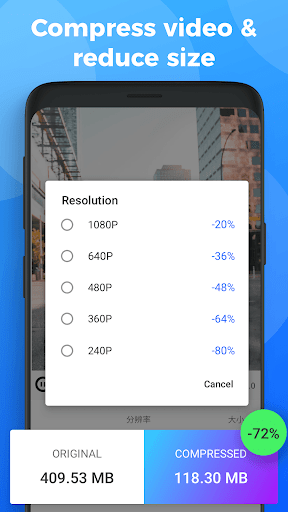
Choose resolution to compress, reduce the video file size and share to your Whatsapp friends easily.
Trim video
Trim and cut video without losing quality.
User Reviews

READ BEFORE DOWNLOADING !! a total waste of time, after reading all the reviews, I thought this would be a great app for removing watermark, but, when I used it, I found it totally a waste, I simply selected the area of the watermark, then clicked export, and when I saw the results, I got mad, the area was only blurred badly, the blur was totally visible, don't just download app by reading other reviews, they're fake, yes, u can download it if u are fond of wasting ur time.❌❌❌

If you're reading this, trust me when I say, download this app!!! It's the best I've used so far, and boy, have I used a lot. It's so easy to use, I use it soo much for my business, and it gets the job done everytime. And the fact that u can rove watermarks, add your own watermarks, change the ratio size of the video, trim, and do other stuffs is simply amazing. And the ads are not even that obstrusive

This app DOES NOT remove any watermark at all! Maybe because I used the free version but I normally tests app with the free version first before upgrading to the PRO version. Again, the fact that the pro version does not have option for montly payments but only yearly/annual plan shows that even the pro version might not be good. As it won't allow you to cancel anytime I regret downloading this app. Uninstalled!!!

Horrible interface for removing watermarks. I highlight the area, then there's no buttons to erase it, absolutely no buttons to press it. Even in 2025, some developers can't grasp the concept of simple UI design. I don't want study a book, to be able to navigate your app. Make simple. 1 star.
How to Download Watermark remover, Logo eraser APK
- Enter the package name
video.watermaker.remover.logo.videowatermarkon the APK Downloader. - Select your device architecture (ARM64 recommended for modern devices).
- Click Download to get the merged APK file.
- Transfer and install the APK on your Android device.
- Keep Updated: Visit APKDER.COM regularly to search for and download the latest secure versions of your favorite apps.
Frequently Asked Questions
Yes! Every APK download provided by APKDER undergoes rigorous security verification. We verify that the cryptographic signature of the APK file matches the official signature from the developer, ensuring the APK is original, untouched, and free from any modifications.
To install it, you first need to enable "Unknown Sources" in your Android device's security settings. After downloading the APK file from APKDER, tap it to begin the installation and follow the on-screen prompts.
Yes! As soon as the developer releases a new version of Watermark remover, Logo eraser, we will update and provide the updated APK on APKDER. You can simply download and install the new APK over the existing installation without losing your app data.
Yes. APKDER allows you to bypass geographic restrictions and download official APK files directly, even if the app or game is not officially available in your country's store.
A standard APK is a single installation package. An XAPK or Split APK contains multiple resource files (like OBB expansions or device-specific layout parts) packaged together. To install them, you can download splits individually or use dynamic helper tools like Split APKs Installer (SAI).
Security & Signature Verification
This APK download is 100% safe. We verify that the cryptographic signature of the file matches the official developer credentials. No modifications or adware are injected.