

Discovery APK Screenshots




Discovery App Information
Download Sources
Device Configuration
Old Versions of Discovery
| Version | Size | Min OS | Architecture | Release Date | Action |
|---|---|---|---|---|---|
| v5.23.1 | 43.4 MB | Android 16+ | x86 x86-64 armeabi armeabi-v7a arm64-v8a mips mips64 | Jul 20, 2017 | Download |
Split APKs Installation Guide
Some apps are distributed as Split APKs (multiple .apk files packaged together) to optimize resources. Standard Android installers cannot open them.
What's New in Discovery
General bug fixes and enhancements.
About Discovery
Discovery Health:
Check the details of your Discovery Health Plan benefits and Medical Savings Account. View your most recent healthcare service claim details, search through 12 months’ claims, view your approved cover for chronic conditions and track benefit usage. Search for a healthcare professional and view your health record. Compare the prices of medicines and their generic alternatives and view a summary of hospital claims.
Some of the Discovery Health features include:
• Care Programmes for managing chronic conditions
• The Emergency assist feature for quick access to emergency care
• Tools for tracking, managing and uploading health records
• Tools for mental health support, counselling services and addiction recovery programmes
• Medicine tracker to manage prescribed medicine
Discovery Vitality
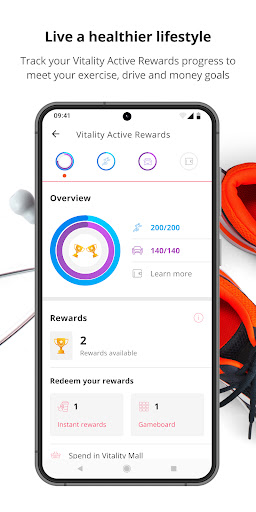
Track your wellness, achieve fitness goals and earn rewards with Discovery Vitality. The app brings together your fitness and sleep data to help you stay motivated and maintain a healthy lifestyle.
Features
• Track steps, workouts, heart rate and activity progress
• Earn and view Vitality points
• Complete your personalised weekly Vitality Active Rewards goal
• Track weight, nutrition habits and HealthyWeight progress
• Track sleep and build better sleep habits with insights and trends
Health Data Integrations
Discovery Vitality can securely sync health and fitness data from supported health platforms:
• Health Connect – Used to import health and activity data from compatible apps. Discovery Vitality reads step count, exercise activity, sleep data, active calories burned, total calories burned, distance, blood glucose, blood pressure, height, weight, heart-rate, and VO₂ Max to calculate activity levels and award you your Vitality points. Discovery Vitality can write sleep records to Health Connect through the Vitality Sleep Tracker in app feature.
• Samsung Health – Sync activity and fitness data recorded on Samsung devices to support activity tracking and rewards.
DiscoveryCard:
View your transactions, account balance and last statement, as well as your Discovery Miles, smart shopper points or cashback balance.
Discovery Insure:
View your policy details, view your Vitality Drive points, status and other driving information, and request emergency assistance. Take a picture of your car after an accident and send it to us to start the claims process. Search for the nearest bp service station or Tiger Wheel & Tyre outlet. Link your Gautrain card to get up to 50% of your spend back. Request a personal driver or taxi service.
Discovery Life:
View all your policy information.
Discovery Invest:
View your portfolio, including fund balances, and request to have a relevant document emailed to you.
Members of the following medical schemes will also have access to their scheme information: MMED, Naspers, LA Health, Tsogo, TFG, Quantum, Remedi, Anglovaal, Retail Medical Scheme, UKZN, BMW, Malcor, Wits and SABMAS.
The application is available for anyone to download, but you have to be a Discovery member with at least one active Discovery product and must register on the Discovery website (www.discovery.co.za) before you can log in to the Discovery app. You will use the same username and password for this app as for the Discovery website.
If you are not registered on the Discovery website, visit https://www.discovery.co.za/portal/individual/register to register.
To find out how we use the device features requested in the permissions, visit https://www.discovery.co.za/portal/individual/discovery-app-permissions
For known issues and current system status, visit https://www.discovery.co.za/portal/individual/help
User Reviews

Possibly the worst app I've ever had the displeasure of downloading, the app is slow, somehow always loses auth, even when using biometrics I always end up having to reset the pw. On the off chance that I'm able to actually log in, the app is slow and unresponsive. it would be one thing if the app layout was intuitive, but it isn't, which means I always have to go back to select some other option. It's almost like no effort was put into UI/UX, and was just copied from some template.

While they seem to have fixed the intermittent crashing, I still hate this app with a passion. It requires logging in everytime which requires you to remember your randomly generated numeric username (Just let me log in with an email address ffs). They implemented fingerprint login, which works like.. 3 times before asking you for login details again. They've somehow managed to make the UI worse and less intuitive to use. If I quit Vitality, it'll be because of this app.

Worst app EVER!!!! Surely with the premiums one pays for medical aid, they could spend a bit more money developing an app that actually works. Keeps kicking you out if you try access any information, forget about making any changes to your profile and forget about getting any support! Call centre for Discovery just as pathetic, you will spend hours on hold. Makes one wonder if they want to retain clients, surely when having medical emergencies last thing you want is additional stress!!!!

For the past week, I just keep getting "unable to load Vitality Active rewards" errors (or similar) on all Vitality pages. Tried reinstalling, unlinking and relinking device, nothing fixes it. What's the point of using Discovery and paying for Vitality and Bank if I can't access the rewards... And unfortunately you can't access it on the site, only the app, which is broken for me.
How to Download Discovery APK
- Enter the package name
za.co.discovery.consumeron the APK Downloader. - Select your device architecture (ARM64 recommended for modern devices).
- Click Download to get the merged APK file.
- Transfer and install the APK on your Android device.
- Keep Updated: Visit APKDER.COM regularly to search for and download the latest secure versions of your favorite apps.
Frequently Asked Questions
Yes! Every APK download provided by APKDER undergoes rigorous security verification. We verify that the cryptographic signature of the APK file matches the official signature from the developer, ensuring the APK is original, untouched, and free from any modifications.
To install it, you first need to enable "Unknown Sources" in your Android device's security settings. After downloading the APK file from APKDER, tap it to begin the installation and follow the on-screen prompts.
Yes! As soon as the developer releases a new version of Discovery, we will update and provide the updated APK on APKDER. You can simply download and install the new APK over the existing installation without losing your app data.
Yes. APKDER allows you to bypass geographic restrictions and download official APK files directly, even if the app or game is not officially available in your country's store.
A standard APK is a single installation package. An XAPK or Split APK contains multiple resource files (like OBB expansions or device-specific layout parts) packaged together. To install them, you can download splits individually or use dynamic helper tools like Split APKs Installer (SAI).
Security & Signature Verification
This APK download is 100% safe. We verify that the cryptographic signature of the file matches the official developer credentials. No modifications or adware are injected.


