


مصادر التحميل
Device Configuration
دليل تثبيت حزم APK المجزأة (Split APKs)
يتم توزيع بعض التطبيقات كحزم APK مجزأة (ملفات .apk متعددة معاً) لتحسين الموارد. ولا يمكن لمثبت أندرويد القياسي فتحها.
ما الجديد
Fix:
- We've squashed some bugs to make the app run more smoothly.
حول هذا التطبيق
Notta: Your AI-Powered Notetaker for Smarter Workflows
Notta is an intelligent AI notetaking assistant that seamlessly transforms speech into text with outstanding precision and speed. Say goodbye to manual transcription—Notta simplifies the process, helping you effortlessly capture meeting minutes, interview insights, and important AI notes in real time.
Focus on the Conversation, Not the Notes—Let Notta Handle the Rest!
Key Features
- 98.86% transcription accuracy
- AI-powered summarization feature for instant insight
- Supports transcription in 58 languages
- Translate text into 42 languages
- Compatible with various file formats
- AI removes noise and delivers clear, high-quality audio
- Auto-sync across multiple devices
Who is Notta for?
- Salespeople and consultants managing frequent meetings or negotiations
- Remote workers, telecommuters, and those working from home
- Media professionals like journalists, writers, interviewers, and bloggers
- Multilingual speakers or students learning new languages
-Security Certifications
Notta obtained the SOC 2 Type II certification, and received ISO/IEC 27001:2013 certification for its information security management system, reinforcing the reliability and security of our services.
-Real-Time Transcription and Summarization
Start transcription with a single click on your PC, smartphone, or tablet. Notta converts spoken words into text in real-time, letting you focus on the conversation instead of taking notes. The AI summarization feature quickly extracts key points from meetings, lectures, and interviews.
- Integration with Hardware
By pairing with devices like Notta Memo or Zenchord, you can save and summarize audio recordings from various scenarios such as business meetings, interviews, and lectures directly to Notta. Notta Memo can also record audio independently, and once connected to the Notta app later, the recordings are automatically transferred.
-Multiple Transcription Options
Notta supports both live transcription and automatic transcription of pre-recorded files. Import audio or video files, and get a one-hour recording transcribed in about five minutes.
-Streamlined Editing Experience
Add bookmarks during transcription to mark important statements, making post-meeting edits faster and more efficient. Searching through recordings is effortless—simply enter keywords to locate specific segments.
-Easily Share Transcription Data
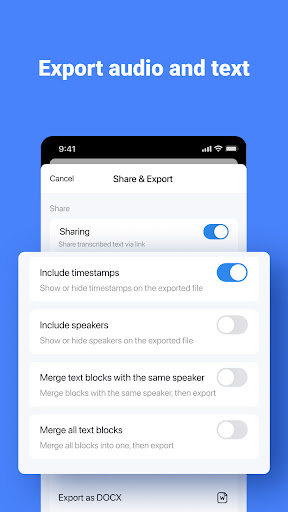
Save transcribed text in formats such as txt, docx, excel, pdf, or srt (subtitles). Export transcriptions with recorded timestamps and timelines, or share them via a link with colleagues and friends.
-Automatic Translation for Global Meetings
Notta supports 58 languages for transcription and can translate text into 42 languages instantly. This feature is ideal for international meetings, helping users understand unfamiliar terms and even improve language skills.
Plans and Pricing
Free Plan
- Real-time transcription: 3 minutes per recording
- Auto-transcription of web meetings (Zoom, Microsoft Teams, Google Meet, Webex): 3 minutes per session
- Import audio files and view the first 3 minutes of transcription for free
- Dictionary: Add up to 3 custom terms
Premium Plan
- 1,800 minutes of transcription per month
- Real-time transcription
- Import audio and video files
- Auto-transcription for web meetings (Zoom, Microsoft Teams, Google Meet, Webex)
- Export transcription data
- Dictionary: Add up to 200 custom terms
- Translate transcription into 42 languages
- Auto-proofreading
- Hide time markers
- Speed up audio playback
- Edit speaker names
- Unlock advanced features and enjoy extensive transcription capabilities.
With Notta, streamline your workflow and elevate your productivity!
Notta Terms of Service:https://www.notta.ai/en/terms
Privacy Policy: https://www.notta.ai/en/privacy
If you have any questions, please feel free to contact us at [email protected].
آراء المستخدمين

ممتاز و اتمنى ان استفيد منه قدر الإمكان ❤️
التطبيق ممتاز و انصح به مجاني و مفيد و سريع في نفس الوقت لا يوجد افضل منه

تطبيق جيد وممتاز جداً ومجاني وبدون إعلانات لكن لو سمحتم كم اكثر شيء يفرغ من الدقائق

هذا البرنامج يقوم بدوره بنسبة 99٪ والمزايا التي فيه أنه يقوم بتفريغ كامل الصوتية بخلاف بعض البرامج التي تقوم بتفريغ الدقائق الأولى فقد ثم إنه يجعل النص المفرغ في مكان واحد فتستطيع معه نسخ النص كاملا جملة واحدة. لن أحتاج إلى غيره.
كيفية تنزيل APK Notta-Transcribe Audio to Text
- أدخل اسم الحزمة
com.langogo.transcribeفي APK Downloader. - حدد بنية جهازك (يوصى بـ ARM64 للأجهزة الحديثة).
- انقر فوق تنزيل للحصول على ملف APK المدمج.
- قم بنقل وتثبيت APK على جهاز Android الخاص بك.
- ابقَ على اطلاع: قم بزيارة APKDER.COM بانتظام للبحث عن أحدث الإصدارات الآمنة من تطبيقاتك المفضلة وتنزيلها.
الأمان والتحقق من التوقيع
تحميل ملف APK هذا آمن بنسبة 100٪. نحن نتحقق من أن التوقيع التشفيري للملف يطابق بيانات المطور الرسمية. لا توجد تعديلات أو إعلانات مدمجة.
