



مصادر التحميل
Device Configuration
دليل تثبيت حزم APK المجزأة (Split APKs)
يتم توزيع بعض التطبيقات كحزم APK مجزأة (ملفات .apk متعددة معاً) لتحسين الموارد. ولا يمكن لمثبت أندرويد القياسي فتحها.
ما الجديد
Improvements and bug fixes.
حول هذا التطبيق
Unlock the full potential of your Philips HomeRun robot. Tell it exactly how and when to clean each room and mow your lawn. Then, relax.
With the Philips HomeRun Robot app you can:
● Start, pause or stop cleaning and mowing remotely
● Make a precise map of your home to clean each room in no time
● Control where your robot cleans and mows
● Choose a cleaning mode per room and mowing mode per lawn
● Set up once, enjoy spotless floors and lawns daily
● Custom clean and mow for specific situations
● Get step-by-step guidance to set up easily
● Receive progress updates on each clean and mow
● Keep your data secure
Start, pause or stop your robot remotely
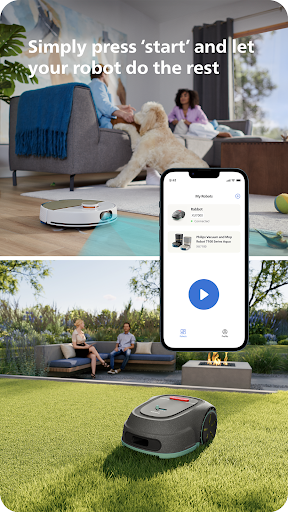
Come home to clean floors and a perfect-looking garden every day by using your Philips HomeRun vacuum, mop, and lawn mowing robot in combination with the app. Set it up once—to clean each room and mow your lawn just the way you like it—touch ‘Start’, anytime, anywhere, and let your robot do the rest.
On its first run, your robot will map your floor plan and garden. Now you have an interactive map of your home that you can use to tell your robot how and when to clean each room or to monitor how your lawn is mowed. The robot vacuum cleaner can store up to five maps.
Control where your robot vacuum cleaner cleans
Only want your robot to clean the kitchen, bathroom, living room? With the app, you can tell your robot which rooms you want cleaned, and in what order. If there are areas or things you’d like it to avoid—like precious items or a rug in an area you want to mop—you can tell it where not to go, or not to mop, as well.
Choose a cleaning mode for each room and mowing mode for each lawn
Give each room unique attention with one of the cleaning modes and mowing modes for your lawn. Use Dry mode to vacuum the bedroom and Wet & Dry mode to vacuum and mop hard floors. Put your robot on Quiet mode if, say, you have a meeting, or give the kitchen an extra thorough clean by using Intensive mode. Choose a mowing mode for your lawn to get the perfect looking garden.
Set up once. Enjoy spotless floors and lawns every day
Once you’ve created a cleaning and mowing plan, clean floors and perfectly mowed lawns are always a tap away. Tap ‘Start’ when you want your robot to begin - every day if you like, and at a time that suits your schedule.
Custom clean for specific situations
Had friends over and need an extra thorough clean? Or maybe the dog left paw prints in your hallway. Again. Schedule a custom clean and mow that targets specific rooms, areas.
Get step-by-step guidance to setup easily
From connecting to Wi-Fi to the first clean and mow, we’ll guide you through every step of getting started. You’ll find easy-to-follow instructions and how-to-videos as well.
Always have support at your fingertips
Have extra questions about the HomeRun app and robot? You’ll find a user manual in the app, answers to FAQs and easy access to Customer Care if need be.
Receive progress updates
As your robot cleans and mows, you’ll receive in-app updates. See where your robot currently is in your home and what the robot mowing progress is in your garden. Check on its battery levels and, most importantly, get notified as soon as the cleaning run or mowing is done
Maintain high performance
Get the best performance from your robot by replacing parts on time. Our app lets you know when it’s time to replace parts like filters, mops, and blades, and makes it easy to order them.
Keep your data secure
Philips adheres to a strict privacy policy. We recommend creating an account to ensure you can save your preferences. If you prefer, you can use the app as a guest.
WiFi
Philips HomeRun robot vacuum cleaners have dual band Wi-Fi so they are easy to connect to your home Wi-Fi, whether it's to 2.4 or 5.0GHz. Robot lawn mowers only connect to your 2.4GHz home Wi-Fi.
Need help?
Visit www.Philips.com to find answers to our most frequently asked questions, or get in touch with our Consumer Care team.
آراء المستخدمين

أستخدمه لمكنسة الروبوت، التطبيق يعلق كثيرا والخريطة تختفي بعض الأحيان ثم تظهر، ونفس المشكلة موجودة عند مستخدمين آخرين.

,نظافه ممتازه

سهل للغاية😍

اريد التواصل مع وكيل فيليبس في الرياض المكنسة لها شهر واحد وتعطلت 😩😩
كيفية تنزيل APK Philips HomeRun Robot App
- أدخل اسم الحزمة
com.philips.da.philipsrobotفي APK Downloader. - حدد بنية جهازك (يوصى بـ ARM64 للأجهزة الحديثة).
- انقر فوق تنزيل للحصول على ملف APK المدمج.
- قم بنقل وتثبيت APK على جهاز Android الخاص بك.
- ابقَ على اطلاع: قم بزيارة APKDER.COM بانتظام للبحث عن أحدث الإصدارات الآمنة من تطبيقاتك المفضلة وتنزيلها.
الأسئلة الشائعة
نعم! يخضع كل ملف يتم استضافته على APKDER لتحقق أمني صارم. نتحقق من أن التوقيع التشفيري يطابق التوقيع الرسمي من المطور، للتأكد من عدم تعديل التطبيق أو العبث به.
لتثبيته، ستحتاج أولاً إلى تمكين "مصادر غير معروفة" في إعدادات أمان جهاز Android الخاص بك. بعد تنزيل ملف APK من APKDER، اضغط عليه لبدء التثبيت واتبع المطالبات التي تظهر على الشاشة.
نعم! بمгرد أن يصدر المطور إصدارًا جديدًا من Philips HomeRun Robot App، سنقوم بتحديث الـ APK ونشره على APKDER. يمكنك ببساطة تنزيل وتثبيت الـ APK الجديد فوق التثبيت الحالي دون فقدان بيانات تطبيقك.
الأمان والتحقق من التوقيع
تحميل ملف APK هذا آمن بنسبة 100٪. نحن نتحقق من أن التوقيع التشفيري للملف يطابق بيانات المطور الرسمية. لا توجد تعديلات أو إعلانات مدمجة.


