مصادر التحميل
Device Configuration
دليل تثبيت حزم APK المجزأة (Split APKs)
يتم توزيع بعض التطبيقات كحزم APK مجزأة (ملفات .apk متعددة معاً) لتحسين الموارد. ولا يمكن لمثبت أندرويد القياسي فتحها.
ما الجديد
Bug fixes
حول هذا التطبيق
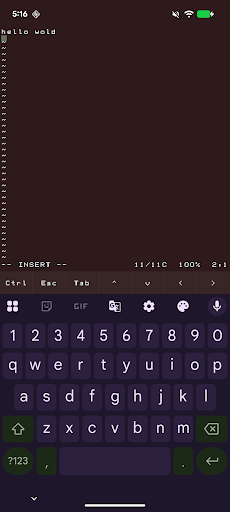
abash is a native Android terminal emulator written in C. It gives you a real interactive bash shell on your phone, complete with a VT100 terminal, scrollback, command history, tab completion, and a soft-key toolbar for Ctrl, Esc, Tab, and arrow keys.
It also ships with a practical Unix toolset, including vim, git, curl, grep, sed, awk, find, tar, less, and a large set of GNU command-line tools. You can edit text files, inspect and transform data, work with repositories, and run shell workflows directly on-device.
abash also includes Android-aware commands for things like the clipboard, share sheet, notifications, camera, sensors, and selected device information when you grant permission. It is designed to feel like a real shell while still fitting naturally into Android.
When you choose abash from Android’s Open with menu, text files can open directly in vim. Other shared items can open a shell that is already navigated to the item’s parent folder, so you can start working immediately. As a fallback, if it cannot access the file's source directory, abash will copy the file into its home directory.
Important limitations
abash still runs inside Android’s app sandbox. It is not root, not a Linux VM, and not a way around Android security. It cannot read other apps’ private data, modify protected system areas, or access files that you have not explicitly shared or granted permission to.
Some parts of the system are also restricted by Android and SELinux. That means certain directories may not be fully discoverable, and some convenience features such as command or path discovery can be more limited than on a desktop Linux system.
For files opened through Android document providers, abash may need to make a private working copy so terminal tools can access it. In those cases, saving changes updates the copy inside abash rather than automatically writing back to the original source file.
كيفية تنزيل APK abash
- أدخل اسم الحزمة
dev.paonessa.abashفي APK Downloader. - حدد بنية جهازك (يوصى بـ ARM64 للأجهزة الحديثة).
- انقر فوق تنزيل للحصول على ملف APK المدمج.
- قم بنقل وتثبيت APK على جهاز Android الخاص بك.
- ابقَ على اطلاع: قم بزيارة APKDER.COM بانتظام للبحث عن أحدث الإصدارات الآمنة من تطبيقاتك المفضلة وتنزيلها.
الأمان والتحقق من التوقيع
تحميل ملف APK هذا آمن بنسبة 100٪. نحن نتحقق من أن التوقيع التشفيري للملف يطابق بيانات المطور الرسمية. لا توجد تعديلات أو إعلانات مدمجة.