

لقطات شاشة APK لـ Ente Auth - 2FA Authenticator




معلومات التطبيق Ente Auth - 2FA Authenticator
مصادر التحميل
Device Configuration
دليل تثبيت حزم APK المجزأة (Split APKs)
يتم توزيع بعض التطبيقات كحزم APK مجزأة (ملفات .apk متعددة معاً) لتحسين الموارد. ولا يمكن لمثبت أندرويد القياسي فتحها.
ما الجديد في Ente Auth - 2FA Authenticator
* Added support for search deep links via
enteauth://search.
* Improved Proton Authenticator import,
including support for encrypted exports.
* Improved QR/image import reliability,
including better cleanup of temporary picked
images.
* Reduced duplicate sync work during bulk code
imports and updates.
حول Ente Auth - 2FA Authenticator
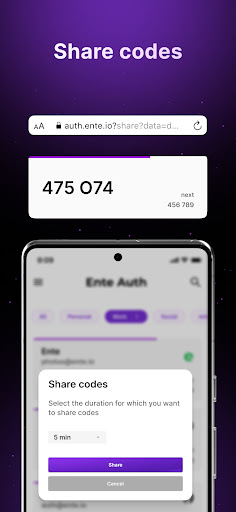
Ente Auth is the best and the only 2FA authenticator app you will ever need. It provides secure, end-to-end encrypted backup to your codes, works across devices whether its Android, iOS, Mac, Windows, Linux or Web. It also offers quality of life features like Tap to Copy, Next Code, and even allows you to share your codes securely with others.
Our customers absolutely love it.
- It works everywhere and can either be used in the cloud with end-to-end encryption or on a single device without the need for an account. Ente’s UI is well thought out and easy to use. Plus it even shows you the next code if the current one is about to expire so you dont have to wait for it to roll over before your start typing. You can even pin, tag, and search your codes which makes it a lot easier to manage a big list compared to Google Authenticator. They call it a labour of love on their Github page, and it really looks like one. - Linus Tech Tips
- Underrated but great authenticator app. Free, open source, and offers cloud backup. Very stable, has nice QoL features like the preview for the next code and the search bar. Overall, the best 2FA app I've used yet. - Luna Lometta
- Fantastic, fluid, has a dark theme, is open source, and also has a PC program. I switched from Authy to Ente Auth precisely for this reason, and I was surprised since the app as a whole is better and faster. - Daniel Ramos
- Better than Google Authenticator. - Piaw Piaw Kittens
- Authy's best replacement. Open source, desktop support, synchronization, convenient token export. Huge thanks to the developers, I hope your product will become popular and famous. - Sergey Tverye
Ente Auth is recommended by Linus Tech Tips, CERN, Zerodha and many others.
✨ Features
EASY IMPORT
Add TOTP 2FA Codes to Ente Auth easily. You can either scan a QR code, or import from other authenticator apps to make sure you never lose a code while migrating
CROSS PLATFORM
Ente Auth is available cross platform and supports all major devices and OS - including Android, iOS, Mac, Windows, Linux and Web.
SECURE E2EE BACKUP
Ente Auth provides end-to-end encrypted cloud backups so that you don't have to worry about losing your tokens. We use the same protocols Ente Photos uses to encrypt and preserve your data.
OFFLINE MODE - NO SIGNUP REQUIRED
Ente Auth generates 2FA tokens offline, so your network connectivity will not get in the way of your workflow. You can even use Ente Auth without signing up for backups and use it locally for as long as you want
INTUITIVE SEARCH
Ente Auth allows you to find your 2FA codes through one tap search. No more scrolling through a long list to find the right codes. Just tap on search and start typing.
CUSTOMISE YOUR EXPERIENCE
Customise your experience of Ente Auth to make it like you want. Reorder your 2FA codes so that your most frequently used services are always on top. Change the icons by choosing from our massive icon library. Add tags so that you can filter codes like you want
SEE NEXT CODE
Ever had to pause for the timer to run out on the current code, so you can type in the new 2FA code? Ente Auth makes your workflow extremely fast by displaying the next code prominently. Say goodbye to waiting
SHARE 2FA CODE
We all have sent multiple messages to that colleague who keeps asking for the 2FA code to a shared account. Such a waste of productive time. With Ente Auth, you can securely share your 2FA tokens as a link. You can even set an expiry time for the link as well.
ADD NOTES
Use notes to save any additional information including recovery codes. All notes are backed up with end to end encryption so you dont have to worry about losing them.
آراء المستخدمين

أفضل برنامج مصادقة ثنائية جربته بعد تجربة كثير من البرامج مجاني ١٠٠٪ وبدون إعلانات ومعرب أيضا ويعمل بحساب للمزامنة وبه العديد من المزايا بس ياريت يتم إضافة رقم هاتف للحساب هيكون أفضل مثل برنامج Authy

يحتاج Ente Auth إلى وسيلة تحقق إضافية غير البريد الإلكتروني، مثل رقم الجوال أو كلمة مرور ثانوية، ضمن مركز أمان لا يعتمد على البريد فقط.

the best 2FA I tried

The world needs what you are programming. The best solution for protecting keys, even if the phone is replaced or the app is accidentally deleted. Thank u .
كيفية تنزيل APK Ente Auth - 2FA Authenticator
- أدخل اسم الحزمة
io.ente.authفي APK Downloader. - حدد بنية جهازك (يوصى بـ ARM64 للأجهزة الحديثة).
- انقر فوق تنزيل للحصول على ملف APK المدمج.
- قم بنقل وتثبيت APK على جهاز Android الخاص بك.
- ابقَ على اطلاع: قم بزيارة APKDER.COM بانتظام للبحث عن أحدث الإصدارات الآمنة من تطبيقاتك المفضلة وتنزيلها.
الأسئلة الشائعة
نعم! يخضع كل تنزيل ملف APK يقدمه موقع APKDER لتحقق أمني صارم. نتحقق من أن التوقيع التشفيري لملف APK يطابق التوقيع الرسمي من المطور، مما يضمن أن ملف APK أصل ولم يتم التلاعب به وخالٍ من أي تعديلات.
لتثبيته، ستحتاج أولاً إلى تمكين "مصادر غير معروفة" في إعدادات أمان جهاز Android الخاص بك. بعد تنزيل ملف APK من APKDER، اضغط عليه لبدء التثبيت واتبع المطالبات التي تظهر على الشاشة.
نعم! بمجرد أن يصدر المطور إصدارًا جديدًا من Ente Auth - 2FA Authenticator، سنقوم بتحديث الـ APK ونشره على APKDER. يمكنك ببساطة تنزيل وتثبيت الـ APK الجديد فوق التثبيت الحالي دون فقدان بيانات تطبيقك.
نعم. يتيح لك APKDER تجاوز القيود الجغرافية وتنزيل ملفات APK الرسمية مباشرة، حتى لو كان التطبيق أو اللعبة غير متاحين رسميًا في متجر بلدك.
ملف APK القياسي عبارة عن حزمة تثبيت واحدة. بينما يحتوي ملف XAPK أو حزم APK المجزأة (Split APKs) على ملفات موارد متعددة تم حزمها معًا. لتثبيتها، يمكنك تنزيل الأجزاء بشكل فردي أو استخدام أدوات مساعدة مثل Split APKs Installer (SAI).
الأمان والتحقق من التوقيع
تحميل ملف APK هذا آمن بنسبة 100٪. نحن نتحقق من أن التوقيع التشفيري للملف يطابق بيانات المطور الرسمية. لا توجد تعديلات أو إعلانات مدمجة.


