




Fuentes de descarga
Device Configuration
Guía de instalación de APKs divididas (Split APKs)
Algunas aplicaciones se distribuyen como APKs divididas (varios archivos .apk empaquetados juntos) para optimizar recursos. Los instaladores estándar de Android no pueden abrirlas.
Novedades
We’re always working on new features, bug fixes and improvements. Make sure you stay updated with the latest version of app for best experience.
Acerca de esta aplicación
Streamline your business process & expand your customer base with eSewa.
eSewa Business is a mobile application that will help you monitor digital payments effortlessly and in a more convenient way. You can maintain a record of your transactions and enhance business flow by reaching a wider customer base. Customer engagement will be made smoother with engaging campaigns on the eSewa app. You can also scan and validate the vouchers that are available from the voucher scan option.
The features of this app are:
View Transaction Statement: Keeping track of your business activities is easier with the neat statement view feature available in the app. Simply go to the transaction statement and view your payment details.
Withdraw Funds: The app allows you to withdraw funds almost in a fraction of a second. You can instantly withdraw funds from your merchant wallet to your linked bank account or eSewa wallet.
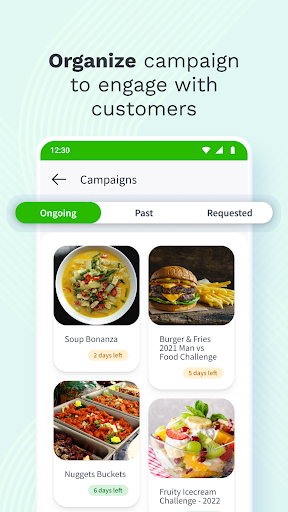
Campaign Request: Plan campaigns that will keep your customers engaged, then request and get them verified by eSewa. In this way, you can easily run campaigns that benefit your business.
Scan Voucher: You can scan the campaign vouchers for verification.
User Creation: User access can be added or removed. To improve efficiency, create multiple merchant wallet login users and assign roles.
How to use eSewa Business App?
1. Open the eSewa Business app.
2. Login with your credentials.
Please note that you must register as an eSewa Business to log in. If you’re not registered, do it now; and then receive your login credentials.
3. After log in you will see the dashboard.
4. At the top you can view your available Balance:
Withdrawable Balance is the balance that can be transferred to your linked bank account or eSewa ID
Pending Balance is the balance that is yet to be realized
Lien Balance is the balance that has been put on hold
5. You can now view all the In and Out Payments from the Payment section.
6. From "Scan QR" you can scan the available vouchers.
7. You can add campaigns from the "Campaign" option; after getting the campaign request approval.
8. On "Vouchers" you can see your available vouchers.
9. Now click on the "Profile" icon on the top left side; here you can add pictures, view your information, change your Password, and TPIN, and add users as well.
Opiniones de usuarios

RAMRO
Cómo descargar eSewa Business APK
- Ingrese el nombre del paquete
com.esewa.merchanten la APK Downloader. - Seleccione la arquitectura de su dispositivo (se recomienda ARM64 para dispositivos modernos).
- Haga clic en Descargar para obtener el archivo APK fusionado.
- Transfiera e instale el APK en su dispositivo Android.
- Manténgase actualizado: Visite APKDER.COM regularmente para buscar y descargar las últimas versiones seguras de sus aplicaciones favoritas.
Seguridad y Verificación de Firma
Esta descarga de APK es 100% segura. Verificamos que la firma criptográfica del archivo coincida con las credenciales oficiales del desarrollador. No se inyectan modificaciones ni adware.


