



Fuentes de descarga
Device Configuration
Guía de instalación de APKs divididas (Split APKs)
Algunas aplicaciones se distribuyen como APKs divididas (varios archivos .apk empaquetados juntos) para optimizar recursos. Los instaladores estándar de Android no pueden abrirlas.
Novedades
◆ Improvements and bug fixes
If you have questions, suggestions or problems, please contact [email protected].
Acerca de esta aplicación
SafeInCloud Password Manager allows you to keep your logins, passwords, and other private info safe and secure in an encrypted database. You can synchronize your data with another phone, tablet, Mac or PC via your own cloud account.
KEY FEATURES
◆ Easy to Use
◆ Material Design
◆ Black Theme
◆ Strong Encryption (256-bit Advanced Encryption Standard)
◆ Cloud Synchronization (Google Drive, Dropbox, Microsoft OneDrive, NAS, WebDAV)
◆ Login with Fingerprint, Face, Retina
◆ Autofill in Apps
◆ Autofill in Chrome
◆ Browser Integration
◆ Wear OS App
◆ Password Strength Analysis
◆ Password Generator
◆ Free Desktop App (Windows, Mac)
◆ Automatic Data Import
◆ Cross-Platform
EASY TO USE
Try it yourself and enjoy an easy-to-use yet powerful user interface.
MATERIAL DESIGN
SafeInCloud was completely redesigned to match new Material Design user interface language by Google. In addition to the standard Light theme SafeInCloud also has a Dark theme option to help you saving a significant amount of battery life.
STRONG ENCRYPTION
Your data is always encrypted on a device and in a cloud with a strong 256-bit Advanced Encryption Standard (AES). This algorithm is used by the U.S. Government for protection of a top secret information. AES is also widely adopted worldwide and became the de facto encryption standard.
CLOUD SYNCHRONIZATION
Your database is automatically synchronized with your own cloud account. Thus you can easily restore your entire database from a cloud to a new phone or computer (in case of a loss or an upgrade). Your phone, tablet and computer are also automatically synchronized between each other via a cloud.
LOGIN WITH FINGERPRINT
You can instantly unlock SafeInCloud with a fingerprint on devices with a fingerprint sensor. This feature is available on all Samsung devices. Devices from other manufacturers should have Android 6.0 or higher.
AUTOFILL IN APPS
You can autofill login and password fields into any app on your phone directly from SafeInCloud. You don't need to copy and paste them manually.
AUTOFILL IN CHROME
You can autofill logins and passwords on webpages in Chrome. For that you should enable SafeInCloud Autofill service in the phone's Accessibility settings.
WEAR OS APP
You can put some selected cards on your wrist to easily access them on the run. These could be your credit card PINs, door and locker codes.
PASSWORD STRENGTH ANALYSIS
SafeInCloud analyses your password strengths and shows a strength indicator next to each password. The strength indicator displays an estimated crack time for a password. All cards with weak passwords are marked with a red sign.
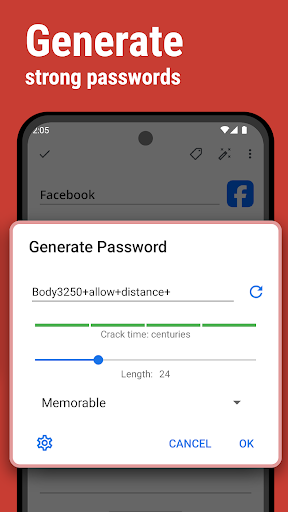
PASSWORD GENERATOR
The password generator helps you generating random and secure passwords. There is also an option to generate memorable, but still strong passwords.
FREE DESKTOP APP
Download a free Desktop application for Windows or Mac OS from www.safe-in-cloud.com to be able access your database on your computer. The Desktop application also makes data entry and editing fast and easy using a hardware keyboard.
AUTOMATIC DATA IMPORT
The Desktop application can automatically import your data from another password manager. You don't need to manually reenter all your passwords.
CROSS PLATFORM
SafeInCloud is available on the following platforms: Mac (OS X), iOS (iPhone and iPad), Windows, and Android.
Opiniones de usuarios

Uno de los mejores password manager que he usado, práctico, estable, con buenas herramientas para hacer más fácil la gestión de las contraseñas. Esta versión no incluye gestión de passkeys, sin embargo funciona perfectamente bien en todo lo relacionado con contraseñas. el único inconveniente que he tenido ha sido que en tablet, no puedo conectarme a la nube en dónde alojo mi BD.

Sencillamente la mejor. pero porfavor denos una sorpresa y envíen una actualización de la app. ya lleva un año sin novedades. Entiendo que ya están concentrados en su otra app, pero hagan honor a la confianza que les dimos cuando pagamos por esta versión y no nos abandonen.

No ha cambiado mucho desde que la comencé a usar, y eso en este caso es bueno ya que para qué cambiar algo si funciona, lo uso en celular y la aplicación de PC y cumple muy bien su cometido. Te da mucha seguridad ya que te permite tener varias contraseñas de diferentes sitios para no repetirlas y sólo memorizando una tienes acceso a las demás. Años utilizándola y sigue siendo muy buena, la opción de generar contraseñas es muy útil.

Muy Buena Aplicación,. Para los que necesitamos tener muchas claves de diferentes aplicaciones, bancos, correos, aparatos o accesos, está aplicación nos da esa posiblidad con una seguridad bastante buena,. Adiciona te sugiere claves, te deja identificar con iconos propios o bien del proveedor, también le da información de control y estadística bien precisa. En fin yo no me arrepiento y no hay día que no la use y por supuesto que la recomiendo.
Cómo descargar SafeInCloud 1 APK
- Ingrese el nombre del paquete
com.safeinclouden la APK Downloader. - Seleccione la arquitectura de su dispositivo (se recomienda ARM64 para dispositivos modernos).
- Haga clic en Descargar para obtener el archivo APK fusionado.
- Transfiera e instale el APK en su dispositivo Android.
- Manténgase actualizado: Visite APKDER.COM regularmente para buscar y descargar las últimas versiones seguras de sus aplicaciones favoritas.
Seguridad y Verificación de Firma
Esta descarga de APK es 100% segura. Verificamos que la firma criptográfica del archivo coincida con las credenciales oficiales del desarrollador. No se inyectan modificaciones ni adware.


