



Sources de téléchargement
Device Configuration
Guide d'installation des APKs divisées (Split APKs)
Certaines applications sont distribuées sous forme d'APKs divisées (plusieurs fichiers .apk groupés) pour optimiser les ressources. Les installateurs Android standard ne peuvent pas les ouvrir.
Nouveautés
◆ Improvements and bug fixes
If you have questions, suggestions or problems, please contact [email protected].
À propos de cette application
SafeInCloud Password Manager allows you to keep your logins, passwords, and other private info safe and secure in an encrypted database. You can synchronize your data with another phone, tablet, Mac or PC via your own cloud account.
KEY FEATURES
◆ Easy to Use
◆ Material Design
◆ Black Theme
◆ Strong Encryption (256-bit Advanced Encryption Standard)
◆ Cloud Synchronization (Google Drive, Dropbox, Microsoft OneDrive, NAS, WebDAV)
◆ Login with Fingerprint, Face, Retina
◆ Autofill in Apps
◆ Autofill in Chrome
◆ Browser Integration
◆ Wear OS App
◆ Password Strength Analysis
◆ Password Generator
◆ Free Desktop App (Windows, Mac)
◆ Automatic Data Import
◆ Cross-Platform
EASY TO USE
Try it yourself and enjoy an easy-to-use yet powerful user interface.
MATERIAL DESIGN
SafeInCloud was completely redesigned to match new Material Design user interface language by Google. In addition to the standard Light theme SafeInCloud also has a Dark theme option to help you saving a significant amount of battery life.
STRONG ENCRYPTION
Your data is always encrypted on a device and in a cloud with a strong 256-bit Advanced Encryption Standard (AES). This algorithm is used by the U.S. Government for protection of a top secret information. AES is also widely adopted worldwide and became the de facto encryption standard.
CLOUD SYNCHRONIZATION
Your database is automatically synchronized with your own cloud account. Thus you can easily restore your entire database from a cloud to a new phone or computer (in case of a loss or an upgrade). Your phone, tablet and computer are also automatically synchronized between each other via a cloud.
LOGIN WITH FINGERPRINT
You can instantly unlock SafeInCloud with a fingerprint on devices with a fingerprint sensor. This feature is available on all Samsung devices. Devices from other manufacturers should have Android 6.0 or higher.
AUTOFILL IN APPS
You can autofill login and password fields into any app on your phone directly from SafeInCloud. You don't need to copy and paste them manually.
AUTOFILL IN CHROME
You can autofill logins and passwords on webpages in Chrome. For that you should enable SafeInCloud Autofill service in the phone's Accessibility settings.
WEAR OS APP
You can put some selected cards on your wrist to easily access them on the run. These could be your credit card PINs, door and locker codes.
PASSWORD STRENGTH ANALYSIS
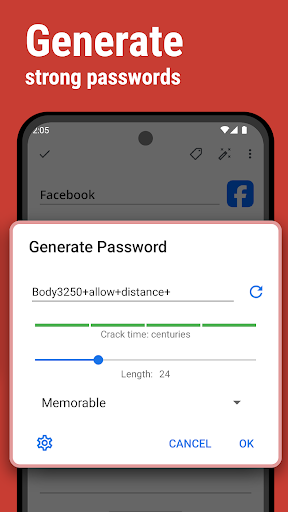
SafeInCloud analyses your password strengths and shows a strength indicator next to each password. The strength indicator displays an estimated crack time for a password. All cards with weak passwords are marked with a red sign.
PASSWORD GENERATOR
The password generator helps you generating random and secure passwords. There is also an option to generate memorable, but still strong passwords.
FREE DESKTOP APP
Download a free Desktop application for Windows or Mac OS from www.safe-in-cloud.com to be able access your database on your computer. The Desktop application also makes data entry and editing fast and easy using a hardware keyboard.
AUTOMATIC DATA IMPORT
The Desktop application can automatically import your data from another password manager. You don't need to manually reenter all your passwords.
CROSS PLATFORM
SafeInCloud is available on the following platforms: Mac (OS X), iOS (iPhone and iPad), Windows, and Android.
Avis des utilisateurs

Très bonne application. Après avoir utilisé Safe+ pendant près de 10 ans que j'abandonne par manque de mise à jour récente (obsolescence programmée?), je suis en train de migrer toutes mes fiches sur SafeInCloud. Très bonne première impression, même si je trouve la limite de 150 ko pour des fichiers un peu contraignante ... Une limite à 1MO serait-elle envisageable pour une prochaine version ?

Bonne application, mais il y aucun filtres de champs dans les recherches de fiche. Par exemple si vous utilisez plusieurs fois le même adresse mail dans plusieurs fiches et que vous recherchez la fiche de cette adresse mail, cela vous donnera en résultat toutes les fiches qui contiennent ce mail. ca devient problématique lorsqu'on commence a enregistrer plusieurs comptes avec la même adresse mail.

Rien à dire, simplement très bon. mais je constate qu'il y plus de mise à jour (1 an) de l'application. es qu'elle est en voie d'abandon au profit de l'autre application : mot de passe ?

La nécessité d'utiliser des mot de passe relativement complexes et différents les uns des autres et la possibilité d'y accéder avec une empreinte digitale rend cette application très pratique et d'usage fréquent. La synchronisation nuagique permet d'accéder en tout temps à ses mots de passe sur l'ordinateur en utilisant la reconnaissance faciale Hello. On peut ainsi accéder à ses mots de passe et les copier-coller sans qu'ils ne soient jamais visibles aux yeux d'un éventuel voisin indiscret...
Comment télécharger l'APK de SafeInCloud 1
- Entrez le nom du paquet
com.safeincloudsur APK Downloader. - Sélectionnez l'architecture de votre appareil (ARM64 recommandé pour les appareils récents).
- Cliquez sur Télécharger pour obtenir le fichier APK fusionné.
- Transférez et installez l'APK sur votre appareil Android.
- Restez à jour: Visitez régulièrement APKDER.COM pour rechercher et télécharger les dernières versions sécurisées de vos applications préférées.
Sécurité et Vérification de Signature
Ce téléchargement APK est 100% sûr. Nous vérifions que la signature cryptographique du fichier correspond aux informations d'identification officielles du développeur. Aucune modification ni adware n'est injecté.


