




Sources de téléchargement
Device Configuration
Guide d'installation des APKs divisées (Split APKs)
Certaines applications sont distribuées sous forme d'APKs divisées (plusieurs fichiers .apk groupés) pour optimiser les ressources. Les installateurs Android standard ne peuvent pas les ouvrir.
Nouveautés
1.Nouvelle fonctionnalité : ajustement de la vitesse de la vidéo superposée
2.Correction de bugs et amélioration des performances
À propos de cette application
VivaCut is an amazing video editor & video maker. Whether you want to make a great movie or just want to share memories and fun moments with your friends, VivaCut is a perfect choice for you.
Create short videos with one click using cool effect and transition templates! VivaCut is also a professional video editing app with all the editing features. Multi-layer timeline, chroma key and green screen features help you create cinematic videos with music for YouTube, Instagram and TikTok. Want to get more likes on your social media? Download this video editor & video maker now!
Basic Video Editing
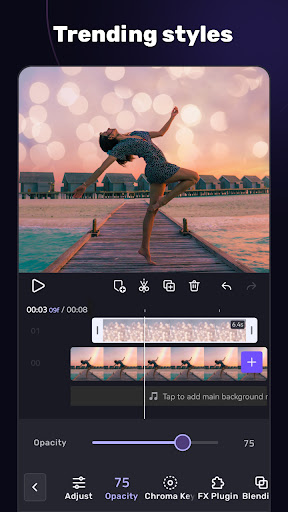
[Multi-layer timeline] An intuitive and sleek editing interface with zoom for frame-by-frame precision with overlay video editor app.
[Text] Edit, duplicate, and modify styles (variety of fonts & emoji, color, opacity, shadow, stroke).
[Trim videos] Professional tools developed for precise Video Editing App.
[Split videos] Split videos and optimize them for sharing.
[Combine video clips] Merge clips into a stunning video with transitions effects; combine video clips into one video.
[Speed Control] Fast & slow motion video like a pro, only with VivaCut Video - Pro Video Editing App!
Advanced Video Editing
[Green Screen/Chroma key] Combine/mix videos like a Hollywood-level movie. Best chroma key video editor app & video background changer editor.
[Keyframe Animation] Apply to Mask, Video Collage, Text, Stickers, Emoji, etc. Pro aesthetic video editor app.
[Mask] Linear, mirror, radial, rectangle, and oval, all for the scene. Full-screen video editor for YouTube.
[Picture in Picture] Combine clips together to create double exposures and eye-catching YouTube videos with transitions for free.
[Collage] Add pictures to your clips and edit videos, then go viral with VivaCut!
[Overlay options] Customize layers with tools such as opacity and blending.
[Blend videos] Mix videos using powerful blending modes such as Color Burn, Multiply, Screen, Soft Light, Hard Light, etc. VivaCut - best video background changer editor.
Effect & Filter & Transition
[Video Transition] Create amazing effects with cinematic overlay video editor with transition effects in VivaCut, a movie-level video background changer editor.
[Filters] Edit videos/combine video clips with adjustable filters and effects.
[Glitch Effects] Coolest video editing app with glitch effects and transitions!
Trendy Music
[Music Marker] Mark the track and add effects according to the music rhythm. Pro video editor app with music and effects.
[Audio Extraction] Aesthetic video editor with transition effects: extract music/audio from any video. Pro video editing app with sound effects.
[Templates] Create your own music videos by automatically adding unique filters and cool effects to video templates.
Save & Share
[Custom video resolution] Export videos in 720p, 1080p, and 4k.
[Rename] Rename video and mark memory with PRO aesthetic video editor.
Save videos directly with transition effects to your device's gallery, non-destructive video maker. One-click sharing to YouTube, Instagram, TikTok, Snapchat, etc.
VivaCut is a pro video editor and video editing app with all features you need! It's a video maker with music for cutting and splitting videos. Take a leap for your video and experience the next PRO video editor generation
Subscription
- Your subscription automatically renews unless auto-renew is turned off at least 24-hours before the end of the current period
- Your account will be charged for renewal within 24-hours prior to the end of the current period
Acknowledgements:
Music by audionautix.com and https://icons8.com/music/
Avis des utilisateurs

Franchement, pour une application gratuite, c'est très pratique . Il y a pas mal d'options pour ajuster la musique, les images, les transitions... Il y a cependant quelques problèmes tel que de nombreux bug et quand même beaucoup de pub . Bref, je recommande pour faire des petits edits mais pour de plus gros projet il vaut mieux installer quelque chose de plus qualitatif.

J'ai tester beaucoup d'application de montage vidéo. Et, franchement, celle ci est la meilleure. Il y a beaucoup plus de filtre, de transition ect... Raccourcir ou allonger la durée de scène est si rapide et facile ! Il y a plus de musique également ! Bref, je recommande vraiment VRAIMENT cette application, c'est pratique quand on est pas habitué à ce genre de chose. Au début ça peut peut-être être un peu dur mais on s'y habitu
C'est une bonne appli ! Petits bémols par contre. -Pour les édits : si on sait utiliser les key-frames pour faire des transitions, c'est clean 👌🏿 ; mais pour les gens qui ne savent pas le faire, je trouve qu'il n'y a pas assez de transitions non-payantes 😐 - Aussi, l'aperçu n'est pas super fluide donc ça peut être un problème...

Peut être il ne faut pas acheter la version Pro, car sa fonctionne pas (apparemment). Mais la version gratuite a quand même pas mal de fonctionnalités super ! Je vous la conseille vivement. Ce qui est génial c'est la possibilité d'animer soi même les textes, ou les images qu'on a insérer. Je recommande VRAIMENT cette application.
Comment télécharger l'APK de AI Video Editor - VivaCut
- Entrez le nom du paquet
com.videoeditorpro.androidsur APK Downloader. - Sélectionnez l'architecture de votre appareil (ARM64 recommandé pour les appareils récents).
- Cliquez sur Télécharger pour obtenir le fichier APK fusionné.
- Transférez et installez l'APK sur votre appareil Android.
- Restez à jour: Visitez régulièrement APKDER.COM pour rechercher et télécharger les dernières versions sécurisées de vos applications préférées.
Sécurité et Vérification de Signature
Ce téléchargement APK est 100% sûr. Nous vérifions que la signature cryptographique du fichier correspond aux informations d'identification officielles du développeur. Aucune modification ni adware n'est injecté.


