
Sources de téléchargement
Device Configuration
Guide d'installation des APKs divisées (Split APKs)
Certaines applications sont distribuées sous forme d'APKs divisées (plusieurs fichiers .apk groupés) pour optimiser les ressources. Les installateurs Android standard ne peuvent pas les ouvrir.
Applications Connexes


Nouveautés
General improvements
À propos de cette application
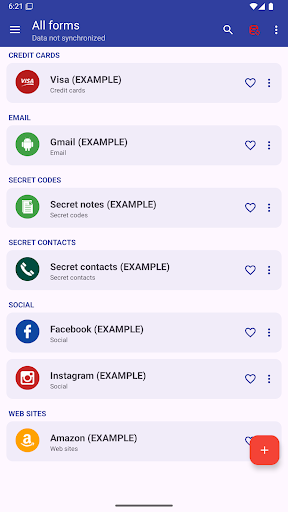
This app allows you to manage everything you need to keep secret: Password, Codes, Contacts, etc.
AES 256-bit encryption method was used, this is the most modern technology .
By automatic sync, you'll have all your passwords on all your Android devices and computer Windows, Linux and Mac.
MAIN FEATURES
➤ Access with fingerprint
➤ Sync with Google Drive and DropBox
➤ Desktop App (Windows, Mac & Linux)
➤ Password security analysis
➤ Password Generator
➤ Advanced search function
➤ Change app colors
➤ Automatic restore
➤ Auto lock
➤ Add your own custom icons
➤ Attach pictures and photographs, they will be encrypted and will be visible only within the application
➤ Add new categories
➤ Add new fields
➤ Creates PDF files with stored data to print on paper
➤ Material design
➤ Wear OS version
..and many more
AUTOMATIC SYNC:
Automatic synchronization lets you always have a backup of your passwords on a Cloud (
Also, with the same account, you can see your passwords in real time on all of your Android devices and Windows, Mac & Linux
ACCESS WITH FINGERPRINT:
Fingerprint access is an additional security method if you have a fingerprint and if your phone is compatible.
PASSWORD GENERATOR AND SECURITY ANALYSIS:
Within the app, a password generator is available, indicating the password security level. Also with the password generator you can check the password security you already have.
CUSTOM ICONS:
When you save a new password or other, you have the choice of over 110 icons, or easily insert your custom icon, which you can select from your phone's gallery or take a photo directly.
---------------------------------------------------------
Link to download the desktop version: https://www.2clab.it/passwordcloud
Comment télécharger l'APK de Password Manager
- Entrez le nom du paquet
password.cloudsur la page d'accueil d'APK Downloader. - Sélectionnez l'architecture de votre appareil (ARM64 recommandé pour les appareils récents).
- Cliquez sur Télécharger pour obtenir le fichier APK fusionné.
- Transférez et installez l'APK sur votre appareil Android.
- Restez à jour: Visitez régulièrement APK Downloader pour rechercher et télécharger les dernières versions sécurisées de vos applications préférées.
Sécurité et Vérification de Signature
Ce téléchargement APK est 100% sûr. Nous vérifions que la signature cryptographique du fichier correspond aux informations d'identification officielles du développeur. Aucune modification ni adware n'est injecté.